

Participant
July 20, 2021
Answered

Center Point

  • July 20, 2021
  • 2 replies
  • 1058 views

In the Arm beta the crop tool displays a marker for the center point of the image. The release version does not and I can't find a way to bring it back in any of the Guides settings. What am I missing?


Thanks

This topic has been closed for replies.
Correct answer Bojan Živković11378569

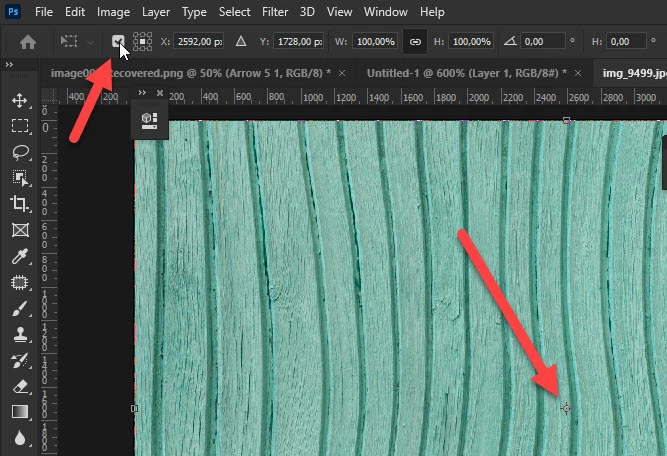
Are you talking about missing reference point in the middle?


Enter free transform (Ctrl + T) then check what is indicated in the Options bar on screenshot below.
2 replies

c.pfaffenbichler
Community Expert
Community Expert
July 21, 2021

What’s an »Arm beta«? 

Could you please post screenshots with the pertinent Panels (Toolbar, Layers, Options Bar, …) visible? 

Participant
July 21, 2021

The arm beta was the new build native to the M1 arm mac architecture. That build, 22.2 displays the center point and the release version, 22.4.2 does not and as far as I can see the settings are the same.

Bojan Živković11378569
Community Expert
Community Expert
July 21, 2021

Have you tried with my suggestion above?

Bojan Živković11378569
Community Expert
Community Expert
July 21, 2021

Are you talking about missing reference point in the middle?


Enter free transform (Ctrl + T) then check what is indicated in the Options bar on screenshot below.

Participant
July 21, 2021

OH I'm so sorry, I missed this reply and yes checking that option in the transform tool does indeed bring that center mark to the crop tool. I never would have thought to look there. Thanks! Why it is not accessable in the crop options is a question we can leave for another day 😉