Omineus
Known Participant
September 17, 2023
Answered

Change the mouse settings for Adobe Photoshop [MX Master 3 on a Mac — Unresolved]

  • September 17, 2023
  • 3 replies
  • 16480 views

Hello,


Sinds I've updated my Photoshop to 25.0

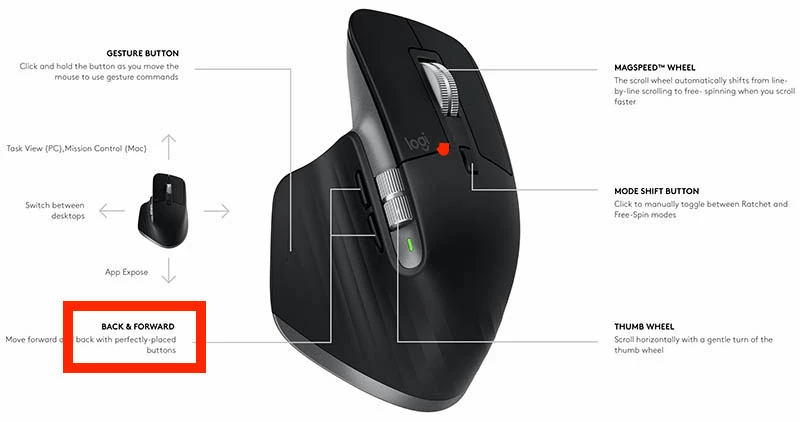
my Logitech MX Master 3 mouse scrolls horizontal when I hit my back or forward button.


I want to use my own custom command instead. 


The custom commands still works at Photoshop Beta.

I've deleted Photoshop Beta hoping that the custom command works at Photoshop 25.0 But I still have the horizontal scroll.


Very anoying! Hopefully somebody can help me with this.


This topic has been closed for replies.
Correct answer LhamaDoMal

I've got everything working in Options with 25.0.0  (That's Options and NOT Options+)


That's:

Mouse wheel (hold down) — pan

Horizontal Scroll Wheel — brush size

The buttons below the horizontal scroll wheel — Undo and Redo


Those are the only useful buttons IMO so far.


At the moment, when I start the computer and open Photoshop, the above functions are not working.  I'm having to open Options and change it from All applications to Photoshop.  I can minimise Options and the Photoshop functions keep working.  We can obviously add Options to Windows Start menu, but I am not sure if we can make it select Photoshop.  I'm thinking that if we have to do that manually every time, we probably won't bother.  I think I could get used to the brush size and pan functions though, so I'll probably persevere.  It's a shame that this is not working with Options+ seeing as that is the reccomened driver for the MX Master 3.


I made it work for Options+. When adding a new application, scroll all the  way down and choose - add other application, then find the location where photoshop is installed (you can right click on its shortcut and go to file location, then copy and paste the diretory). Then you can use keyboard shortcuts to customize buttons. Its not the best but it worked.


3 replies

Trevor.Dennis
Community Expert
Community Expert
September 18, 2023

I'm looking at Logitch Options+, which is the driver for that mouse, and you can set aplication specific controls, but it's not like some of their gaming mice that have far more choice regards options.

If you add the Photoshop profile, and then select Photoshop in the top right corner drop-down. 

Then with the Mouse tab selected you can click on one of the buttons or wheel.

In the example below these are the options for the scroll forward button, and while the choice is limited, I can see that it could be useful.  I HATE using computer mice without those controls as they dramatically speed up your workflow, and while I have never used the app specific options, I am going to try the Photoshop options.  Brush size or Redo perhaps?


So are you trying to use these options and finding they don't work?  If this is happening since the upgrade, then it seems likely that the Photoshop app Options+ is pointing at is the previous version.  You need to delete the old one (a tiny x to the right of the app name) and add Photoshop again.


I have just tried it with those buttons controlling brush size.  I had to restart Photoshop and close Options+, but it works perfectly after doing so.  I see you are using a Mac though, and I am on Windows 11, so that might make a difference.  I am going to edit your subject line so people can see you are using an MX Master 3, and hopefully attract someone who uses that mouse on a Mac system.  Or it might just work for you if you remove Photoshop and add it again.


Good luck.

Omineus
OmineusAuthor
Known Participant
September 18, 2023

First of all thank you for your comprehensive response.


I am using Option+ Firmware version 19.1.15

Photoshop: 25.0


Somehow photoshop overwrites my own custom command which I have set on my 'Back + forward' button on my MX 3.

As you can see my screen goes horizontally left or right instead of the commands I have by default.


• I've deleted the photoshop application and added it again.

• I added simple commands like copy and paste.

• Restarted photoshop again and still I get to see the horizontal command in photoshop.


Trevor.Dennis
Community Expert
Community Expert
September 18, 2023

I can only think that it is a Mac specific issue.  I have tested as much as I am able abd eveything seems to work as it should.  In fact I am really quite pleased to have responded to your thread, because I am going to use the mouse features going forward.  I edited youe subject line, as I said, so lets hope a Mac using MX Master 3 owner sees your thread and tries to help.  If there is no change by tomorrow, I'll add 'Unresolved' to the subject line.

Trevor.Dennis
Community Expert
Community Expert
September 18, 2023

I use an MX Master 3.  What exactly do you want it to do?

Your screen shot is not helpful because of the langauge, so you might need to describe in as much detail as you can manage to help us get past that. 

Participating Frequently
September 17, 2023

My MX Master 3 mouse isnt working with custom settings with the new photoshop

Participant
September 19, 2023

Brush size and other custom options for scroll-wheel is not available after the new update for photoshop 2024 - bugs the hell out of me.