


May 9, 2013
Answered

Character Map (Glyph Palette) in Photoshop?

  • May 9, 2013
  • 5 replies
  • 26040 views

Is it there anywhere in photoshop a glyph palette, since i am using many icon fonts and it is slowing me down everytime to go to "Character Map". Or if not as part of photoshop is it there any plugin/extension that could give me this feature? Thank you.
This topic has been closed for replies.
Correct answer Chuck Uebele

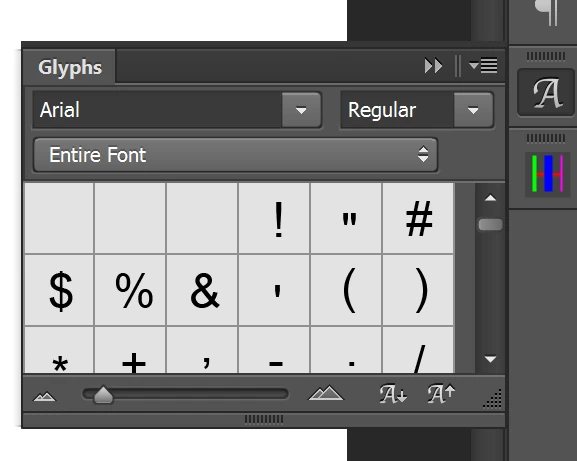
PS 2015 has a Glyph panel:

5 replies

Chuck Uebele
Community Expert
Chuck UebeleCommunity ExpertCorrect answer
Community Expert
August 14, 2015

PS 2015 has a Glyph panel:

Known Participant
April 20, 2015

The forum post below was created over 11 years ago! There have been similar posts on other forums (including this one) for years. I, myself, have submitted a feature request for this about 6 years ago.

http://www.clearps.com/photoshop-forum/index.php/t/18755/

Why has Adobe not integrated a simple glyph panel into Photoshop? Answer: because they don't care about their customers. They don't respect their customer's requests. They are only out to make money.

Instead of giving designers the tools they need, instead Adobe tries to add hack features like 3D, which is half-a$$ed.

Adobe has touted for years that their apps are seamless and the interfaces are the same between them, yet huge holes like this exist.

station_two
Inspiring
April 21, 2015

jumpyone wrote:

…Adobe has touted for years that their apps are seamless and the interfaces are the same between them, yet huge holes like this exist.

Inconsistency between or among applications in the artificial "suites" should come as no surprise.

The "suite" concept is a fabrication of Adobe marketing and bean-counting types.  The engineering teams are totally independent of each other, they are not only in different buildings but in different cities and states of the American Union, even in different countries.

The fact that they have little if any communication among them is highlighted by requests occasionally made in these forums by top Adobe engineers to let the other teams know when there are problems in one application that impact our workflow in another one.

~~~~~~~~~

Great to see you around here, jumpyone! 

Known Participant
August 14, 2015

People, a character is a character in any program.  If you have MSWord (I used Windows, but I'm sure the mac version works), you can copy the character from Word into Photoshop.

(1)  Create your text in Photoshop -- font, color and size -- and then put a space "placeholder" where you want the extra character to go.

(2)  Go to MSWord, Insert, Symbol, and choose your font from the character map dropdown box and the same size as in Photoshop.

(3)  OK the character (it will be black), copy it from your Word text.

(4)  Click in your Photoshop text box where you put the placeholder space, and paste.

Your character is the correct size and picks up the color from Photoshop.

Participant
July 9, 2014

I cheat: copy glyph from Illustrator and paste into PSD file.

Mike_Gondek10189183
Community Expert
Community Expert
May 9, 2013
Participant
June 18, 2018

Thank you so much! Would never have known of the existence of PopChar.
Now I can even insert the glyphs of fonts that didn't work with newer photoshop versions!

Mylenium
Legend
May 9, 2013

Nope, PS doesn't have a glyph palette. As for plug-ins/ extensions I'm not aware of any, but several third-party keyboard helper utilities or font managers allow inserting special characters with key combos or live preview pop-overs...

Mylenium