
Doc_Pit
Inspiring
December 13, 2019
Answered

Clone source problem

  • December 13, 2019
  • 2 replies
  • 959 views

Routinely, I clone from one document to another in PS (current CC version).  There is some setting or "aspect" of my current document that prevents me from cloning into it.  I can't figure out what it might be.  I can create a new document and clone into that.  And it's easy enough to figure out a work-around.  But, given that there are only a few variables, it's driving me nuts that I can't figure out what the problem is.


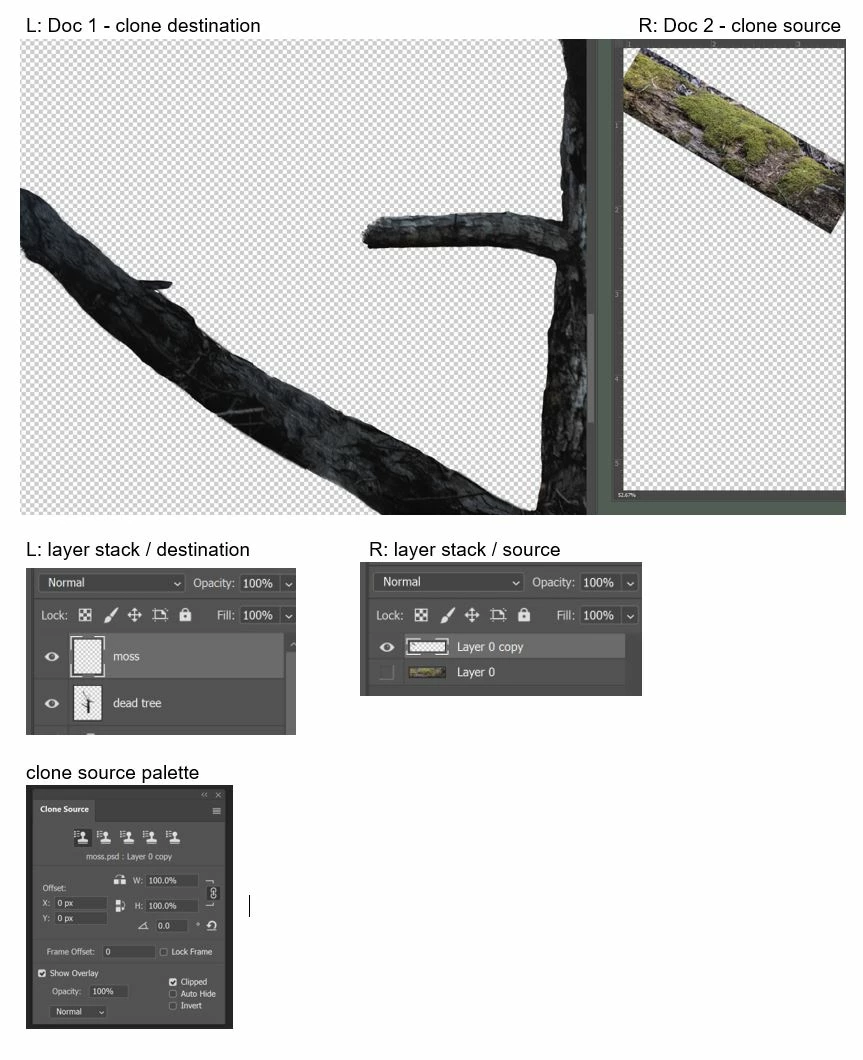
The following pic shows the doc that I'm trying to clone into (L) and the doc that I'm trying to clone from (R). Also, the two simple layer stacks. The clone source palette correctly identifies the source file (moss.psd).  I select the source file; click+alt to sample; select the destination file; move the clone stamp across the surface...and nothing. I see the source image in the clone stamp circle, but no image is transferred.  Any idea what the problem might be?
This topic has been closed for replies.
Correct answer r-bin

Read this https://community.adobe.com/t5/photoshop/ps-2020-clone-stamp-problem/td-p/10796499


Probably your case.
If it helps (see workaround), write your message on the bug report link.
 

2 replies

r-binCorrect answer
Legend
December 13, 2019

Read this https://community.adobe.com/t5/photoshop/ps-2020-clone-stamp-problem/td-p/10796499


Probably your case.
If it helps (see workaround), write your message on the bug report link.
 
Doc_Pit
Doc_PitAuthor
Inspiring
December 13, 2019

Yes, that is the case!  Thanks.  For a while, I thought I must be taking stupid pills.  I feel much better.

Chuck Uebele
Community Expert
Community Expert
December 13, 2019

It all looks good. I'm not having issues doing that. No layers are locked? Right blend mode on the tool? Reset the tool? No mask or hidden selection?