


Inspiring
February 21, 2025
Answered

Close Photoshop path without extra point

  • February 21, 2025
  • 2 replies
  • 421 views

I wrote a script (years ago)  to draw a circle using paths in Photoshop. It works!


However, the thing that it doesn't quite do properly is close the path - the start and end point just co-incide (which used to be the way paths were closed) I've tried messing around with the code the obvious choice woule be to so set closed to true:


lineSubPathArray[0].closed = true;


But that adds an extra point to the circle and closes it. see screen shot - I've move the extra point out the way so you can see it clearly.
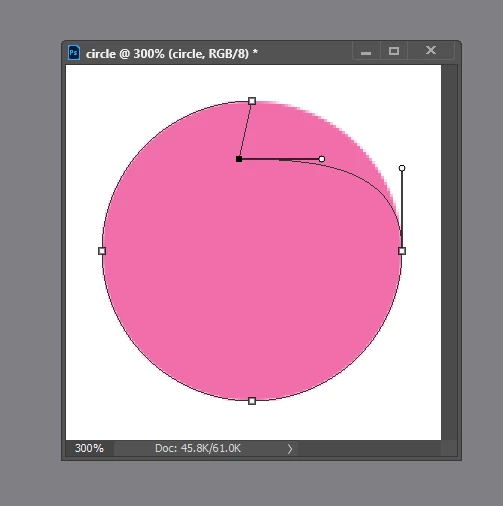


I'm aiming for a closed, fourpoint circle. Here's my code:


function draw_circle(X, Y, rad, pathName, col)
{
	var K = (4 * (Math.sqrt(2) - 1) / 3)* rad;

	// define circle points
	var C = new Array();
	C = [X, Y - rad, X + rad, Y, X, Y + rad, X - rad, Y, X + K, Y - rad, X + rad, Y - K, X + rad, Y + K, X - K, Y + rad, X + K, Y + rad, X - rad, Y + K, X - rad, Y - K, X - K, Y - rad];

	// create the array of PathPointInfo objects
	var lineArray = new Array();
	lineArray.push(new PathPointInfo());
	lineArray[0].kind = PointKind.CORNERPOINT;

	lineArray[0].anchor = new Array(C[0], C[1]); // A
	lineArray[0].leftDirection =  [C[8], C[9]];
	lineArray[0].rightDirection = lineArray[0].anchor;

	lineArray.push(new PathPointInfo());
	lineArray[1].kind = PointKind.CORNERPOINT;
	lineArray[1].anchor = new Array(C[2], C[3]); // B

	lineArray[1].leftDirection = [C[12], C[13]];
	lineArray[1].rightDirection =  [C[10], C[11]];

	lineArray.push(new PathPointInfo());
	lineArray[2].kind = PointKind.CORNERPOINT;
	lineArray[2].anchor = new Array(C[4], C[5]); // C

	lineArray[2].leftDirection = [C[14], C[15]];
	lineArray[2].rightDirection =  [C[16], C[17]];

	lineArray.push(new PathPointInfo());
	lineArray[3].kind = PointKind.CORNERPOINT;
	lineArray[3].anchor = new Array(C[6], C[7]);	// D

	lineArray[3].leftDirection = [C[20], C[21]];
	lineArray[3].rightDirection =  [C[18], C[19]];

	lineArray.push(new PathPointInfo());
	lineArray[4].kind = PointKind.CORNERPOINT;
	lineArray[4].anchor = new Array(C[0], C[1]); 

	lineArray[4].leftDirection = lineArray[4].anchor; 
	lineArray[4].rightDirection =  [C[22], C[23]];

	// create a SubPathInfo object, which holds the line array in its entireSubPath property.
	var lineSubPathArray = new Array();
	lineSubPathArray.push(new SubPathInfo());
	lineSubPathArray[0].operation = ShapeOperation.SHAPEXOR;
	lineSubPathArray[0].closed = false;
	lineSubPathArray[0].entireSubPath = lineArray;

	//create the path item, passing subpath to add method
	var myPathItem = docRef.pathItems.add(pathName, lineSubPathArray);

}


Correct answer c.pfaffenbichler
function draw_circle(X, Y, rad, pathName, col)
{
	var K = (4 * (Math.sqrt(2) - 1) / 3)* rad;

	// define circle points
	var C = new Array();
	C = [X, Y - rad, X + rad, Y, X, Y + rad, X - rad, Y, X + K, Y - rad, X + rad, Y - K, X + rad, Y + K, X - K, Y + rad, X + K, Y + rad, X - rad, Y + K, X - rad, Y - K, X - K, Y - rad];

	// create the array of PathPointInfo objects
	var lineArray = new Array();
	lineArray.push(new PathPointInfo());
	lineArray[0].kind = PointKind.SMOOTHPOINT;

	lineArray[0].anchor = new Array(C[0], C[1]); // A
	lineArray[0].leftDirection =  [C[8], C[9]];
	lineArray[0].rightDirection = [C[22], C[23]];

	lineArray.push(new PathPointInfo());
	lineArray[1].kind = PointKind.SMOOTHPOINT;
	lineArray[1].anchor = new Array(C[2], C[3]); // B

	lineArray[1].leftDirection = [C[12], C[13]];
	lineArray[1].rightDirection =  [C[10], C[11]];

	lineArray.push(new PathPointInfo());
	lineArray[2].kind = PointKind.SMOOTHPOINT;
	lineArray[2].anchor = new Array(C[4], C[5]); // C

	lineArray[2].leftDirection = [C[14], C[15]];
	lineArray[2].rightDirection =  [C[16], C[17]];

	lineArray.push(new PathPointInfo());
	lineArray[3].kind = PointKind.SMOOTHPOINT;
	lineArray[3].anchor = new Array(C[6], C[7]);	// D

	lineArray[3].leftDirection = [C[20], C[21]];
	lineArray[3].rightDirection =  [C[18], C[19]];

	// create a SubPathInfo object, which holds the line array in its entireSubPath property.
	var lineSubPathArray = new Array();
	lineSubPathArray.push(new SubPathInfo());
	lineSubPathArray[0].operation = ShapeOperation.SHAPEXOR;
	lineSubPathArray[0].closed = true;
	lineSubPathArray[0].entireSubPath = lineArray;

	//create the path item, passing subpath to add method
	var myPathItem = activeDocument.pathItems.add(pathName, lineSubPathArray);

}

2 replies

Stephen Marsh
Community Expert
February 21, 2025

Hah, since vector shape tools were introduced, I'd just cheat!


vectorEllipse(0, 0, 500, 500);

function vectorEllipse(top, left, bottom, right) {
    var desc200 = new ActionDescriptor();
    var desc201 = new ActionDescriptor();
    var ref7 = new ActionReference();
    ref7.putProperty(stringIDToTypeID("path"), stringIDToTypeID("workPath"));
    desc200.putReference(stringIDToTypeID("null"), ref7);
    desc201.putInteger(stringIDToTypeID("unitValueQuadVersion"), 1);
    desc201.putUnitDouble(stringIDToTypeID("top"), stringIDToTypeID("pixelsUnit"), top);
    desc201.putUnitDouble(stringIDToTypeID("left"), stringIDToTypeID("pixelsUnit"), left);
    desc201.putUnitDouble(stringIDToTypeID("bottom"), stringIDToTypeID("pixelsUnit"), bottom);
    desc201.putUnitDouble(stringIDToTypeID("right"), stringIDToTypeID("pixelsUnit"), right);
    desc200.putObject(stringIDToTypeID("to"), stringIDToTypeID("ellipse"), desc201);
    executeAction(stringIDToTypeID("set"), desc200, DialogModes.NO);
    // Cut and paste to create a new path that isn't a live shape
    executeAction(stringIDToTypeID("cut"), undefined, DialogModes.NO);
    executeAction(stringIDToTypeID("paste"), undefined, DialogModes.NO);
}
Inspiring
February 22, 2025

That's not gonna help Kappa Kappa Pi! 😄 - 

But yes a new solution to a script written about 12 years ago

c.pfaffenbichler
c.pfaffenbichlerCorrect answer
Community Expert
February 21, 2025
function draw_circle(X, Y, rad, pathName, col)
{
	var K = (4 * (Math.sqrt(2) - 1) / 3)* rad;

	// define circle points
	var C = new Array();
	C = [X, Y - rad, X + rad, Y, X, Y + rad, X - rad, Y, X + K, Y - rad, X + rad, Y - K, X + rad, Y + K, X - K, Y + rad, X + K, Y + rad, X - rad, Y + K, X - rad, Y - K, X - K, Y - rad];

	// create the array of PathPointInfo objects
	var lineArray = new Array();
	lineArray.push(new PathPointInfo());
	lineArray[0].kind = PointKind.SMOOTHPOINT;

	lineArray[0].anchor = new Array(C[0], C[1]); // A
	lineArray[0].leftDirection =  [C[8], C[9]];
	lineArray[0].rightDirection = [C[22], C[23]];

	lineArray.push(new PathPointInfo());
	lineArray[1].kind = PointKind.SMOOTHPOINT;
	lineArray[1].anchor = new Array(C[2], C[3]); // B

	lineArray[1].leftDirection = [C[12], C[13]];
	lineArray[1].rightDirection =  [C[10], C[11]];

	lineArray.push(new PathPointInfo());
	lineArray[2].kind = PointKind.SMOOTHPOINT;
	lineArray[2].anchor = new Array(C[4], C[5]); // C

	lineArray[2].leftDirection = [C[14], C[15]];
	lineArray[2].rightDirection =  [C[16], C[17]];

	lineArray.push(new PathPointInfo());
	lineArray[3].kind = PointKind.SMOOTHPOINT;
	lineArray[3].anchor = new Array(C[6], C[7]);	// D

	lineArray[3].leftDirection = [C[20], C[21]];
	lineArray[3].rightDirection =  [C[18], C[19]];

	// create a SubPathInfo object, which holds the line array in its entireSubPath property.
	var lineSubPathArray = new Array();
	lineSubPathArray.push(new SubPathInfo());
	lineSubPathArray[0].operation = ShapeOperation.SHAPEXOR;
	lineSubPathArray[0].closed = true;
	lineSubPathArray[0].entireSubPath = lineArray;

	//create the path item, passing subpath to add method
	var myPathItem = activeDocument.pathItems.add(pathName, lineSubPathArray);

}
Inspiring
February 21, 2025

Of course - the first point is effectively the last! Brilliant, as always!