Brand-It
New Participant
November 3, 2021
Question

Colors printer for sublimation look dull

  • November 3, 2021
  • 4 replies
  • 7045 views

I recently bought an Epson ECOtank ET-15000 printer

I set it up for the first time last night using

myCartridge SUPCOLOR Sublimation Ink from amazon.

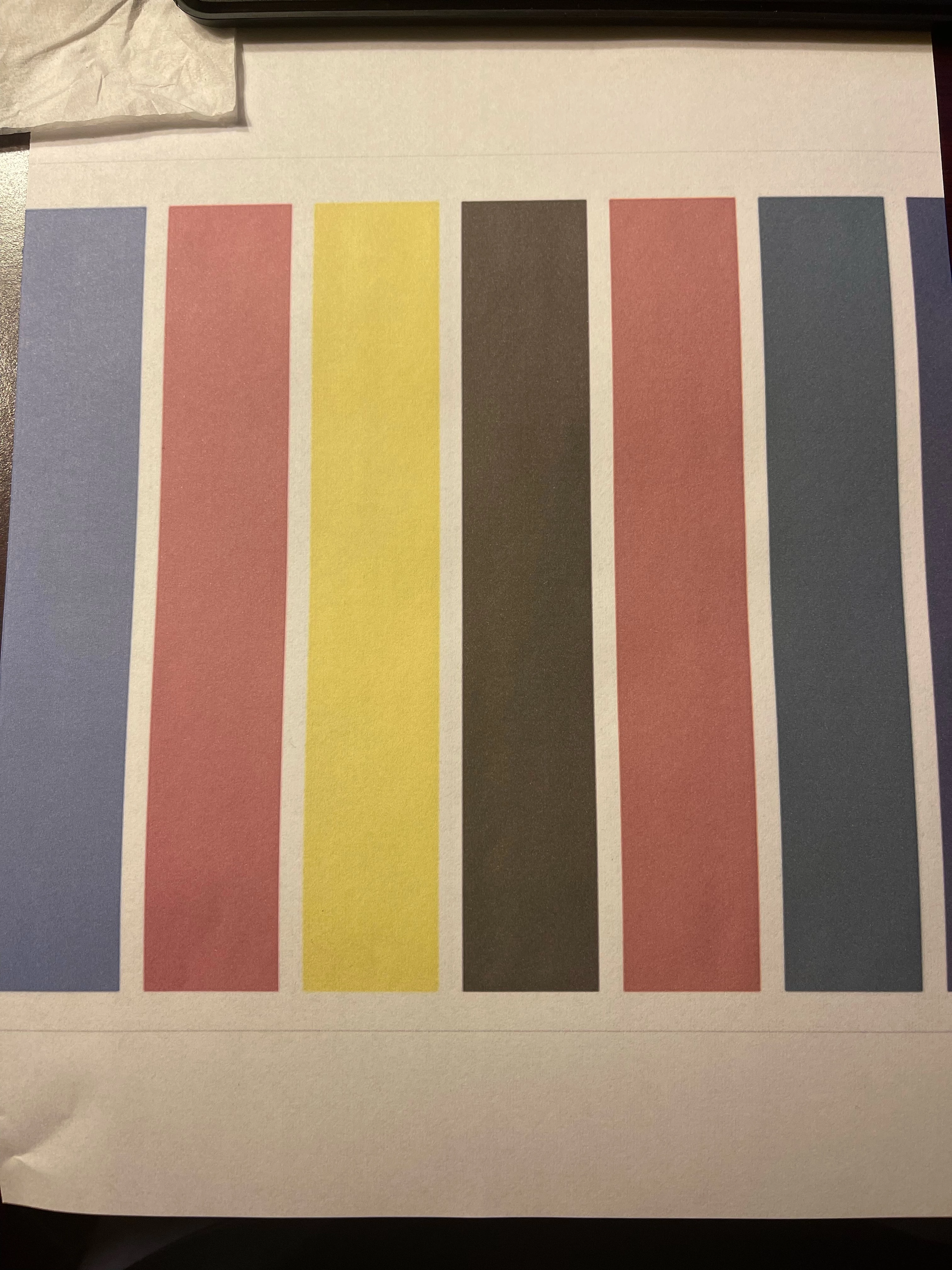
Go to print my first project and I printed on A-SUB Sublimation Paper and the colors are SUPER dull looking. They are on regular printer paper as well. I attached the color page I used as an example to print and the paper that it turned out like.

My printer settings are set to High quality so I'm not sure what else I can do to make the colors bright and look good, as they should.

P.S- I am using Windows 10
 

This topic has been closed for replies.

4 replies

josephlavine
Community Expert
August 28, 2022

What is your printing workflow? The chosen settings, such as working with ICC profiles, are key to quality and repeatable prints. Perhaps, you can share screen captures of your print settings for review.

warmly/j

NB, colourmanagement
Community Expert
August 28, 2022

Ideally, you're going to need to use "Photoshop Manages Color" and select an ICC profile made for your ink and printer - plus the media. Also, the 'media' selected by name in "Print Settings" should be correct for the supplied ICC profile.


You'll also have to treat any heated pressing process carefully to maintain consistency (IF that’s involved here). 


Inks and media have a maximum gamut. That colour range is the best it can do. Have you seen good results from this manufacturer's materials?


Start with an RGB image in the Adobe RGB colourspace and test that, please go here and download the Adobe RGB testimage: https://www.colourmanagement.net/index.php/downloads_listing/


I hope this helps
neil barstow, colourmanagement net :: adobe forum volunteer:: co-author: 'getting colour right'
google me "neil barstow colourmanagement" for lots of free articles on colour management

TheDigitalDog
Inspiring
August 26, 2022

You should always test output using good color reference images designed for that task. The color reference images RGB values are such that they are set for output and are editing and display agnostic. Test the output this way and examine for the same color issues so we know it's not your image-specific issues causing the problems:
http://www.digitaldog.net/files/2014PrinterTestFileFlat.tif.zip

Author “Color Management for Photographers" & "Photoshop CC Color Management/pluralsight"
New Participant
March 25, 2023

Link not working for me! A tab opens and dissappears immediately! Thanks!


TheDigitalDog
Inspiring
March 25, 2023
quote

Link not working for me! A tab opens and dissappears immediately! Thanks!


By @Susiecrabcakes

https://www.dropbox.com/s/ywprm21mrd0x5zf/2014PrinterTestFileFlat.tif.zip?dl=0

Author “Color Management for Photographers" & "Photoshop CC Color Management/pluralsight"
Stephen Marsh
Community Expert
August 26, 2022

@Brand-It 


Was the file CMYK mode? It should be RGB...


Third-party ink and third-party paper! OEM printer driver settings are often based around the OEM ink and paper, if you use others then you need a lot of trial and error to get the best results. Also consider some light/medium/dark neutral grays in your test file.