


New Participant
October 30, 2022
Answered

Colour Settings

  • October 30, 2022
  • 2 replies
  • 829 views

Looking to solve this issue....


When i open photoshop and preview my recent files the colours show up correctly but when i open each file they appear a look different to how they should. I have included pictures to give you an idea of how it looks.


I have updated my graphics driver and i'm still getting the same issue.


I believe this must be a seeting on my computer as i have the same problem on Illustrator.


Thanks for reading and i hope you are able to help.
This topic has been closed for replies.
Correct answer Per Berntsen

The first image is when i opened the file in photoshop. Yes the convert to sRGB and embed profile are both ticked.

I'm viewing the exported image in the standard photo viewer on windows.


This looks like a defective monitor profile.

The Windows Photos app is color managed, and should display identically to Photoshop.

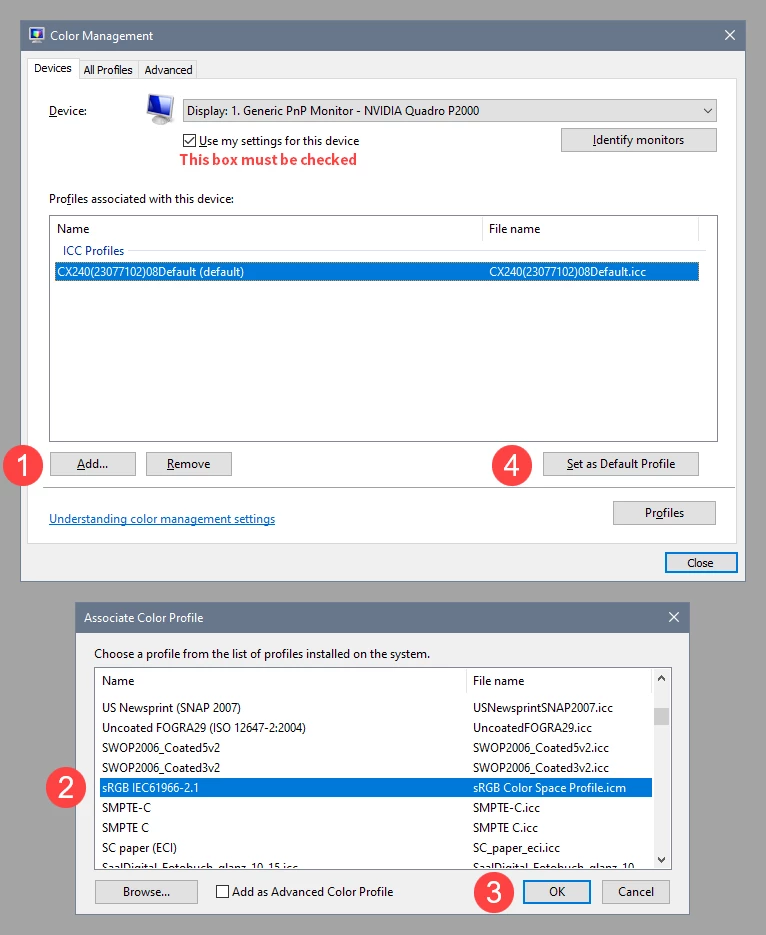
Try setting the monitor profile to sRGB (use Adobe RGB if you have a wide gamut monitor). If that fixes the issue, you should ideally calibrate your monitor with a hardware calibrator, which will also create and install a custom monitor profile that will be more accurate than sRGB.


Press the Windows key + R, type colorcpl in the box and press Enter.

Add the sRGB profile, then set it as default.


2 replies

Per Berntsen
Adobe Expert
October 30, 2022

Are you on Mac or Windows?

What application are you using to preveiw the files?

In the future, please use the Insert Photos button in the toolbar to insert screenshots directly in your posts.


NB, colourmanagement
Adobe Expert
October 31, 2022
kglad
Adobe Expert
October 30, 2022

<moved from enterprise & teams>

New Participant
October 30, 2022

Hi,

I'm using Windows. I'm using photoshop to preview the files, when you load up photoshop it shows you the recent files, this is where the colours are showing correctly.

Per Berntsen
Adobe Expert
October 30, 2022

I have never used the home screen before, but it seems that it's not color managed, which I'd call a bug.

I have a wide gamut monitor (and you probably do as well), and thumbnails on the home screen display over saturated.

Lack of color management on wide gamut monitors typically causes images to display that way.

@J453  – can you take a look at this, and change from discussion to bug?