


Inspiring
August 11, 2019
Answered

Command "Delete" is not currently available

  • August 11, 2019
  • 4 replies
  • 13482 views

Hi,

I'm trying to figure out why i suddenly get this error when i run my script.

I verify, in VSCode that

activeDocument.layers.getByName("split_2")

[ArtLayer split_2]

But when i try to remove it:

activeDocument.layers.getByName("split_2").remove()

I get this:
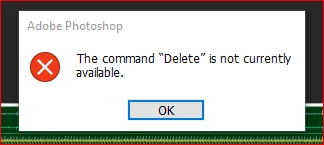
I restarted PS, run the same script and the error is gone.

Is there anything i can do to try and understand what caused it to prevent this from happening again?

Thanks,

This topic has been closed for replies.
Correct answer amrsngh25

It's been more than two years, I hope you've got the Answer.
If someone still loking for the answer
this error ocuures because some of your layers might be locked. 
Unlock the layer and run the script again.

Hope it works.

4 replies

New Participant
November 7, 2023

I get this error when the script tries to delete something that is outside of my image.    The delete command was told to go to a coordinates Top: 2 inches, Left: 18 inches, Bottom: 2 inches and Right:20inches.  My document was only 5 inchec wide and 5 inches tall.   It won't "delete" something that is  outside of my image.  My image was too small.    Check that your "delete" coordinates are within your image!..    Hope that helps.

New Participant
November 7, 2023

I get this error when the script tries to delete something that is outside of my image.    The delete command was told to go to a coordinates Top: 2 inches, Left: 18 inches, Bottom: 2 inches and Right:20inches.  My document was only 5 inchec wide and 5 inches tall.   It won't "delete" something that is  outside of my image.  My image was too small.    Hope that helps.

amrsngh25
amrsngh25Correct answer
New Participant
February 3, 2022

It's been more than two years, I hope you've got the Answer.
If someone still loking for the answer
this error ocuures because some of your layers might be locked. 
Unlock the layer and run the script again.

Hope it works.

Stephen Marsh
Community Expert
February 3, 2022

@amrsngh25 wrote:

It's been more than two years, I hope you've got the Answer.
If someone still loking for the answer
this error ocuures because some of your layers might be locked. 
Unlock the layer and run the script again.

Hope it works.


Thank you for contributing!


To add even more value, could you post the appropriate code?


Brainiac
August 11, 2019

If "split_2" is a group, then you will get this error if no layers are selected.

EDITED:

This happens if no layers are selected and the topmost layer is "split_2"

When you reopen the file, the active layer is automatically reselected and the error disappears.