dsev1
Inspiring
March 23, 2021
Answered

Confusion on Gradient Tool Behavior

  • March 23, 2021
  • 6 replies
  • 18503 views

When I use the gradient tool, it affects the layer, and if I am unhappy with its results, I just UNDO and then try again. It is basically a "one shot deal" ... love it or hate it.


However, in this YouTube tutorial (5:25 to 6 min.), the gradient tool in the mask seems to be ADDITIVE, like he keeps adding to what is being masked.  https://youtu.be/oZr378NyOKM?list=PLHRSsMUaMQK3CeE_8Ayg36ix01Zgh9teI&t=325 


When I try this, after one gradient tool stroke, it completely annihilates any prior masking and creates something from scratch. And the same for each successive gradient tool stroke.  So how is he able to make it ADDITIVE? Please help!  Thank you!!
This topic has been closed for replies.
Correct answer Jeff Arola

The problem as i see it is your settings.


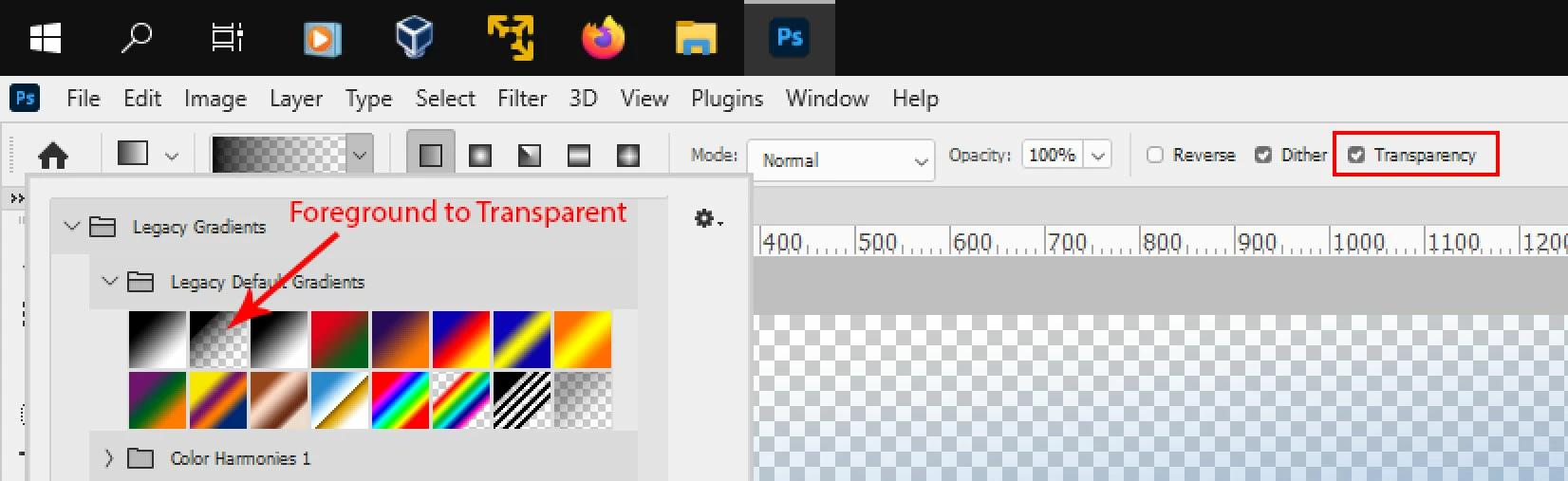
First you need to select the Foreground to Transparent gradient and then you need to check Transparency in the Gradient tool options.

(you have your Edit>Preferences>Workspace set for Enable Narrow Options Bar, so you don't see

  the word Transpaency in the Tool Options)


After that you should get the same results as in the video in your intial post.


The Narrow Options Bar


6 replies

c.pfaffenbichler
Community Expert
March 27, 2021

Something seems strange, though. 

Resetting the Tool should have activated Transparency and @PECourtejoie recommended that pretty early on. 

Jeff Arola
Jeff ArolaCorrect answer
Community Expert
March 26, 2021

The problem as i see it is your settings.


First you need to select the Foreground to Transparent gradient and then you need to check Transparency in the Gradient tool options.

(you have your Edit>Preferences>Workspace set for Enable Narrow Options Bar, so you don't see

  the word Transpaency in the Tool Options)


After that you should get the same results as in the video in your intial post.


The Narrow Options Bar


davescm
Community Expert
March 26, 2021

Well spotted Jeff 🙂

Dave

dsev1
dsev1Author
Inspiring
March 26, 2021

All, 

Adobe Tech Support got back to me today.

They said the gradient tool would not work properly due to insufficient video RAM in my computer. Apparently, you need at least 2 GB of video RAM for Photoshop 2021, while mine was much lower. 


Very odd the items that still work and random items that don't work due to this.  Anyway, that's their official position, and I'd thought I'd pass it along. Thanks for all your input and help!

davescm
Community Expert
March 26, 2021

That is incorrect.

The gradient tool will work with the GPU disabled.

Try resetting the tool and if that does not change, reset preferences.

Dave

c.pfaffenbichler
Community Expert
March 24, 2021

dsev1
dsev1Author
Inspiring
March 24, 2021

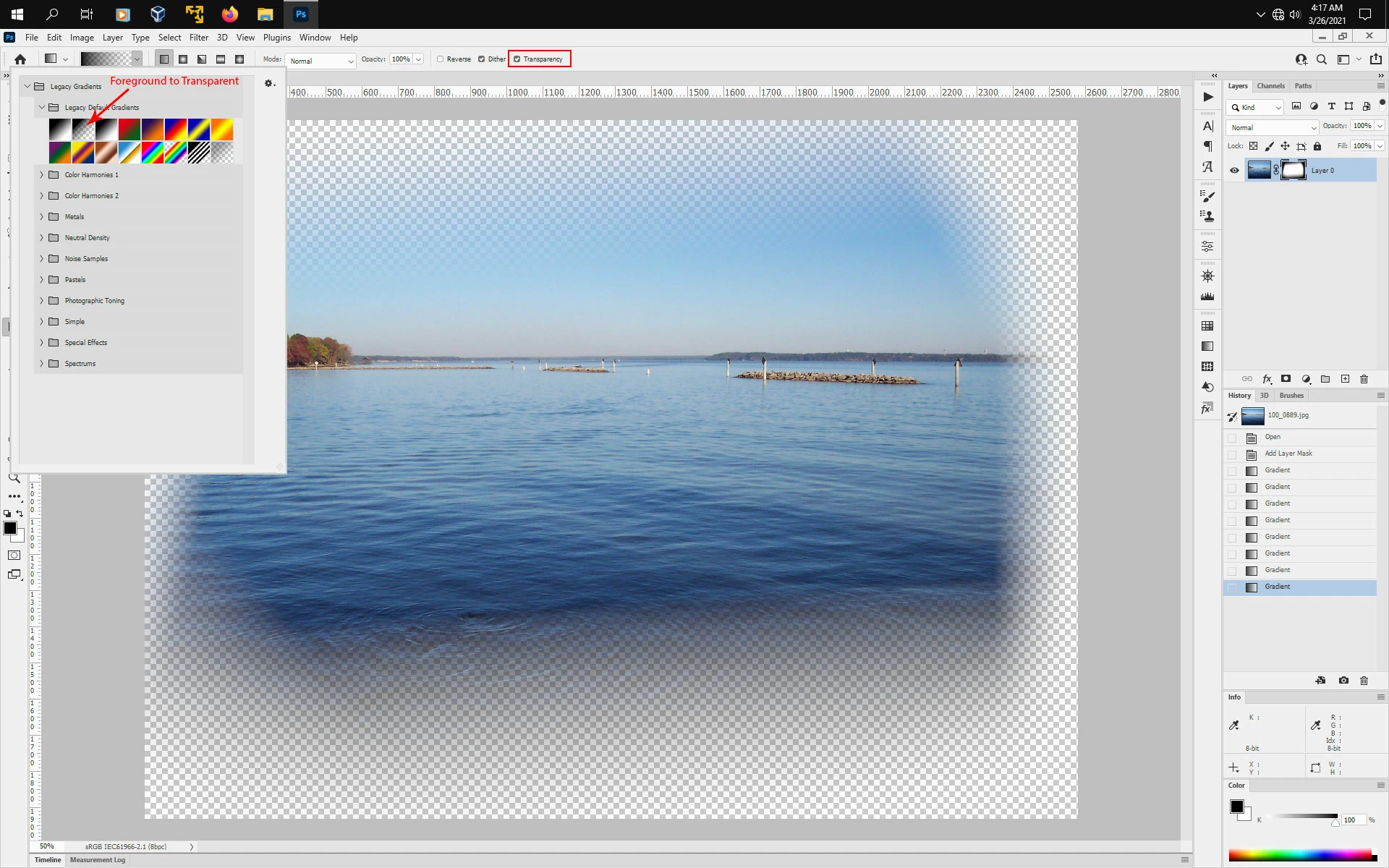
Interesting. Mine doesn't seem to behave in this way. Whatever is laid down in the prior gradient tool stroke disappears and only the new gradient tool stroke results seem to present themselves.

Participating Frequently
March 25, 2021

Hello pal, See attached for what I mean. Thinking about it I don't think it it this doing it.


Your friend you asked, did you make sure they had transparency etc all set correctly? It might be to do with the windows drivers if this happened after a CC update is all. 


You could roll back to a previous version of PS and see if it works there is all. 


Cheers


Rob


Could you see attached please and folow the instructions. Then post a screen grab?


Davescm's comment got me thinking! Thanks Dave

Marianne-Deiters
Participating Frequently
March 24, 2021

In the tutorial he set the gradient from black to transparent, not black to white.

dsev1
dsev1Author
Inspiring
March 24, 2021

Thank you. However, this is not the issue.


In the video, he is able to almost 'paint' like with a brush with the gradient tool, and it continues to add black to the mask. Conversely, for me, for every stroke of the gradient tool, it eliminates the prior gradient in the mask and starts fresh. There is nothing additive. Nothing builds upon the prior gradient tool stroke. It's all or nothing. 

c.pfaffenbichler
Community Expert
March 24, 2021

»Thank you. However, this is not the issue.«

You appear to be mistaken, have you actually tested using the Foreground to transparent-gradient? 

c.pfaffenbichler
Community Expert
March 24, 2021

Could you please post screenshots with the pertinent Panels (Toolbar, Layers, Options Bar, …) visible? 

Which Gradient have you chosen to use? »Black, white«, Foreground to transparent«, …? 


You can also experiment with Blend Modes. 

dsev1
dsev1Author
Inspiring
March 24, 2021

I've posted an example screenshot of the gradient to which I am referring. I have used blending modes as well exercise from the tutorial video but for other uses in the task.

I would like to know why the person in the tutorial video has a gradient tool that is behaving differently than mine. Thanks. 


c.pfaffenbichler
Community Expert
March 24, 2021

Did you notiice that I underligned Foreground to transparent in my previous post?