smithcgl9043167
Inspiring
April 18, 2017
Answered

Control the movement of a layer with Slider

  • April 18, 2017
  • 2 replies
  • 3508 views

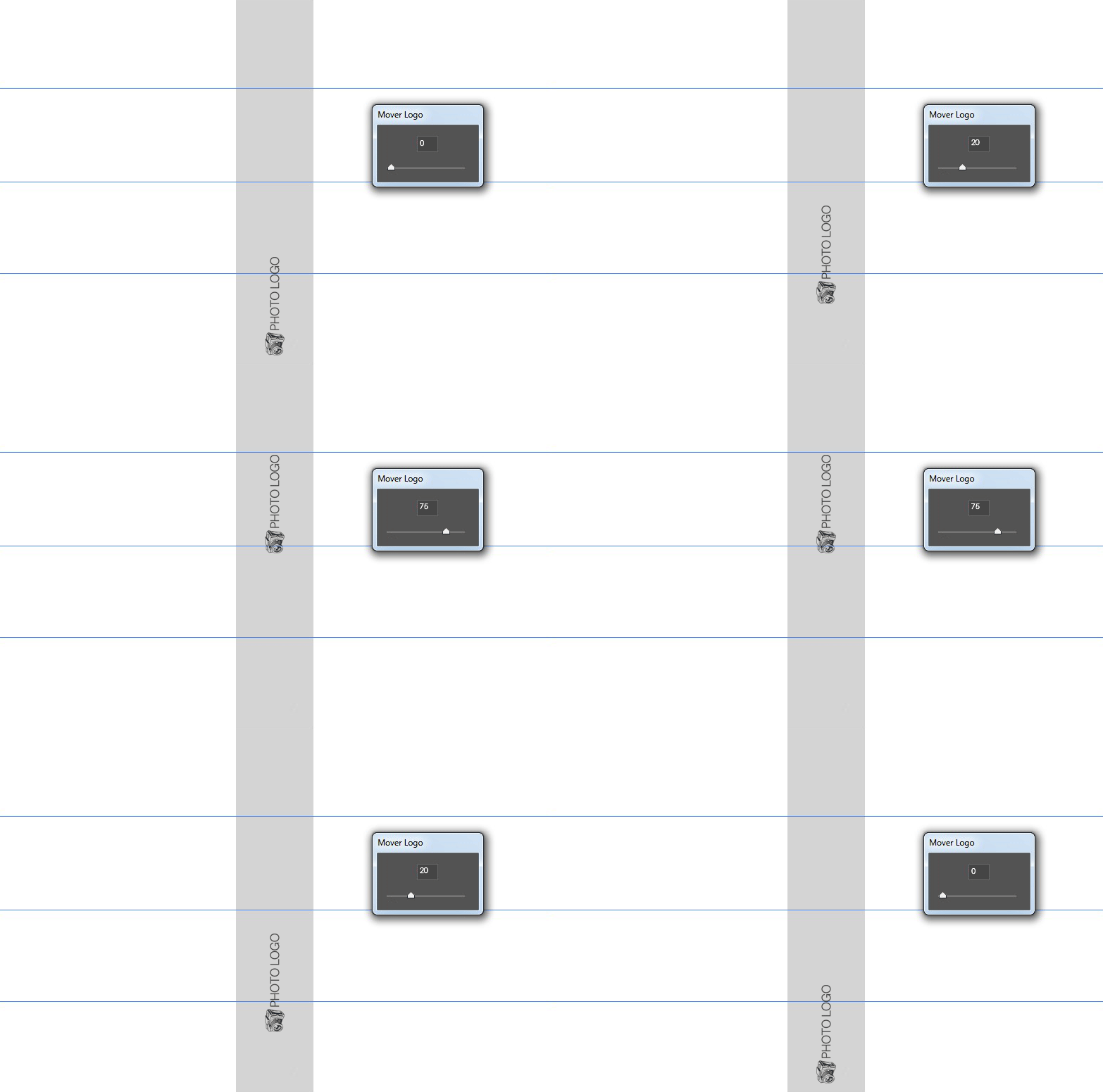
Hi guys, how are you? My friends, is there any chance of a script writing the path of a layer on the "y-axis" and controlling that movement through slider?

Here is a small illustration of how it would work:

This topic has been closed for replies.
Correct answer c.pfaffenbichler

// 2017, use it at your own risk;

#target photoshop

var checksOut = true;

checksOut = checkPhotoshop(checksOut);

// do the operation if everything has checked out;

if (checksOut == true) {

// set the ruler units;

var originalRulerUnits = app.preferences.rulerUnits;

app.preferences.rulerUnits = Units.PIXELS;

var myDocument = app.activeDocument;

var theHeight = myDocument.heght;

var thisState = myDocument.activeHistoryState;

var theFirstState = myDocument.activeHistoryState;

var theHeight = myDocument.height;

var dlg = new Window("dialog", "stuff", [500,300,920,500]);

// position;

dlg.scale = dlg.add('panel', [15,15,405,65], 'offset');

dlg.scale.slider = dlg.scale.add('slider', [12,12,300,32]);

dlg.scale.slider.minvalue = 0;

dlg.scale.slider.maxvalue = theHeight;

dlg.scale.slider.value = activeDocument.activeLayer.bounds[1];

dlg.scale.number = dlg.scale.add('edittext', [312,12,372,30], 0);

dlg.scale.number.text = activeDocument.activeLayer.bounds[1];

dlg.scale.slider.onChanging = function () {dlg.scale.number.text = Math.round(this.value)};

dlg.scale.slider.onChange = positionTheLayers;

dlg.scale.number.onChange = function () {

  while (this.text.indexOf(",") != -1) {this.text = this.text.replace(",", ".")};

  while (this.text.indexOf(".") != this.text.lastIndexOf(".")) {this.text = this.text.replace(".", "")};

// checking if entry is numeric, thanks to xbytor;

  if (this.text.match(/[^\-\.\d]/)) {

  this.text = this.text.replace(/[^\-\.\d]/g, '');

  }

  if (this.text == "") {this.text = 0};

  while (Number (this.text) > theHeight) {this.text = theHeight};

  while (Number (this.text) < 0) {this.text = 0};

  var theNumber = Number(dlg.scale.number.text);

  dlg.scale.slider.value = theNumber;

  positionTheLayers()

  };

// buttons for ok and cancel;

dlg.buttons = dlg.add('panel', [15,135,405,185], '');

dlg.buttons.buildBtn = dlg.buttons.add('button', [13,12,185,34], 'OK', {name:'ok'});

dlg.buttons.cancelBtn = dlg.buttons.add('button', [195,12,370,34], 'Cancel', {name:'cancel'});

// show dialog;

dlg.center();

// show dialog;

var myReturn = dlg.show ();

////////////////////////////////////

if (myReturn == 1) {

// select the layers;

  reselectLayers0 (myDocument, theLayers);

  }

else {

// go back in history and select the layers;

  myDocument.activeHistoryState = theFirstState;

  };

app.preferences.rulerUnits = originalRulerUnits;

};

////////////////////////////////////

////////////////////////////////////

////////////////////////////////////

// thanks to kasyan servetsky;

function checkPhotoshop(checksOut) {

  if (app.documents.length == 0) {

  alert("no documents are open. please open a document and try again");

  checksOut = false

  };

  var theKinds = ["LayerKind.BLACKANDWHITE", "LayerKind.BRIGHTNESSCONTRAST", "LayerKind.CHANNELMIXER", "LayerKind.COLORBALANCE", "LayerKind.CURVES", "LayerKind.EXPOSURE",

  "LayerKind.GRADIENTMAP", "LayerKind.HUESATURATION", "LayerKind.INVERSION", "LayerKind.LAYER3D", "LayerKind.LEVELS", "LayerKind.PHOTOFILTER", "LayerKind.POSTERIZE",

  "LayerKind.SELECTIVECOLOR", "LayerKind.THRESHOLD", "LayerKind.VIBRANCE"];

  for (var n = 0; n < theKinds.length; n++) {

  if (app.activeDocument.activeLayer.kind == theKinds) {

  alert ("layer is ineligible");

  checksOut = false;

  }

  };

  return checksOut

  };

////// scale the layers //////

function positionTheLayers () {

  app.activeDocument.suspendHistory("scale and rotate", "main()");

function main () {

  app.activeDocument.activeHistoryState = thisState;

  var thePos = Number(dlg.scale.number.text);

try {

var idTrnf = charIDToTypeID( "Trnf" );

    var desc3 = new ActionDescriptor();

    var idnull = charIDToTypeID( "null" );

        var ref2 = new ActionReference();

        var idLyr = charIDToTypeID( "Lyr " );

        var idOrdn = charIDToTypeID( "Ordn" );

        var idTrgt = charIDToTypeID( "Trgt" );

        ref2.putEnumerated( idLyr, idOrdn, idTrgt );

    desc3.putReference( idnull, ref2 );

    var idFTcs = charIDToTypeID( "FTcs" );

    var idQCSt = charIDToTypeID( "QCSt" );

    var idQcsa = charIDToTypeID( "Qcsa" );

    desc3.putEnumerated( idFTcs, idQCSt, idQcsa );

    var idOfst = charIDToTypeID( "Ofst" );

        var desc4 = new ActionDescriptor();

        var idHrzn = charIDToTypeID( "Hrzn" );

        var idPxl = charIDToTypeID( "#Pxl" );

        desc4.putUnitDouble( idHrzn, idPxl, 0 );

        var idVrtc = charIDToTypeID( "Vrtc" );

        var idPxl = charIDToTypeID( "#Pxl" );

        desc4.putUnitDouble( idVrtc, idPxl,  (activeDocument.activeLayer.bounds[1] - thePos) * (-1));

    var idOfst = charIDToTypeID( "Ofst" );

    desc3.putObject( idOfst, idOfst, desc4 );

executeAction( idTrnf, desc3, DialogModes.NO );

} catch (e) {};

app.refresh();

};

};

2 replies

c.pfaffenbichler
Community Expert
Community Expert
April 19, 2017

Like JJMack mentioned it seems a bit much effort for the result.

But you may have intended it as part of some larger functionality or just be looking for the learning experience so I don’t want to discourage you from pursuing the idea.

What are the units in your example supposed to be – pixels or percent?

smithcgl9043167
Inspiring
April 20, 2017

Hi c.pfaffenbichler! And I've created an action to automate the layout of dozens of photo book covers. On all these covers I will have to add a graphic logo where I work in which I use script to add and modify its opaque color. My idea is to add a control to move, change the positioning of the logo, in that same script, this would prevent it from conflicting with the title of the Cover, which is in the center of the document.

Illustration Final model:

tssee
Inspiring
April 23, 2017

You could duplicate the existing parts (both the UI-elements and the functions), rename the various elements and amend them accordingly.


I ve changed the script and I can even run it horizontally

But when I go to move the horizontal slider I bring the text back

As it was at the beginning


This script changed:

// 2017, use it at your own risk;
#target photoshop
var checksOut = true;
checksOut = checkPhotoshop(checksOut);
// do the operation if everything has checked out;
if (checksOut == true) {
// set the ruler units;
var originalRulerUnits = app.preferences.rulerUnits;
app.preferences.rulerUnits = Units.PIXELS;

var myDocument = app.activeDocument;
var oneWidth = myDocument.width;
var theHeight = myDocument.heght;

var thisState = myDocument.activeHistoryState;
var theFirstState = myDocument.activeHistoryState;
var oneWidth = myDocument.width;
var theHeight = myDocument.height;

var dlg = new Window("dialog", "stuff", [500,300,920,500]);
// position;
dlg.scale_1 = dlg.add('panel', [15,15,405,65], 'ORZ');
dlg.scale_1.slider = dlg.scale_1.add('slider', [12,12,300,32]);
dlg.scale_1.slider.minvalue = 0;
dlg.scale_1.slider.maxvalue = oneWidth;
dlg.scale_1.slider.value = activeDocument.activeLayer.bounds[0];
dlg.scale_1.number = dlg.scale_1.add('edittext', [312,12,372,30], 0);

dlg.scale_1.number.text = activeDocument.activeLayer.bounds[0];
dlg.scale_1.slider.onChanging = function ()

{dlg.scale_1.number.text = Math.round(this.value)};
dlg.scale_1.slider.onChange = positionTheLayersORZ;

dlg.scale_1.number.onChange = function () {
  while (this.text.indexOf(",") != -1) {this.text = this.text.replace(",", ".")};
  while (this.text.indexOf(".") != this.text.lastIndexOf(".")) {this.text = this.text.replace(".", "")};
// checking if entry is numeric, thanks to xbytor;
  if (this.text.match(/[^\-\.\d]/)) {
  this.text = this.text.replace(/[^\-\.\d]/g, '');
  }
  if (this.text == "") {this.text = 0};
  while (Number (this.text) > oneWidth) {this.text = oneWidth};
  while (Number (this.text) < 0) {this.text = 0};
  var theNumber = Number(dlg.scale_1.number.text);
  dlg.scale_1.slider.value = theNumber;
  positionTheLayersORZ()
  };

dlg.scale = dlg.add('panel', [15,75,405,125], 'VRT');
dlg.scale.slider = dlg.scale.add('slider', [12,12,300,32]);
dlg.scale.slider.minvalue = 0;
dlg.scale.slider.maxvalue = theHeight;
dlg.scale.slider.value = activeDocument.activeLayer.bounds[1];
dlg.scale.number = dlg.scale.add('edittext', [312,12,372,30], 0);
dlg.scale.number.text = activeDocument.activeLayer.bounds[1];

dlg.scale.slider.onChanging = function () {dlg.scale.number.text = Math.round(this.value)};
dlg.scale.slider.onChange = positionTheLayers;
dlg.scale.number.onChange = function () {
  while (this.text.indexOf(",") != -1) {this.text = this.text.replace(",", ".")};
  while (this.text.indexOf(".") != this.text.lastIndexOf(".")) {this.text = this.text.replace(".", "")};
// checking if entry is numeric, thanks to xbytor;
  if (this.text.match(/[^\-\.\d]/)) {
  this.text = this.text.replace(/[^\-\.\d]/g, '');
  }
  if (this.text == "") {this.text = 0};
  while (Number (this.text) > theHeight) {this.text = theHeight};
  while (Number (this.text) < 0) {this.text = 0};
  var theNumber = Number(dlg.scale.number.text);
  dlg.scale.slider.value = theNumber;
  positionTheLayers()
  };

// buttons for ok and cancel;
dlg.buttons = dlg.add('panel', [15,135,405,185], '');
dlg.buttons.buildBtn = dlg.buttons.add('button', [13,12,185,34], 'OK', {name:'ok'});
dlg.buttons.cancelBtn = dlg.buttons.add('button', [195,12,370,34], 'Cancel', {name:'cancel'});
// show dialog;
dlg.center();
// show dialog;
var myReturn = dlg.show ();
////////////////////////////////////
if (myReturn == 1) {
// select the layers;
  dlg.close();
  //reselectLayers0 (myDocument, theLayers);
  }
else {
// go back in history and select the layers;
  myDocument.activeHistoryState = theFirstState;
  };
app.preferences.rulerUnits = originalRulerUnits;
};
////////////////////////////////////
////////////////////////////////////
////////////////////////////////////
// thanks to kasyan servetsky;
function checkPhotoshop(checksOut) {
  if (app.documents.length == 0) {
  alert("no documents are open. please open a document and try again");
  checksOut = false
  };
  var theKinds = ["LayerKind.BLACKANDWHITE",
  "LayerKind.BRIGHTNESSCONTRAST",
  "LayerKind.CHANNELMIXER",
  "LayerKind.COLORBALANCE",
  "LayerKind.CURVES",
  "LayerKind.EXPOSURE",
  "LayerKind.GRADIENTMAP",
  "LayerKind.HUESATURATION",
  "LayerKind.INVERSION",
  "LayerKind.LAYER3D",
  "LayerKind.LEVELS",
  "LayerKind.PHOTOFILTER",
  "LayerKind.POSTERIZE",
  "LayerKind.SELECTIVECOLOR",
  "LayerKind.THRESHOLD",
  "LayerKind.VIBRANCE"];
  for (var n = 0; n < theKinds.length; n++) {
  if (app.activeDocument.activeLayer.kind == theKinds) {
  alert ("layer is ineligible");
  checksOut = false;
  }
  };
  return checksOut
  };

////// scale the layers //////
function positionTheLayersORZ () {
app.activeDocument.suspendHistory("scale and rotate", "main()");
function main () {
  app.activeDocument.activeHistoryState = thisState;
  var thePos = Number(dlg.scale_1.number.text);
try {
var idTrnf = charIDToTypeID( "Trnf" );
    var desc3 = new ActionDescriptor();
    var idnull = charIDToTypeID( "null" );
        var ref2 = new ActionReference();
        var idLyr = charIDToTypeID( "Lyr " );
        var idOrdn = charIDToTypeID( "Ordn" );
        var idTrgt = charIDToTypeID( "Trgt" );
        ref2.putEnumerated( idLyr, idOrdn, idTrgt );
    desc3.putReference( idnull, ref2 );
   
    var idFTcs = charIDToTypeID( "FTcs" );
    var idQCSt = charIDToTypeID( "QCSt" );
    var idQcsa = charIDToTypeID( "Qcsa" );
    desc3.putEnumerated( idFTcs, idQCSt, idQcsa );
    var idOfst = charIDToTypeID( "Ofst" );
        var desc4 = new ActionDescriptor();
        var idHrzn = charIDToTypeID( "Hrzn" );
        var idPxl = charIDToTypeID( "#Pxl" );
        desc4.putUnitDouble( idHrzn, idPxl, (activeDocument.activeLayer.bounds[0] - thePos) * (-1));
        var idVrtc = charIDToTypeID( "Vrtc" );
        var idPxl = charIDToTypeID( "#Pxl" );
        desc4.putUnitDouble( idVrtc, idPxl,  0);
    var idOfst = charIDToTypeID( "Ofst" );
    desc3.putObject( idOfst, idOfst, desc4 );
executeAction( idTrnf, desc3, DialogModes.NO );
} catch (e) {};
app.refresh();
};
};


////// scale the layers //////
function positionTheLayers () {
app.activeDocument.suspendHistory("scale and rotate", "main()");
function main () {
  app.activeDocument.activeHistoryState = thisState;
  var thePos = Number(dlg.scale.number.text);
try {

var idTrnf = charIDToTypeID( "Trnf" );
    var desc3 = new ActionDescriptor();
    var idnull = charIDToTypeID( "null" );
        var ref2 = new ActionReference();
        var idLyr = charIDToTypeID( "Lyr " );
        var idOrdn = charIDToTypeID( "Ordn" );
        var idTrgt = charIDToTypeID( "Trgt" );
        ref2.putEnumerated( idLyr, idOrdn, idTrgt );
    desc3.putReference( idnull, ref2 );
   
    var idFTcs = charIDToTypeID( "FTcs" );
    var idQCSt = charIDToTypeID( "QCSt" );
    var idQcsa = charIDToTypeID( "Qcsa" );
    desc3.putEnumerated( idFTcs, idQCSt, idQcsa );
    var idOfst = charIDToTypeID( "Ofst" );
        var desc4 = new ActionDescriptor();
        var idHrzn = charIDToTypeID( "Hrzn" );
        var idPxl = charIDToTypeID( "#Pxl" );
        desc4.putUnitDouble( idHrzn, idPxl, 0 );
        var idVrtc = charIDToTypeID( "Vrtc" );
        var idPxl = charIDToTypeID( "#Pxl" );
        desc4.putUnitDouble( idVrtc, idPxl,  (activeDocument.activeLayer.bounds[1] - thePos) * (-1));
    var idOfst = charIDToTypeID( "Ofst" );
    desc3.putObject( idOfst, idOfst, desc4 );
executeAction( idTrnf, desc3, DialogModes.NO );
} catch (e) {};
app.refresh();
};
};

JJMack
Community Expert
Community Expert
April 19, 2017

You could do that with a script simple transform the layer varying the layer y.  I would not think it necessary. For with the move tool you can nudge a layer location  using the keyboard arrow keys and Shift Arrow Keys. Up, Down, Left and Right...

Logo are usually automated  by sizing and aligning them to some location so the process can be batched.  Adding a logo in an interactive process I would just use the move tool.  Why script it?

JJMack