Exit
  • Global community
    • Language:
      • Deutsch
      • English
      • Español
      • Français
      • Português
  • 日本語コミュニティ
  • 한국 커뮤니티
1

Copy and Paste Not Working Correctly

Community Beginner ,
Jun 23, 2022 Jun 23, 2022

Not sure what has gone wrong. Since updating, the Copy and Paste is not working as it should. If I have a image on the Screen in a Browser Tab, then do right click copy, when I paste in Photoshop and Select Clipboard as the size, the Clipboard size is correct, but it pastes a half sized image. its the full image, but not as big as it should be? It even does it in Photoshop as well. So let's say I have a 1,000 x 1000px image, I select 500px x 500px if it and select copy, then try and paste it as a new image, it says Clipboard 500px x 500pc, but only a half size image is pasted. The image is not cropped, its just too small?


Thx

TOPICS
Windows
3.0K
Translate
Report
Community guidelines
Be kind and respectful, give credit to the original source of content, and search for duplicates before posting. Learn more
community guidelines
Adobe
Community Expert ,
Jun 23, 2022 Jun 23, 2022

I cannot reproduce the issue. 

Could you please post screenshots taken at View > 100% with the pertinent Panels (Toolbar, Layers, Channels, Options Bar, …) visible to illustrate the goings on when copy/pasting in Photoshop itself? 

Translate
Report
Community guidelines
Be kind and respectful, give credit to the original source of content, and search for duplicates before posting. Learn more
community guidelines
Community Expert ,
Jun 23, 2022 Jun 23, 2022

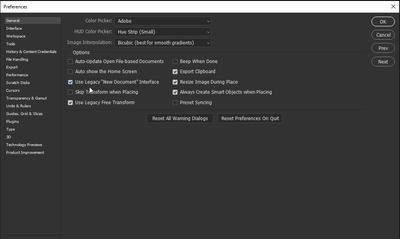
Hi @Gemma5D06, Please try checking Use Legacy "New Document" Interface in Preferences on the General tab. Is it working now? Let us know.


JainLemos_0-1655937843999.png

Translate
Report
Community guidelines
Be kind and respectful, give credit to the original source of content, and search for duplicates before posting. Learn more
community guidelines
Community Beginner ,
Jun 23, 2022 Jun 23, 2022

Yes, it works if I use the Legacy "New Document" Interface, everything is how it should be. 


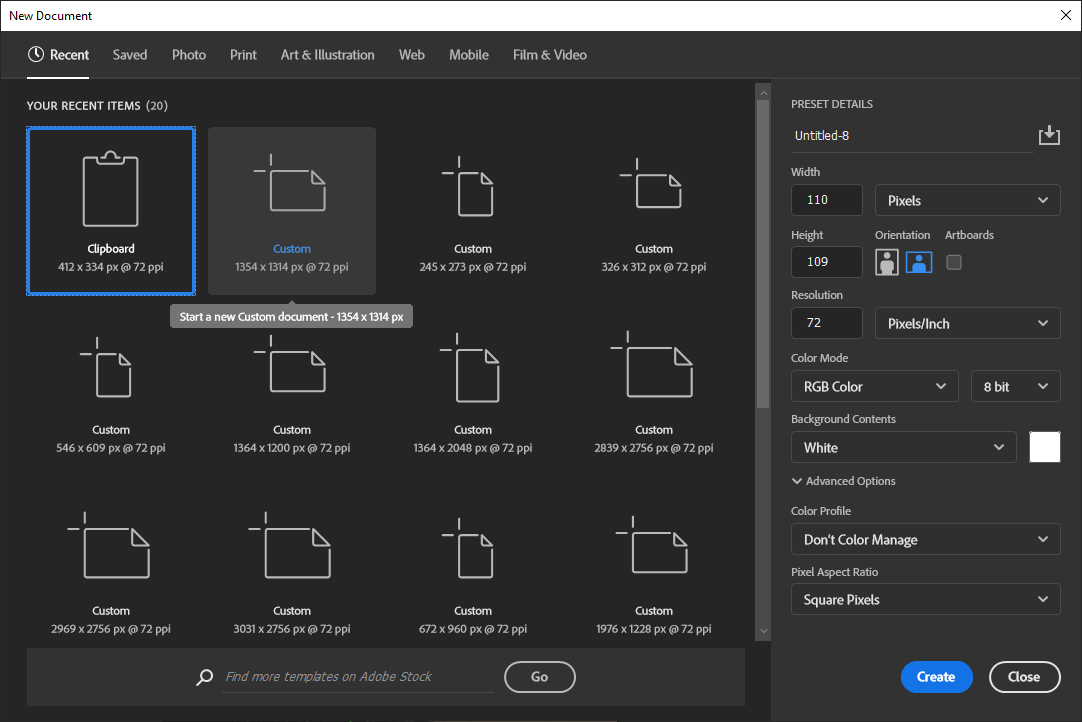
I figured out the problem,. If I Select File New, The numbers in Clipboard are correct, but the preset on the right does not update itself automatically anymore, so i I have to click on and off Clipboard. Odd Behaviour as the preset figure is not updating itself when I click Clipboard, see screenshot. 


Gem

Translate
Report
Community guidelines
Be kind and respectful, give credit to the original source of content, and search for duplicates before posting. Learn more
community guidelines
Community Expert ,
Jun 23, 2022 Jun 23, 2022

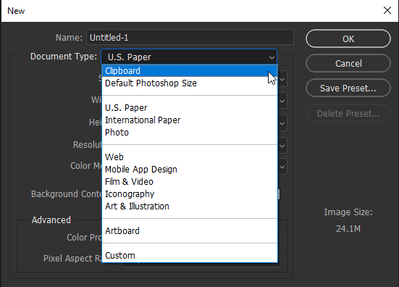
Great, glad to hear it works for you. Yes, changing back to the Legacy New Document profile, you'll be able to use "clipboard" every time and the W/H values will reflect whatever is on your clipboard at the time. You won't see the "Preset Details" panel on the right anymore. 

JainLemos_0-1656007519704.png


Translate
Report
Community guidelines
Be kind and respectful, give credit to the original source of content, and search for duplicates before posting. Learn more
community guidelines
Community Beginner ,
Jun 23, 2022 Jun 23, 2022

Yes, this is a bug in the new update by the looks of it, I see others are reporting the same problem I had now and its been forward to the Software Engineers.


Thx G

Translate
Report
Community guidelines
Be kind and respectful, give credit to the original source of content, and search for duplicates before posting. Learn more
community guidelines
Explorer ,
Aug 20, 2022 Aug 20, 2022
LATEST

This workaround does the trick for me as well.

Thank you for the info, Gemma5D06.

Translate
Report
Community guidelines
Be kind and respectful, give credit to the original source of content, and search for duplicates before posting. Learn more
community guidelines
Mentor ,
Jun 23, 2022 Jun 23, 2022

your browser or OS has scaling active.

Translate
Report
Community guidelines
Be kind and respectful, give credit to the original source of content, and search for duplicates before posting. Learn more
community guidelines
New Here ,
Jul 23, 2022 Jul 23, 2022

I see the same problem. It happens in PS 2022. In 2021 it works fine.

Translate
Report
Community guidelines
Be kind and respectful, give credit to the original source of content, and search for duplicates before posting. Learn more
community guidelines
New Here ,
Jul 23, 2022 Jul 23, 2022

I workaround seems to first click in another image format and again in the first one. Doing this the image size visible in the right/top corner of the window is updated correctly.

Translate
Report
Community guidelines
Be kind and respectful, give credit to the original source of content, and search for duplicates before posting. Learn more
community guidelines