Participant
August 25, 2021
Answered

Could not parse the file contents as a data set. The name 'background' is not a variable in the c...

  • August 25, 2021
  • 1 reply
  • 16214 views

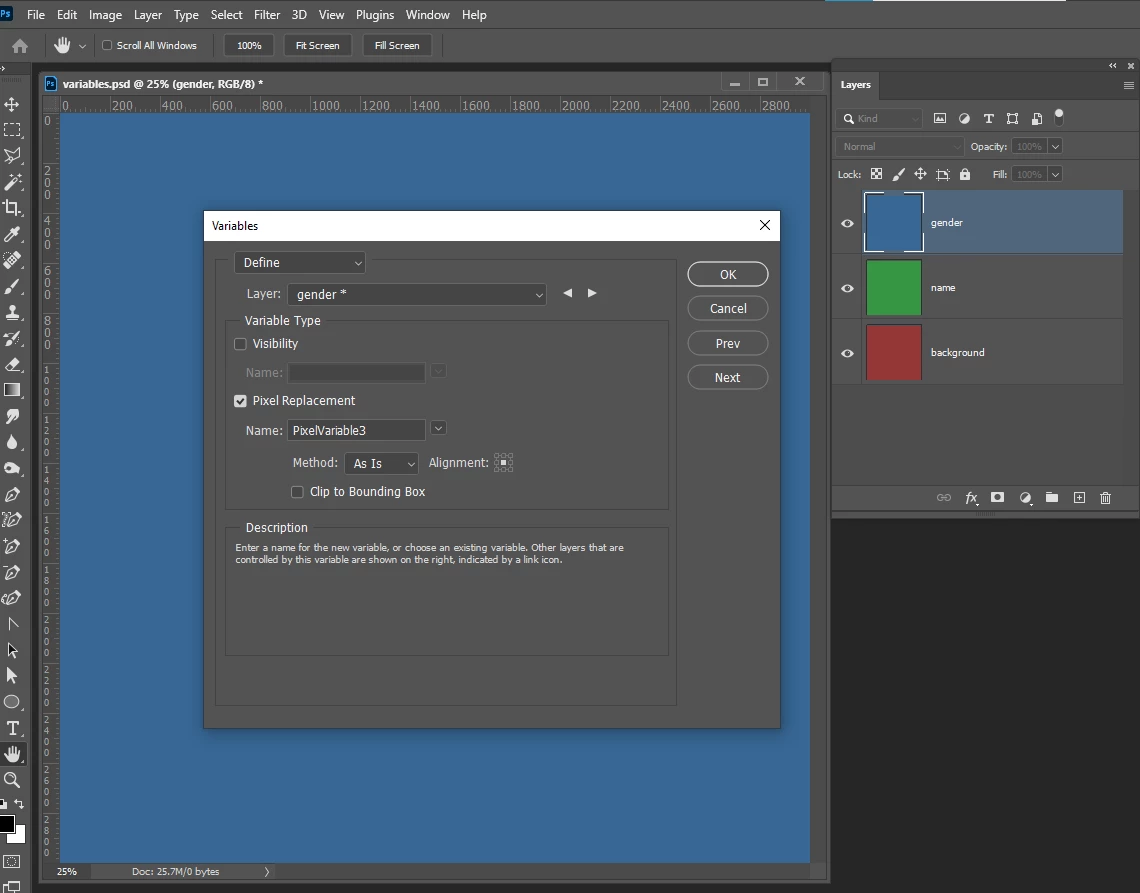
"Could not parse the file contents as a data set. The name 'background' is not a variable in the current document." - when I tried to do variables

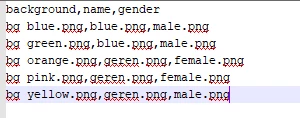
But it is there as you can see in the 4 pictures I attached. And yes, everything is spelled correctly everywhere.


I tried switching to UTF-16 but then it said it doesn't have enough data or something. I also tried every decoding to what but nothing worked...


So can somebody help please?

This topic has been closed for replies.
Correct answer JJMack

Yes. I made an example csv and ps file for that.

(tested, and got the same issue)


To me it look like your CVS file is all wrong.  It has you template's layer names in the header columns  instead of  the variable names and the replacement rows  do not have three  file paths. Seem to be just file name file type no file path and drive.

https://helpx.adobe.com/photoshop/using/creating-data-driven-graphics.html#define_variables 


1 reply

Myra Ferguson
Community Expert
Community Expert
August 25, 2021

It looks like you're trying to use your layer named "background" as a variable name. Give the pixel replacement data a different variable name and set up your spreadsheet with the variable names in the top row. Then put the corresponding values in the rows below the variable names. See the example in the Data-driven Graphics section of my article on CreativePro's site:

Photoshop Automation


Zsolt5E9AAuthor
Participant
August 27, 2021

Thank you but I did the exact same thing.


 Also, I tried to remove the first column and the layer belonging to it and I got the same message with the current first column's name.

Zsolt5E9AAuthor
Participant
August 28, 2021

Can you post a PSD and the CSV to go with that exhibits this problem so we can better troubleshoot? (link to CC files or dropbox)


Yes. I made an example csv and ps file for that.

(tested, and got the same issue)