


Inspiring
August 14, 2019
Answered

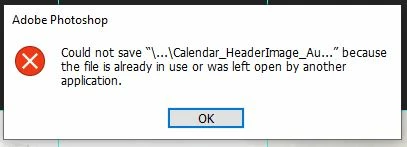
Could not save [ --- ] because the file is already....

  • August 14, 2019
  • 1 reply
  • 831 views

Just got a new PC and setup all my programs. However, ever since I have completed the fresh installs, Photoshop gives me this error when saving an PSD file. If I hit save again, it will work just fine, but it's painful to wait for large files to save when I know this is going to happen the first time. Anyone experience this?

Thanks

Shawn
This topic has been closed for replies.
Correct answer

Hi

You don't mention what version of Photoshop and operating system you have, but if you're on Windows 10 try disabling controlled folder access

https://www.tenforums.com/tutorials/113380-enable-disable-controlled-folder-access-windows-10-a.html

1 reply

Correct answer
August 14, 2019

Hi

You don't mention what version of Photoshop and operating system you have, but if you're on Windows 10 try disabling controlled folder access

https://www.tenforums.com/tutorials/113380-enable-disable-controlled-folder-access-windows-10-a.html

TuuluuwagAuthor
Inspiring
August 14, 2019

Hi Ged - thanks for the quick reply.

I am a brand new Windows 10 Pro platform.

Dell XPS 8930

Processor: Intel Core i9-9900K CPU@3.6GHz

RAM: 64GB

When i did as the link instructed, Inside of the Ransomware Protection, I was unable to disable the Controlled Folder Access (it's greyed out) and there is a line above it in red text stating "Controlled folder access requires turning on Real-Time protection."

August 14, 2019

Ah do you have some other Anti Virus installed, I have Kaspersky Total Security and I don't have the option to change that so the AV could be controlling it, are you working off a domain with network shares by any chance