


Inspiring
May 6, 2019
Answered

CR3 files not opening in either Photoshop or Lightroom

  • May 6, 2019
  • 2 replies
  • 33521 views

Hi everyone,

I have some photos taken with a newly-released canon camera (EOS 200D Mark II) and the .cr3 files that it produces aren’t compatible with the latest versions of Photoshop CC 20.0.4 release or Lightroom Classic 8.2.1 Release (Camera Raw 11.2.1).

I understand that every camera raw file is different among the various camera models and Adobe may not yet support this one from my model but I wondered if anyone has any idea when it will work. Also is there some online file that I can check to see if it is supported or the timeframe in which it will be?

I’m literally stuck in my tracks here as none of the files will be usable.

Would really appreciate any help.
This topic has been closed for replies.
Correct answer Akash Sharma

Yeah I suspected that but just thought I’d try just in case! Thanks for letting me know.


Hi All,

We are happy to announce the release of Camera Raw 11.3.

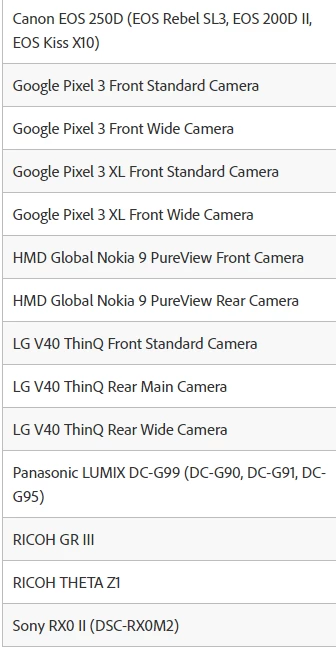
The Canon EOS 200D II raw files should be supported in this update release of Camera raw.

This update includes new features, camera support, and bug fixes to some of the top customer reported issues.

What’s new

To update Camera Raw to 11.3, click "Update" in the Creative Cloud desktop app next to Camera Raw.

More detailed instructions for updating

New camera raw file support added in this release.

Please let us know in case you you're still not able to read raw images from this particular camera in this new version of Camera Raw. Also, we'd love to hear your feedback as it helps us to improve and do more.

Thanks,

Akash

2 replies

c.pfaffenbichler
Community Expert
Community Expert
May 6, 2019

Is the camera listed as supported?

Cameras supported by Camera Raw

JKA@4153Author
Inspiring
May 6, 2019

Thanks for the list. So it seems it supports CR3 but not for my camera model. So I can’t move forward until they support it - is that how it works?

c.pfaffenbichler
Community Expert
Community Expert
May 6, 2019

Camera makers tend to create new RAW formats for new cameras and unless they cooperate extensively with Adobe or they allow shooting DNG Adobe staff may need to reverse-engineer the format and that takes time.

If you prefer processing RAW images with ACR instead of the camera maker’s proprietary software you might want to petition them to allow shooting DNG.

Derek Cross
Community Expert
Community Expert
May 6, 2019

The latest version of Photoshop (at this date) is 20.0.4 – is that what you've got?

JKA@4153Author
Inspiring
May 6, 2019

Thanks for the reply Derek - yes I edited this post above and mentioned that I did have the latest 20.0.4.

Do you know why it’s not working?