Known Participant
November 25, 2022
Answered

Create a bubble below the text based on an existing image by magic wand script?

  • November 25, 2022
  • 3 replies
  • 2813 views

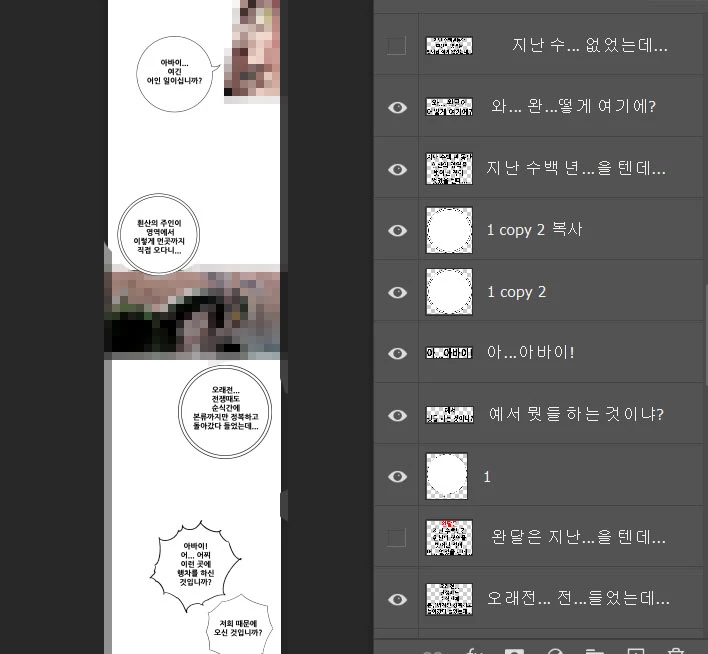
Hello, I work as a comic editor and my job is to put translated text in the middle of the dialogue bubbles. My files sometimes have built-in text layers or not, sometimes they are rasterized layers. To turn off all rasterized text is really annoying, because they usually don't arrange in a certain order, and there are hundreds of layers.

So I usually use magic wand (all layers mode) to select the boxes, then modify the selection and fill them at new layer (I recorded this action so it's alright).

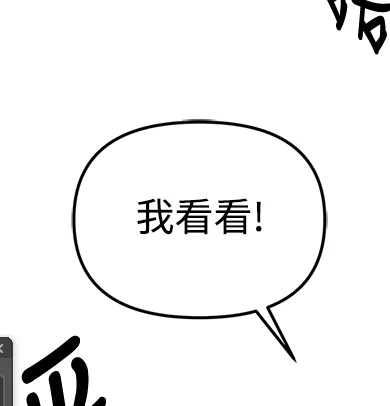
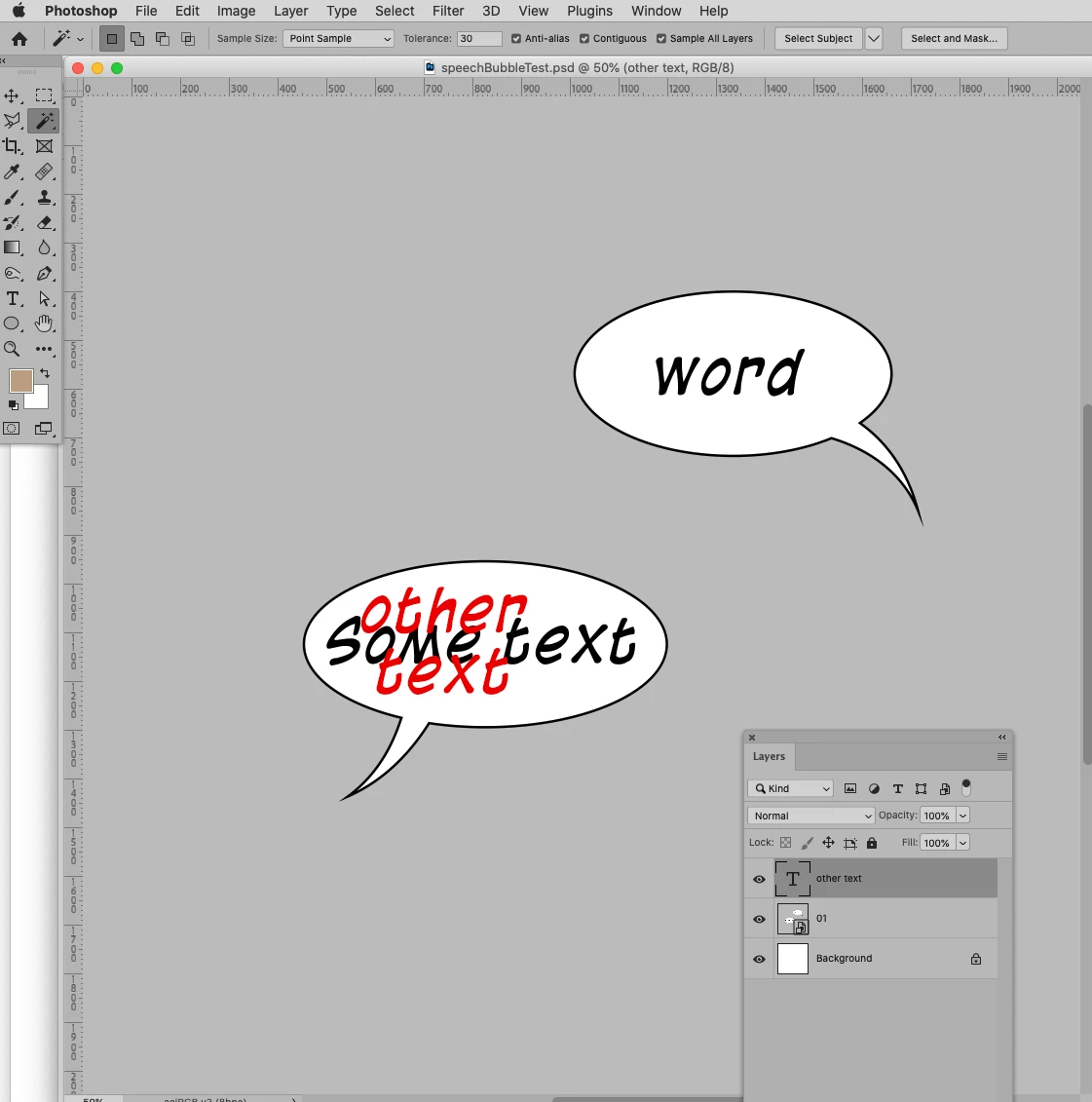
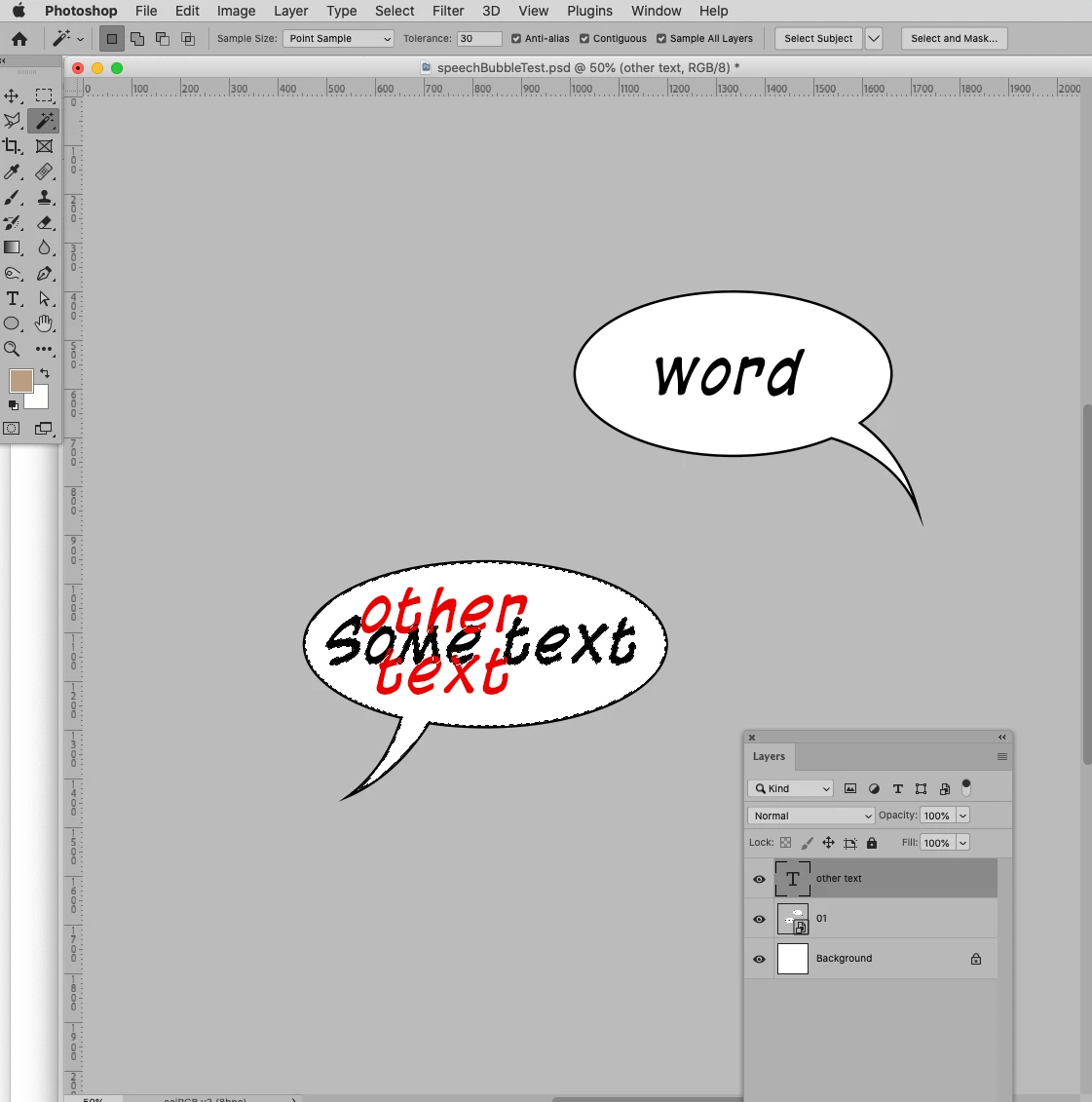
It takes quite a while to select each bubble one by one. Is there a way to automatically get the selection outside a text layer using magic wand script? I could play it after setting the text and use the selection for aligning, too, or to handle broken dialog boxes like this: 

This topic has been closed for replies.
Correct answer c.pfaffenbichler

Please try this. 

// apply magic wand tool at center of active layer’s bounds;
// 2022, use it at your own risk;
if (app.documents.length > 0) {
	var theLayer = activeDocument.activeLayer;
	var theBounds = getBounds();
	theLayer.visible = false;
	var originalRulerUnits = app.preferences.rulerUnits;
	app.preferences.rulerUnits = Units.POINTS;
	useMagicWand2022 ([theBounds[3], theBounds[4]]);
// reset;
	theLayer.visible = true;
	app.preferences.rulerUnits = originalRulerUnits;
};
////////////////////////////////////
////// use magic wand tool //////
function useMagicWand2022 (theCoord) {
	var idnull = charIDToTypeID( "null" );
	var idPxl = charIDToTypeID( "#Pxl" );
// select tool;
		var desc2 = new ActionDescriptor();
			var ref2 = new ActionReference();
			ref2.putClass( stringIDToTypeID( "magicWandTool" ) );
		desc2.putReference( idnull, ref2 );
		desc2.putBoolean( stringIDToTypeID( "dontRecord" ), true );
		desc2.putBoolean( stringIDToTypeID( "forceNotify" ), true );
	executeAction( charIDToTypeID( "slct" ), desc2, DialogModes.NO );
// apply tool;
		var desc2 = new ActionDescriptor();
			var ref2 = new ActionReference();
			ref2.putProperty( charIDToTypeID( "Chnl" ), charIDToTypeID( "fsel" ) );
		desc2.putReference( idnull, ref2 );
			var desc3 = new ActionDescriptor();
			desc3.putUnitDouble( charIDToTypeID( "Hrzn" ), idPxl, theCoord[0] );
			desc3.putUnitDouble( charIDToTypeID( "Vrtc" ), idPxl, theCoord[1] );
		desc2.putObject( charIDToTypeID( "T   " ), charIDToTypeID( "Pnt " ), desc3 );
		desc2.putInteger( charIDToTypeID( "Tlrn" ), 30 );
		desc2.putBoolean( charIDToTypeID( "AntA" ), true );
		desc2.putBoolean( stringIDToTypeID("merged"), true);
	executeAction( charIDToTypeID( "setd" ), desc2, DialogModes.NO );
	};
////// bounds of active layer //////
function getBounds (theIndex) {
    var ref = new ActionReference();
    ref.putProperty (stringIDToTypeID ("property"), stringIDToTypeID ("bounds"));
/*ref.putIndex(stringIDToTypeID("layer"), theIndex);*/
	ref.putEnumerated( charIDToTypeID("Lyr "), charIDToTypeID("Ordn"), charIDToTypeID("Trgt") );
	var layerDesc = executeActionGet(ref);
    var theBounds = layerDesc.getObjectValue(stringIDToTypeID("bounds"));
    var theseBounds = [theBounds.getUnitDoubleValue(stringIDToTypeID("left")), theBounds.getUnitDoubleValue(stringIDToTypeID("top")), theBounds.getUnitDoubleValue(stringIDToTypeID("right")), theBounds.getUnitDoubleValue(stringIDToTypeID("bottom"))];
    var theW = theBounds.getUnitDoubleValue(stringIDToTypeID("right")) - theBounds.getUnitDoubleValue(stringIDToTypeID("left"));
    var theH = theBounds.getUnitDoubleValue(stringIDToTypeID("bottom")) - theBounds.getUnitDoubleValue(stringIDToTypeID("top"));
    var horCenter = theseBounds[0] + theW / 2;
    var verCenter = theseBounds[1] + theH / 2;
    return ([theseBounds, theW, theH, horCenter, verCenter])
};
 

3 replies

c.pfaffenbichler
Community Expert
c.pfaffenbichlerCommunity ExpertCorrect answer
Community Expert
December 17, 2022

Please try this. 

// apply magic wand tool at center of active layer’s bounds;
// 2022, use it at your own risk;
if (app.documents.length > 0) {
	var theLayer = activeDocument.activeLayer;
	var theBounds = getBounds();
	theLayer.visible = false;
	var originalRulerUnits = app.preferences.rulerUnits;
	app.preferences.rulerUnits = Units.POINTS;
	useMagicWand2022 ([theBounds[3], theBounds[4]]);
// reset;
	theLayer.visible = true;
	app.preferences.rulerUnits = originalRulerUnits;
};
////////////////////////////////////
////// use magic wand tool //////
function useMagicWand2022 (theCoord) {
	var idnull = charIDToTypeID( "null" );
	var idPxl = charIDToTypeID( "#Pxl" );
// select tool;
		var desc2 = new ActionDescriptor();
			var ref2 = new ActionReference();
			ref2.putClass( stringIDToTypeID( "magicWandTool" ) );
		desc2.putReference( idnull, ref2 );
		desc2.putBoolean( stringIDToTypeID( "dontRecord" ), true );
		desc2.putBoolean( stringIDToTypeID( "forceNotify" ), true );
	executeAction( charIDToTypeID( "slct" ), desc2, DialogModes.NO );
// apply tool;
		var desc2 = new ActionDescriptor();
			var ref2 = new ActionReference();
			ref2.putProperty( charIDToTypeID( "Chnl" ), charIDToTypeID( "fsel" ) );
		desc2.putReference( idnull, ref2 );
			var desc3 = new ActionDescriptor();
			desc3.putUnitDouble( charIDToTypeID( "Hrzn" ), idPxl, theCoord[0] );
			desc3.putUnitDouble( charIDToTypeID( "Vrtc" ), idPxl, theCoord[1] );
		desc2.putObject( charIDToTypeID( "T   " ), charIDToTypeID( "Pnt " ), desc3 );
		desc2.putInteger( charIDToTypeID( "Tlrn" ), 30 );
		desc2.putBoolean( charIDToTypeID( "AntA" ), true );
		desc2.putBoolean( stringIDToTypeID("merged"), true);
	executeAction( charIDToTypeID( "setd" ), desc2, DialogModes.NO );
	};
////// bounds of active layer //////
function getBounds (theIndex) {
    var ref = new ActionReference();
    ref.putProperty (stringIDToTypeID ("property"), stringIDToTypeID ("bounds"));
/*ref.putIndex(stringIDToTypeID("layer"), theIndex);*/
	ref.putEnumerated( charIDToTypeID("Lyr "), charIDToTypeID("Ordn"), charIDToTypeID("Trgt") );
	var layerDesc = executeActionGet(ref);
    var theBounds = layerDesc.getObjectValue(stringIDToTypeID("bounds"));
    var theseBounds = [theBounds.getUnitDoubleValue(stringIDToTypeID("left")), theBounds.getUnitDoubleValue(stringIDToTypeID("top")), theBounds.getUnitDoubleValue(stringIDToTypeID("right")), theBounds.getUnitDoubleValue(stringIDToTypeID("bottom"))];
    var theW = theBounds.getUnitDoubleValue(stringIDToTypeID("right")) - theBounds.getUnitDoubleValue(stringIDToTypeID("left"));
    var theH = theBounds.getUnitDoubleValue(stringIDToTypeID("bottom")) - theBounds.getUnitDoubleValue(stringIDToTypeID("top"));
    var horCenter = theseBounds[0] + theW / 2;
    var verCenter = theseBounds[1] + theH / 2;
    return ([theseBounds, theW, theH, horCenter, verCenter])
};

 

Known Participant
December 18, 2022

Wow, this worked to me! Thank you very much!

c.pfaffenbichler
Community Expert
Community Expert
December 19, 2022

You could try including the operations the Actions perform in the Sript, too.

It might be a little faster, but naturally it is not a necessity when the Actions themselves work satisfactorily. 

c.pfaffenbichler
Community Expert
Community Expert
November 28, 2022

I fail to see Type Layers in your screenshot, could you elaborate on the actual process you have in mind? 

Known Participant
December 2, 2022

Thank you and sorry for my late reply!

There is no type layer in my screenshot, they are rasterized layer which arranged in no order. Each comic page has hundreds of different layers like that, most are rasterized (including speech ones) so it's hard for me to find and hide all of them. I usually fill the speech bubbles on a new layer - using the magic wand to select the bubble's color (outside the text, within the bubble) and some action to make sure to fill the whole bubble. But I would sometimes use THAT selection for aligning the new text, too. So all I need is just a script, or an action to select the area within the bubbles below the selected text layer, so that I can skip the area selection step with magic wand.

Maybe this is a difficult thing, but I think this request is not too much. Thank you very much if you can help!

c.pfaffenbichler
Community Expert
Community Expert
December 3, 2022

I don’t fully understand the process you describe, please post meaningful screenshots to illustrate the steps. 

Myra Ferguson
Community Expert
Community Expert
November 28, 2022

I don't have a script for you that creates a bubble after you've selected your text layers, but here's a suggestion for the text selection.


In Photoshop, select the text that you want in bubbles and assign their layers a color so that you can display only them by doing the following:

  1. In the Layers panel, click the T to the right of the dropdown menu that by default shows Kind to filter the layers so that only text layers are shown.
  2. Select all the text layers in the Layers panel.
  3. Right-click and select a color name to label the text layers.
  4. Toggle off the Text filter to see the rest of the layers.
  5. Use the Move tool with Auto-Select selected and the dropdown menu set to Layer in the Options bar to manually select any rasterized text layers.
  6. Right-click again and select the same color name that you used in step 3.


Then you can filter the layers by the color by doing the following:

  1. At the top of the Layers panel, change the dropdown menu from Kind to Color.
  2. In the dropdown menu that appears to the right of Color, select the color that you assigned to the text layers.


Known Participant
December 2, 2022

Thank you so much, but I think that's not what I'm aiming for. My goal is to remove the existing text in the speech bubble by adding a layer of color above it, not to hide them one by one (so there should be the part where I talk about the action that selects the area around the text). I could totally add a thick stroke to the new text layer, but that would ruin the original bubble. Anyway, thank you very much for your comment!