


Shine BR
Known Participant
November 11, 2015
Answered

Create folder and move files by reading csv

  • November 11, 2015
  • 3 replies
  • 2753 views

Hello Guys,

Is that possible create a script to read csv and create folders and move the files into the folder.

My csv will look like
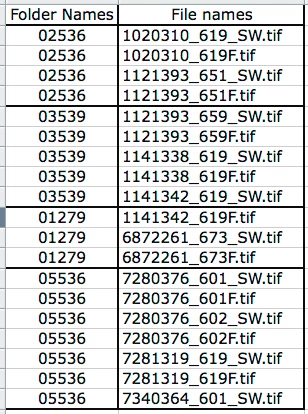
It has folder names and File names, I have kept my files (Mention in "File names" column) in desktop. When I run the script it need to read the csv and create folder(as per "Folder Names") and the correct file need to move into particular folder. Hope I made the requirements clear.

So from the above csv we need 4 folders and the respective files need to move into their folders. Looking for help!!!

This topic has been closed for replies.
Correct answer SuperMerlin

Thing may have changed as I tested it with CS6.

Please try this then.

#target photoshop;

main();

function main(){

var csv = File.openDialog("Please select CSV file.","CSV File:*.csv");

if(csv == null) return;

var sourceFolder = Folder.selectDialog( "Please select source folder");

if(sourceFolder == null) return;

var data=[];

csv.open('r');

while(!csv.eof){  

var InputLine = csv.readln();

if(InputLine.length > 3) data.push(InputLine);

}

csv.close();

for(var f in data){

var dataLine = data.split(',');

var folderName = dataLine[0].toString().replace(/^\s+|\s+$/g,'');

var fileName = dataLine[1].toString().replace(/^\s+|\s+$/g,'');

var file = File(sourceFolder + "/" + fileName);

if(!file.exists) continue;

var outputFolder = Folder(sourceFolder + "/" + folderName);

if(!outputFolder.exists) outputFolder.create();

if(file.copy(outputFolder + "/" + fileName)) file.remove();

    }

alert("All Completed");

};

3 replies

SuperMerlin
Inspiring
November 13, 2015

Try this

#target photoshop;

main();

function main(){

var csv = File.openDialog("Please select CSV file.","CSV File:*.csv");

if(csv == null) return;

var sourceFolder = Folder.selectDialog( "Please select source folder");

if(sourceFolder == null) return;

var data=[];

csv.open('r');

while(!csv.eof){  

var InputLine = csv.readln();

if(InputLine.length > 3) data.push(InputLine);

}

csv.close();

for(var f in data){

var dataLine = data.split(',');

var folderName = dataLine[0].toString().replace(/^\s+|\s+$/g,'');

var fileName = dataLine[1].toString().replace(/^\s+|\s+$/g,'');

var file = File(sourceFolder + "/" + fileName);

if(!file.exists) continue;

var outputFolder = Folder(sourceFolder + "/" + folderName);

if(!outputFolder.exists) outputFolder.create();

file.rename(File(outputFolder + "/" + fileName));

    }

alert("All Completed");

};

Shine BR
Shine BRAuthor
Known Participant
November 13, 2015

Merlin,

The jsx creating folder as expected, but not moving the files into the folders.

SuperMerlin
SuperMerlinCorrect answer
Inspiring
November 13, 2015

Thing may have changed as I tested it with CS6.

Please try this then.

#target photoshop;

main();

function main(){

var csv = File.openDialog("Please select CSV file.","CSV File:*.csv");

if(csv == null) return;

var sourceFolder = Folder.selectDialog( "Please select source folder");

if(sourceFolder == null) return;

var data=[];

csv.open('r');

while(!csv.eof){  

var InputLine = csv.readln();

if(InputLine.length > 3) data.push(InputLine);

}

csv.close();

for(var f in data){

var dataLine = data.split(',');

var folderName = dataLine[0].toString().replace(/^\s+|\s+$/g,'');

var fileName = dataLine[1].toString().replace(/^\s+|\s+$/g,'');

var file = File(sourceFolder + "/" + fileName);

if(!file.exists) continue;

var outputFolder = Folder(sourceFolder + "/" + folderName);

if(!outputFolder.exists) outputFolder.create();

if(file.copy(outputFolder + "/" + fileName)) file.remove();

    }

alert("All Completed");

};

bala281972
Known Participant
November 13, 2015

May be you can use applescript to read CSV and use the move command to move files from present folder to folder mentioned in CSV. You may need to add 'fixed path of present and destination drives' before giving move command. If you are not on MAC only option is javascript (but there's no move command) as suggested by JJ

SuperMerlin
Inspiring
November 13, 2015

There is a move command, but you need to use Bridge.

An example:-

#target bridge

var outputFolder = Folder("/c/output/folder");

if(!outputFolder.exists) outputFolder.create();

app.document.thumbnail = Folder("/c/source/folder");

app.document.deselectAll();

//Get a list of all tif,jpg and cr2 files

var filestomove = app.document.getSelection("tif,jpg,cr2");

//move the files

for(var z in filestomove){

new Thumbnail(filestomove).moveTo(outputFolder);

}

Also File.rename(); works well as a move command.

Shine BR
Shine BRAuthor
Known Participant
November 13, 2015

Merlin,

Thanks for looking int this.

I have a jsx which can move files from 1 folder to another without using bridge, but here my requirement is bit different which need to read the csv and create folders and move the respective files into respective folders.

JJMack
Community Expert
November 11, 2015

Would not even need Photoshop you can just use javascript.  That would not require any Photoshop function.  Also Adobe Photoshop uses it own version of javascript.  I do not see file.move() listed in Adobe object viewer so it may not be supported by Adobe scripting.  I have never seen a Photoshop that used file.move(). So you may need to use File.Copy() and File.remove() in a Photoshop Script that may change the file creation date.

FileSystemObject.CreateFolder() : FileSystemObject « MS JScript « JavaScript Tutorial

File.Move() : File « MS JScript « JavaScript Tutorial

JJMack
Shine BR
Shine BRAuthor
Known Participant
November 13, 2015

Hello JJ,


Thank you for you time.Yes it can be worked without PS using jsx, but I have also included some task in PS. So I have planned to link this requested script along with my work so once the work is completed it will read the csv and the files get moved into respective folder.