


Known Participant
February 6, 2024
Answered

Create multiple artboards from a CSV File

  • February 6, 2024
  • 3 replies
  • 7874 views

Hello! 

I often have to create multiple artboards in photoshop, and I was asking myself if there wasn't a script or plugin allowing to create multiple artboards from a .CSV or excel file.

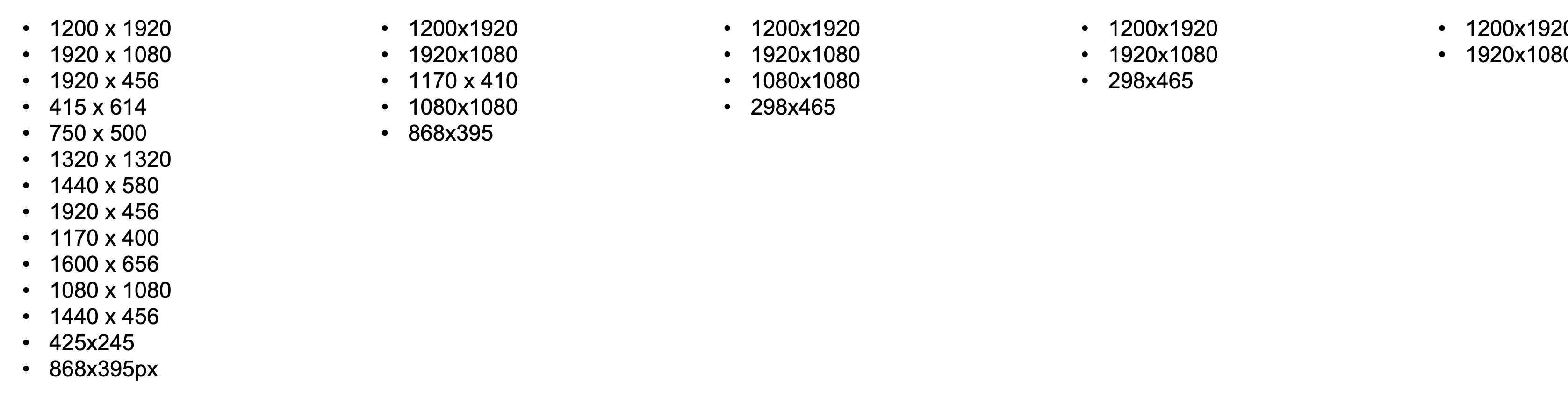
I am wasting so much time at creating art board at the right size, and naming them after their dimensions:
 

I am aware something like this is possible in illustrator, from what I have seen in another thread:
https://community.adobe.com/t5/illustrator-discussions/question-creating-artboards-at-different-sizes-from-csv-file/m-p/13335388

The same would exist for photoshop ?


Thank you for your upcoming answers
Correct answer Stephen Marsh

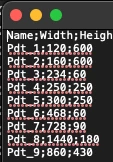
Here it is! Maybe it's the comma/semi-colon, that's causing an issue


CSV stands for Comma Separated Value, not Semicolon Separated Value! :]


I understand that in different countries different separators are used and that separators are not universal, however, the original script was only built to accept commas or colons.


If using semicolons suits your workflow better, then the script can be altered...


From:


var data = curRow.split(/,|:/);


To:


var data = curRow.split(/,|:|;/);


NOTE: The actual names/width/height content must not contain such characters!

3 replies

New Participant
May 30, 2025

Hi Ernesto! 
You could also try the Multiple Artboard Generator for Adobe Illustrator script I created:
https://iamharm.gumroad.com/l/MultipleArtboardsFromCSV

This script generates multiple artboards in Adobe Illustrator for you from a csv file. You specify the names for the artboards and their dimensions in the csv file and the script will do the rest. When you run the script there is a dialogue box that will allow you to specify the units (pt, px, mm, in) as well as the spacing between the artboards.

I also made a video showing how it works: 
Multiple Artboard Generator for Adobe Illustrator

Known Participant
February 7, 2024

THANK YOU VERY MUCH! 

It is greatly appreciated! The artboard renamer script, is fire too!
I just have an issue with the artboard from csv script, when launching it, nothing seems to happen!
Here is a screen record of me doing it:

Thank you again you are the greatest!

Stephen Marsh
Community Expert
February 7, 2024

What happens with no doc open?


Looks like one needs an open doc! Just have a layer, no existing artboard.


Flattened Background layers are converted to a fill layer (other layer kinds appear to remain as they were), only the first artboard receives a layer, and the others are empty.


The next question is, what else, if anything needs to be automated after the script is run? I.E. Remove or replace the single layer? Add layers to the other artboards?

Known Participant
February 6, 2024

Thank you for your answer, I might have been wrong when I spoke about scripts... I was thinking about "actions", ahhaha…
But I will try to learn about scripts… In another hand, where can I link the .csv file to be read by the script ?
(Sorry if I am not clear, english is not my mothertongue)
Thank you again for your time and answer!

Stephen Marsh
Community Expert
February 6, 2024

@Ernesto TK 


Actions can be used to automate artboard setup, but not from CSV file.


More on saving and running scripts here:


https://prepression.blogspot.com/2017/11/downloading-and-installing-adobe-scripts.html