


misterpeepers
New Participant
November 10, 2018
Question

Creating a 300x250 image with sharp text

  • November 10, 2018
  • 3 replies
  • 4146 views

Hello,

I'm working on a project to create an 300x250 image that highlights some short quotes about a company. It's going to appear as a 'house ad' on its website, hence 300x250. Using the latest version of Photoshop I created the image at 300x250 at 300dpi. Besides being super small on a 4k monitor and scaling up looking blurry,  the text in the final PNG output is also blurry and that's what I'm having trouble with.

I've seen plenty of 300x250 ads (images) with text that appears to be smaller than this with text that looks just fine. Unfortunately, it cannot be scaled down, i.e., creating the image at 600x500. Scaling it down also makes the image blurry and it has to be an image (PNG).

Question:

How can I make this (small of an) image output with sharp/clear text? Is it even possible?
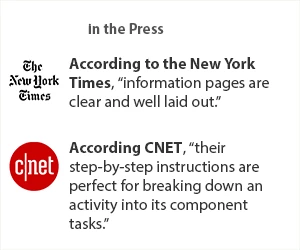
Thx in advance!

    3 replies

    Stephen Marsh
    Adobe Expert
    November 11, 2018

    Here is a 300x250px PNG with a sample off all the text rendering options:

    And here is a screenshot of the text tool rendering options:

    misterpeepers
    New Participant
    November 11, 2018

    Is that in Photoshop?

    I’m just not sure how to make the output work. If I need to use Illustrator I will, again, looking for directional help. Thx!

    lambiloon
    Adobe Expert
    November 11, 2018

    Hi this is Character Box which you can use for tying there all will be good for you in window menu it is present to choose....thanks.

    Ali Sajjad / Graphic Design Trainer / Freelancer / Adobe Certified Professional
    D Fosse
    Adobe Expert
    November 10, 2018

    misterpeepers  wrote

    I've seen plenty of 300x250 ads (images) with text that appears to be smaller than this with text that looks just fine.

    Then it probably has live text overlaid the image.

    Your 4K screen complicates this quite a lot. Your web browser will scale up images when it detects a 4K screen, so that it appears the same size as on a standard screen.

    Live text will still be rendered at native screen resolution, whereas an image is displayed at document resolution, which in this particular case is half that.

    IOW - this is normally not an issue, but it becomes an issue because of the 4K scaling workaround.

    misterpeepers
    New Participant
    November 11, 2018

    Ok. Thx.  So.....how should I go about creating this image so that it looks like I’m intending?

    Muqqarib Hassan
    Inspiring
    November 10, 2018

    Hi, According to my point of view.

    Create this small size text in Adobe Illustrator. It will give you sharp and clear image.

    Thanks.

    misterpeepers
    New Participant
    November 10, 2018

    How would I get it into Photoshop then? Export as SVG?