


AG_Ps_100
Inspiring
June 22, 2018
Question

Creating a tinyPNG script for an already opened file

  • June 22, 2018
  • 1 reply
  • 3201 views

Hello everyone,

I wanted to compress files and came across tinyPNG that compresses PNG and JPG files.

I want to use it on an already opened file in Photoshop. i also want to use script.

I found on their website they shared a script to use tinyPNG on opened files:
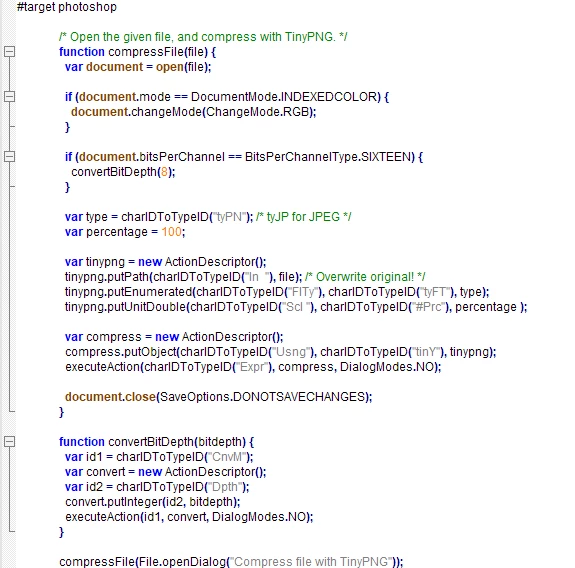
I want to combine it with a script I have to save JPG quality 5.
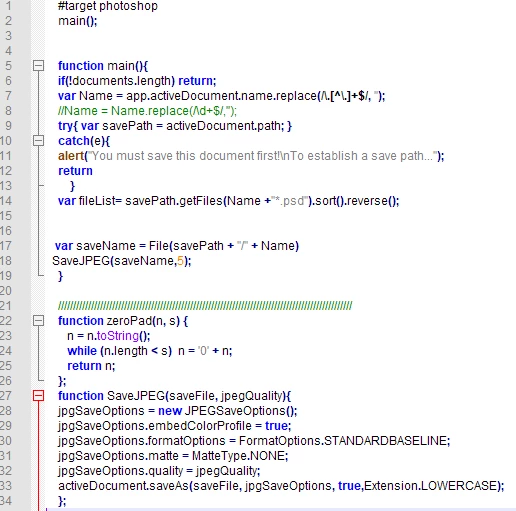
i will ask their support as well, if they shared their script maybe they'll know.

thanks in advance for any help.

This topic has been closed for replies.

1 reply

Geppetto Luis
Brainiac
June 22, 2018

This does not work on open files

compresses the files contained in a folder

but to do this you have to buy the tinypng plugin first.

however, it's up to you what you really need

What should the script do?

What are the steps you want to do?

AG_Ps_100
AG_Ps_100Author
Inspiring
June 23, 2018

1. i have the plugin already in my Photoshop.

2. I have a NEF file, i save it as PSD + JPG (Quality = 5) + another JPG (Quality = 5) after hiding the watermark

3. I want the 2 JPG files i saved to be compressed by tinyPNG, i think that i don't even need a JPG file in the first place to compress and i can save a JPG from a PSD file. that is written on their website:

so to sum up i need PSD + 2 compressed/saved JPG by tinyPNG

here is the script i'm using for step 2 i mentioned:

JJMack
Community Expert
June 23, 2018

What are you actually trying to do. NEF  files are RAW Nikon camera  files and need to be converted into a RGB image wit a converter like ACR which can open the rgb image in Photoshop as a Smart Object layer or a Background layer.  These can be saved into image files like PSD, Jpeg, PNG etc.   IMO you should download and install Image Processor Pro and use that to save the files you want saved.  I do not understand the need for a small PNG file there is no transparency in a Converted NEF image.

JJMack