


Creating a Vector Mask using Pen
Hi. I am relatively new to Adobe Photoshop and therefore I need your help. I am making a vector art of my friend's portrait and I am doing that by using the pen tool. I use the pen tool to create a path, then I go to Layers > Vector Mask > Current Path. When I do that, my Path is removed and everything else that is outside the path stays. So when I try to fill in the path, instead of whatever was in the path being filled, whatever was not in the path gets filled. I think I am forgetting to do something as I did a vector mask for other parts of the image and it was working fine.
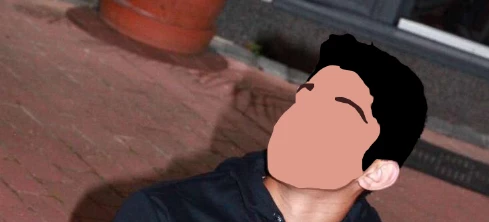
I create vector masks for his hair and his face and they work fine.
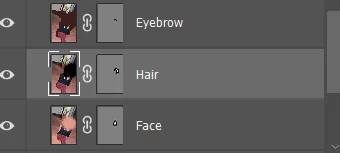
This is how the laner panel looks for those layers.
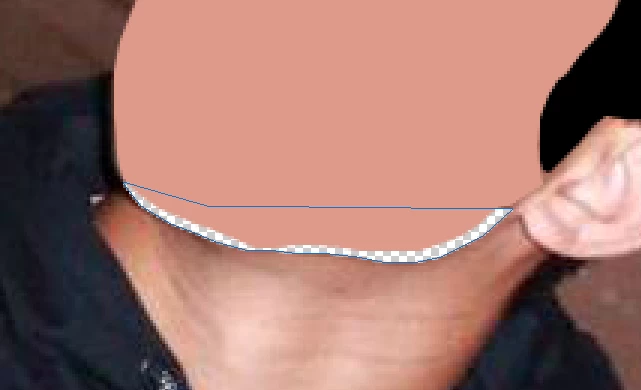
I made the path for his jawline using the pen tool, but now when I click on Current Path for a vector mask, it removes the jawline instead of removing everything else in the background. Therefore, when I go to fill it fills the background instead of the jawline. I can't seem to remember if there is a step I am missing.
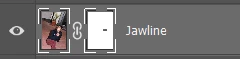
Also, this is how the layer panel looks for the jawline layer. You can see this is different as the vector mask for jawline looks different when compared to the vector masks for other layers above.
I have also looked at some other posts where they say the solution is in Path Operations and I need to change it so that it is on "Exclude Overlapping Shapes". I have done that and it still doesn't work.
Sorry if I am not clear with certain terminology as I am new. Please Help. Thanks.
 AdChoices