


D R Smith
Known Participant
October 4, 2019
Answered

Creating Adjustment Layer does not create layer mask.

  • October 4, 2019
  • 3 replies
  • 1696 views

I am trying to get a grasp on adjustment layers and layer masks.  I have been watching numerous tutuorials and one thing I've noticed is they all click on the adjustment layer they want to use, example: Exposure and up pops a settings box and on the right under the layers panel there is a box with a circle in it.  Fine so far.  In ALL the tutorials I have watched a blank white layer mask appears at the same time.  The instructors then go about painting or whatever using that layer mask.  When I do it, the white layer mask does not appear.   In order to get a layer mask I have to click on the Add Layer Mask at the bottom of the panel.  

Do I have something set wrong or...?  I've tried Googling it and YouTubing it but can't find an answer.  I'm using Photoshop CC 2019 with the latest update.  Thanks much in advance.
This topic has been closed for replies.
Correct answer Chuck Uebele

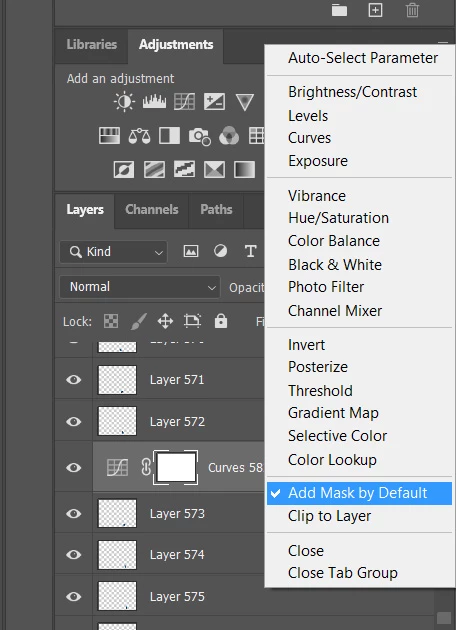
You might have creating masks for adjustment layers turned off.

3 replies

Rob_Cullen
Community Expert
Community Expert
October 4, 2019

Thanks Chuck, I am learning also!

So, select the [Adjustments] tab, and click the 'four bars' icon for the menu.

Great.

Regards. My System: Windows-11, Lightroom-Classic 15.0, Photoshop 27.0, ACR 18.0, Lightroom 9.0, Lr-iOS 10.4.0, Bridge 16.0 .
Chuck Uebele
Community Expert
Chuck UebeleCommunity ExpertCorrect answer
Community Expert
October 4, 2019

You might have creating masks for adjustment layers turned off.

D R Smith
D R SmithAuthor
Known Participant
October 4, 2019
That did it. I didn't have that selected. Thank you very much!
Rob_Cullen
Community Expert
Community Expert
October 4, 2019

Disclaimer- I am NOT a Ps expert!

Your adjustment layer looks strange! It shows an icon that is the icon used to 'create' an adjustment layer.

When I add an 'Exposure' adjustment layer I see this- The +/- icon:

So I presume you are at the 20.0.6 release of Ps (the "Latest").

My only suggestion is to reset the Preferences- Open Preferences and click the button on the General page-

Regards. My System: Windows-11, Lightroom-Classic 15.0, Photoshop 27.0, ACR 18.0, Lightroom 9.0, Lr-iOS 10.4.0, Bridge 16.0 .