



Hidde.G
Participating Frequently
September 23, 2020
Question

Creating template for a round physical object

  • September 23, 2020
  • 5 replies
  • 1429 views

Dear Reader,


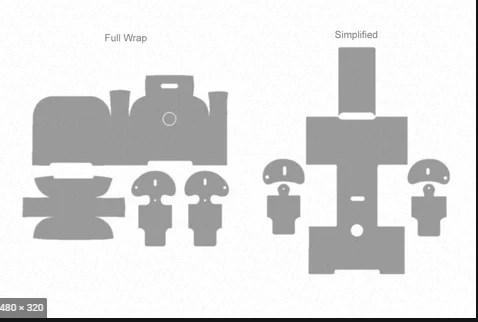
I have an issue regarding the creation of a template for my wirelss earbuds (huawei freebuds 3). It has a round shape and so i was wondering: "How can you create a template that fits perfectly around the object? Then my second question is: "How do you allign (for example) different shapes on the template correctly while having a weird kind of shape (see picture as an exampl)"? 


Example of template for airpods 2
 

This topic has been closed for replies.

5 replies

Ussnorway7605025
Braniac
September 25, 2020

i would start with the default template which comes in Photoshop

why = because the UV map is better than anything you will be able to make on your own

then I would use a 3rd party software called Wrap 3D to 'wrap' it around your shape


davescm
Braniac
September 25, 2020

"...the UV map is better than anything you will be able to make on your own"


I disagree on that point Graham. Photoshop offers no control over the mapping or stretching - instead you have to stretch the UV texture which can be a real pain. Many 3D apps, including Blender, give much more control and will result in a better unwrap.


Dave

Ussnorway7605025
Braniac
September 26, 2020

yes thats why I would use 3D wrap to take back control of my map i.e, if you need part of your map to be a bit to the left \ right or just different then its the best software I've found so far but the Photoshop templates are still a good starting point for this shape


don't get me wrong, Blender is good software too and people that want to learn 3D should start there if only because its free but it does suffer from the same basic problem as Photoshop in that its a big investment in learning and that puts a lot of new comers off it

davescm
Braniac
September 23, 2020

The problem you are trying to resolve is one that is faced daily by those using 3D modelling applications , or even those creating sewing patterns.

The trick is adding seams (i.e. cuts) , along appropriate lines, so that the surface of a 3D object unwraps into a flat 2D plane.


In 3D modelling applications that is known as UV unwrapping and the software provides tools to add those seams and control the unwrapping process to minimise stretching of the surface. In the physical world it can be done by building up a real surface then cutting it.

Photoshop, being primarily a 2D application with some limited 3D functions, does not provide tools to control such 3D unwrapping.


Dave

Hidde.G
Hidde.GAuthor
Participating Frequently
September 24, 2020

Dave thank you for your reply!,


You describe that photoshop is not the right tool for this question. Also you say that doing it in a physical world might be a solution. I've send a picture in the reply where you can see the round shape of the case. How would you see this happening in the physical world with this round shape (of the freebuds 3). 

(ps: I understand if you dont have the time or will to answer this question extensive).


Thanks in regard!

davescm
Braniac
September 24, 2020

Hi

If you mean the black shape, there are many way to unwrap the surface depending on where on the object you are prepared to accept some joins as well as stretch or distortion and how much of each you can accept.

Here are just a couple of the many ways (shown in Blender 3D). The unwrapped surface is on the left, the object on the right showing the seams in red). Each is a different compromise, achieved by placing the seams differently.


Dave


Hidde.G
Hidde.GAuthor
Participating Frequently
September 23, 2020

Thank you both for your quick reply!


Sorry if my question is not clear. It's hard to explain. As shown on the picture in the last post I am trying to make a template like that. The example shows the airpods 2 template what results in the following: All the lines fit together and make a total wrap. What I want to do, is create this template but I dont know how to measure everything, etc.  

JJMack
Braniac
September 23, 2020

That a third thing. Its a Picture if a Hand  applying a skin onto a 3D object,  Its partly on the object and partly off the 3d object.  The Skin is a 3d object itself        . Nothing you showed is a template the fist thing you showed a  pattern for the skin flattened.   Filled you filled it with a pattern  how would the seams meet.  There is no model for the 3D object no UV for the surface texture

JJMack
Hidde.G
Hidde.GAuthor
Participating Frequently
September 23, 2020

Sorry but I don't understand what you are saying? 

JJMack
Braniac
September 23, 2020

It also not clear if you mean 2D flat  shapes like you show or texture for a 3D model of your earbuds. Photoshop is a pixels editor not a 3D application. If your mean for 3D earbuds model you should look for a 3D application perhapses Adobe Dimension 

JJMack
Bojan Živković11378569
Braniac
September 23, 2020

How can you create a template that fits perfectly around the object"

This is not clear, what you mean by fits around object? Template does not fit, template is file with usually smart object layers which needs to be replaced with content. Can you please explain with different wording?


To align things you can use Smart Guides for example, as helpers. To activate smart guides go to View > Show > Smart Guides.