


Known Participant
October 17, 2018
Answered

Crop Tool Issue With CC2019 - Possible Bug?

  • October 17, 2018
  • 14 replies
  • 14977 views

Just noticed something odd with the crop tool in CC2019. This only happens in Classic Crop mode.

When you want to do a custom crop with W x H x resolution selected with the size and resolution boxes left blank, the crop remains in the same aspect ratio if you try to lengthen/shorten one side of the crop.

Has anyone had the same issue - and how do you resolve this?
    This topic has been closed for replies.
    Correct answer Akash Sharma

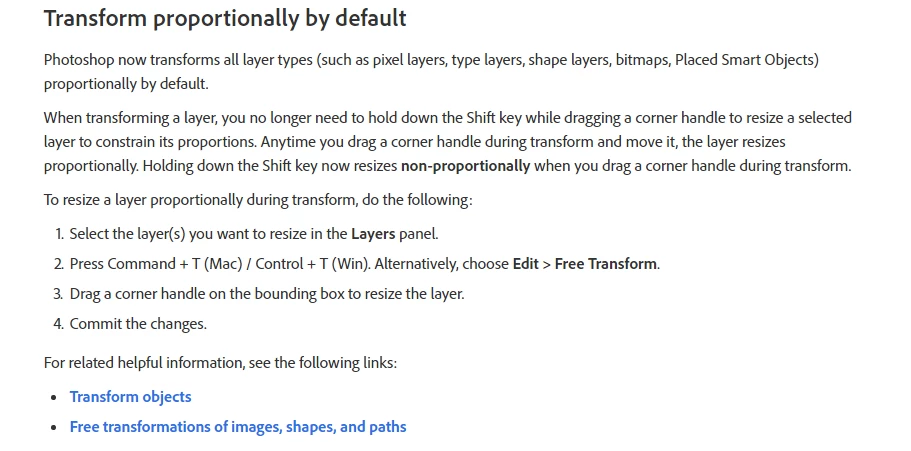
    Thanks for sharing the video. As davescm has mentioned, I believe that this is related to the new transform behavior change in the 20.0 Photoshop update.

    See the below screengrab:

    Source New and enhanced features | Latest release of Photoshop CC

    ~Akash

    14 replies

    Participating Frequently
    October 17, 2018

    I have the same problem.

    stefan113
    New Participant
    October 17, 2018

    I have exactly the same issue and it's very frustrating. It must be a bug!
    Holding the SHIFT key solves the problem in some way, but its still a lot more complicated than in the earlier version.

    C-Marc
    New Participant
    October 17, 2018

    I have found the same problem.

    Holding the SHIFT key makes it work like it is supposed to.

    Akash Sharma
    Brainiac
    October 17, 2018

    Hi Contemporary_Dave,

    Sorry that the Crop tool in Photoshop CC 20.0 version is now working as expected.

    If I am following you correctly, with the crop tool in use if I leave the resolution field left empty I am able to crop the image as expected.

    Would you like to share a few screenshots of what's happening at your end?

    Thanks,

    Akash

    Known Participant
    October 17, 2018

    Thanks for getting back to me. See video here: PS Crop error - YouTube

    PECourtejoie
    Community Expert
    October 18, 2018

    Thanks for sharing the video. As davescm has mentioned, I believe that this is related to the new transform behavior change in the 20.0 Photoshop update.

    See the below screengrab:

    Source New and enhanced features | Latest release of Photoshop CC

    ~Akash


    Akash, I seriously hope that you report the number of threads where this new behavior causes issues, is totally inconsistent within Photoshop itself, as Dave demonstrated, and also within the CC ecosystem.