

Answered
CS3: Cannot open RAW/NEF files from my Nikon
After I reinstalled my harddisk and my CS3, Bridge and PS will not open the RAW files from my Nikon D90.
Wgat do I do?

After I reinstalled my harddisk and my CS3, Bridge and PS will not open the RAW files from my Nikon D90.
Wgat do I do?
I think Adobe ought to tell customers that their product are meant only for computer engineers.
I am dead tired of spending more time on making software work than on working with it.
Niels, it's actually a nice thing that Adobe provides after-the-release updates, or you'd never have had D90 support with Photoshop CS3. But you're right, if the automatic features of the software don't work right, you have to work through manual installations and then things can get a bit geeky. But you're a PC/Windows user - you have to be tough! 
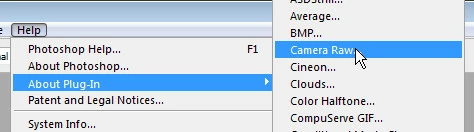
To use the Help - About Plug-in feature, in Photoshop click the Help menu, then the About Plug-in entry, then go over and click Camera Raw...
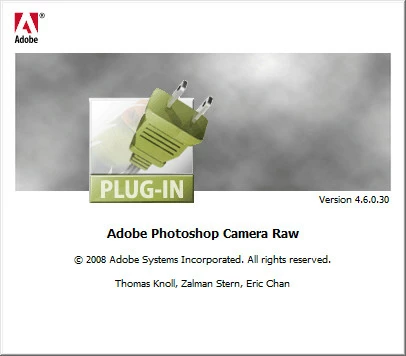
This is the dialog you should see, if your Camera Raw is fully up to date (note the 4.6):
-Noel
Already have an account? Login
Enter your E-mail address. We'll send you an e-mail with instructions to reset your password.
 AdChoices