New Participant
January 16, 2024
Answered

CSV Data to colour pixels

  • January 16, 2024
  • 6 replies
  • 2251 views

Hi All


I have a CSV that has around 24,000 lines of X,Y coordinates (LED Tape pixels in real life)


What i was wondering is there a way to import this data to Photoshop and have it colour the said pixels with a 1 pixel pencil for example?


I hope this thought makes sence


Regards


Steve  

This topic has been closed for replies.
Correct answer Davide_Barranca12040269

Save the following in a `.psjs` file:


const photoshop = require("photoshop");
const app = photoshop.app;
const core = photoshop.core;
const executeAsModal = core.executeAsModal;
const imaging = photoshop.imaging;
const storage = require("uxp").storage;
const lfs = storage.localFileSystem;
const constants = photoshop.constants;

const convertStringToArray = (str) => {
  return str.split("\n").map((line) => {
    const [x, y] = line.split(";");
    return { x: parseInt(x, 10), y: parseInt(y, 10) };
  });
};

const width = 20;
const height = 20;

const { types, formats, modes, errors } = require("uxp").storage;
let f = await lfs.getFileForOpening();

const txtContent = await f.read({ format: formats.utf8 });
const points = convertStringToArray(txtContent);

const doc = await app.documents.add({
  width,
  height,
  mode: constants.NewDocumentMode.GRAYSCALE,
});

let pixelsArray = new Uint8Array(width * height).fill(255);
points.forEach(({ x, y }) => {
  pixelsArray[y * width + x] = 0;
});

const imageData = await imaging.createImageDataFromBuffer(pixelsArray, {
  width,
  height,
  components: 1,
  colorSpace: "Grayscale",
});

await imaging.putPixels({
  layerID: app.activeDocument.activeLayers[0].id,
  imageData,
  commandName: "LED stuff",
});


Then File > Scripts > Browse... and get it.

It will pop up a file selection dialog; I've pointed it to a `pixels.csv` file with the following content:


0;0
1;1
2;2
3;3
4;4
5;5
6;6
7;7
8;8
9;9
10;10
11;11
12;12
13;13
14;14
15;15
16;16
17;17
18;18
19;19


It creates a new document, 20x20px (the doc size is hardwired for simplicity) and fill it with black pixels at the x,y coords in the csv, like so:
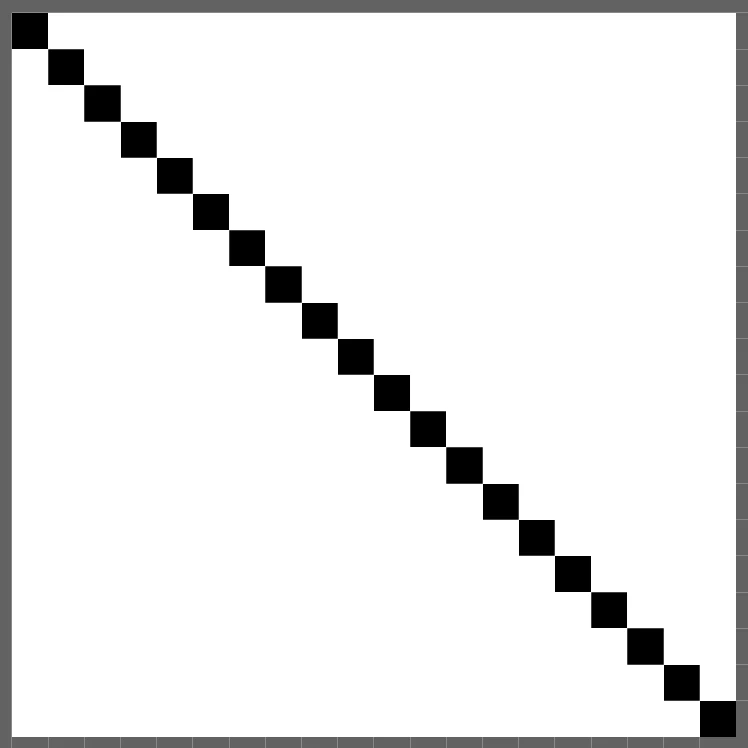
 

It's a toy example, but you can tweak it to fit your purposes—if I've properly understood what you're after. Please note that in PS the cartesian plane points downwards, y values must be adjusted if one expects it to be as we're taught in school 🙂 

Cheers,


Davide

6 replies

Davide_Barranca12040269
Community Expert
January 17, 2024

Save the following in a `.psjs` file:


const photoshop = require("photoshop");
const app = photoshop.app;
const core = photoshop.core;
const executeAsModal = core.executeAsModal;
const imaging = photoshop.imaging;
const storage = require("uxp").storage;
const lfs = storage.localFileSystem;
const constants = photoshop.constants;

const convertStringToArray = (str) => {
  return str.split("\n").map((line) => {
    const [x, y] = line.split(";");
    return { x: parseInt(x, 10), y: parseInt(y, 10) };
  });
};

const width = 20;
const height = 20;

const { types, formats, modes, errors } = require("uxp").storage;
let f = await lfs.getFileForOpening();

const txtContent = await f.read({ format: formats.utf8 });
const points = convertStringToArray(txtContent);

const doc = await app.documents.add({
  width,
  height,
  mode: constants.NewDocumentMode.GRAYSCALE,
});

let pixelsArray = new Uint8Array(width * height).fill(255);
points.forEach(({ x, y }) => {
  pixelsArray[y * width + x] = 0;
});

const imageData = await imaging.createImageDataFromBuffer(pixelsArray, {
  width,
  height,
  components: 1,
  colorSpace: "Grayscale",
});

await imaging.putPixels({
  layerID: app.activeDocument.activeLayers[0].id,
  imageData,
  commandName: "LED stuff",
});


Then File > Scripts > Browse... and get it.

It will pop up a file selection dialog; I've pointed it to a `pixels.csv` file with the following content:


0;0
1;1
2;2
3;3
4;4
5;5
6;6
7;7
8;8
9;9
10;10
11;11
12;12
13;13
14;14
15;15
16;16
17;17
18;18
19;19


It creates a new document, 20x20px (the doc size is hardwired for simplicity) and fill it with black pixels at the x,y coords in the csv, like so:


It's a toy example, but you can tweak it to fit your purposes—if I've properly understood what you're after. Please note that in PS the cartesian plane points downwards, y values must be adjusted if one expects it to be as we're taught in school 🙂 

Cheers,


Davide

Davide Barranca - PS developer and authorwww.ps-scripting.com
Stephen Marsh
Community Expert
January 18, 2024

@Davide_Barranca12040269 


Thanks for sharing. Although there are most likely optimisations and improvements to be made in my script, at 14-25 seconds for 600 rows of data it is slow as expected in ExtendScript. Perhaps XML or JSON would read faster to read than CSV, but I'm not the one to answer that question! Perhaps it's the 1x1px vector layer that is slow.


Further tests:

CSV read of 600 rows of X/Y data = ~0.2 seconds

Create 600 1x1px raster layers = ~8 seconds

So the bulk of the processing time is in plotting and merging the 600 layers at ~14-25 seconds


Your UXP script ran in less than ~1 second for the same 600 rows!

Davide_Barranca12040269
Community Expert
January 18, 2024

I have been bugging Adobe with feature requests for a pixel setter since Adobe Generator came out (2014, maybe?) The Imaging API is a blessing—the one, truly new feature that sets UXP and ExtendScript apart, IMHO. I've had some legit fun in my book doing all sorts of things with it 😁
If you combine the Imaging API with Hybrid plugins or WASM, you can get better performances for elaborate image processing routines, but even with JS alone, it's rather impressive as is.


Davide Barranca - PS developer and authorwww.ps-scripting.com
Brainiac
January 17, 2024

I'd look at ImageJ to see if there is a script or built-in support. That app is designed for specialty image processing.

https://imagej.net/

Stephen Marsh
Community Expert
January 17, 2024
quote

I'd look at ImageJ to see if there is a script or built-in support. That app is designed for specialty image processing.

https://imagej.net/


By @Lumigraphics


I thought of that too, but all I found was Python or MatLab.

Davide_Barranca12040269
Community Expert
January 17, 2024

I understand that you want to fill a blank image (say, 200x120px) with data coming from a CSV.

It's doable, the process must be split in two parts:

  1. Read the CSV and extract the data—see these UXP API
  2. Use the Imaging API to set the pixels.

Hope this helps!


Davide

Davide Barranca - PS developer and authorwww.ps-scripting.com
Stephen Marsh
Community Expert
January 17, 2024

Although this is possible to script, I agree with @c.pfaffenbichler that it wouldn't be worth it as Photoshop is the wrong tool for the job.


Take a look at other tools, the most common appears to be a Python script:


https://stackoverflow.com/questions/48414219/rendering-a-csv-with-pixel-values-to-an-image-with-pyplot


https://www.geeksforgeeks.org/create-2d-pixel-plot-in-python/

c.pfaffenbichler
Community Expert
January 17, 2024

I suppose there would be alternatives to using the Pencil Tool in Photoshop (Paths, …), but I think reading the csv-file itself would be pretty slow when performed from Photoshop. 

Stephen Marsh
Community Expert
January 17, 2024
quote

I suppose there would be alternatives to using the Pencil Tool in Photoshop (Paths, …), but I think reading the csv-file itself would be pretty slow when performed from Photoshop. 


By @c.pfaffenbichler


I think it would be compared to the dedicated libraries found in Python, however, I don't know how slow this would be in ExtendScript... 24K of X/Y coordinates to read and plot sounds slow.


I would read the CSV data using a function from:


I was also thinking of an SL function for creating a 1x1 black vector shape based on the CSV coordinates.
 
EDIT:
 
Consider a 2x2 pixel white canvas... The following code would create the following plot (enlarged preview from 2x2px):
 
 
// MOCK READ VARIABLES FROM CSV
pixGen(0, 0);
pixGen(1, 1);


function pixGen(theX, theY) {

    // 1x1 PIXEL
    var theR = theX + 1;
    var theB = theY + 1;

    var idmake = stringIDToTypeID( "make" );
    var desc768 = new ActionDescriptor();
    var idnull = stringIDToTypeID( "null" );
        var ref306 = new ActionReference();
        var idcontentLayer = stringIDToTypeID( "contentLayer" );
        ref306.putClass( idcontentLayer );
    desc768.putReference( idnull, ref306 );
    var idusing = stringIDToTypeID( "using" );
        var desc769 = new ActionDescriptor();
        var idtype = stringIDToTypeID( "type" );
            var desc770 = new ActionDescriptor();
            var idcolor = stringIDToTypeID( "color" );
                var desc771 = new ActionDescriptor();
                var idgray = stringIDToTypeID( "gray" );
                desc771.putDouble( idgray, 100.000000 );
            var idgrayscale = stringIDToTypeID( "grayscale" );
            desc770.putObject( idcolor, idgrayscale, desc771 );
        var idsolidColorLayer = stringIDToTypeID( "solidColorLayer" );
        desc769.putObject( idtype, idsolidColorLayer, desc770 );
        var idshape = stringIDToTypeID( "shape" );
            var desc772 = new ActionDescriptor();
            var idunitValueQuadVersion = stringIDToTypeID( "unitValueQuadVersion" );
    desc772.putInteger(idunitValueQuadVersion, 1);

    /////
    
            var idtop = stringIDToTypeID( "top" );
            var idpixelsUnit = stringIDToTypeID( "pixelsUnit" );
    desc772.putUnitDouble(idtop, idpixelsUnit, theY);
    
            var idleft = stringIDToTypeID( "left" );
            var idpixelsUnit = stringIDToTypeID( "pixelsUnit" );
    desc772.putUnitDouble(idleft, idpixelsUnit, theX);
    
            var idbottom = stringIDToTypeID( "bottom" );
            var idpixelsUnit = stringIDToTypeID( "pixelsUnit" );
    desc772.putUnitDouble(idbottom, idpixelsUnit, theB);
    
            var idright = stringIDToTypeID( "right" );
            var idpixelsUnit = stringIDToTypeID( "pixelsUnit" );
    desc772.putUnitDouble(idright, idpixelsUnit, theR);

    /////

            var idtopRight = stringIDToTypeID( "topRight" );
            var idpixelsUnit = stringIDToTypeID( "pixelsUnit" );
    desc772.putUnitDouble(idtopRight, idpixelsUnit, 0.000000);
    
            var idtopLeft = stringIDToTypeID( "topLeft" );
            var idpixelsUnit = stringIDToTypeID( "pixelsUnit" );
    desc772.putUnitDouble(idtopLeft, idpixelsUnit, 0.000000);
    
            var idbottomLeft = stringIDToTypeID( "bottomLeft" );
            var idpixelsUnit = stringIDToTypeID( "pixelsUnit" );
    desc772.putUnitDouble(idbottomLeft, idpixelsUnit, 0.000000);
    
            var idbottomRight = stringIDToTypeID( "bottomRight" );
            var idpixelsUnit = stringIDToTypeID( "pixelsUnit" );
    desc772.putUnitDouble(idbottomRight, idpixelsUnit, 0.000000);
    
    /////

        var idrectangle = stringIDToTypeID( "rectangle" );
        desc769.putObject( idshape, idrectangle, desc772 );
        var idstrokeStyle = stringIDToTypeID( "strokeStyle" );
            var desc773 = new ActionDescriptor();
            var idstrokeStyleVersion = stringIDToTypeID( "strokeStyleVersion" );
            desc773.putInteger( idstrokeStyleVersion, 2 );
            var idstrokeEnabled = stringIDToTypeID( "strokeEnabled" );
            desc773.putBoolean( idstrokeEnabled, true );
            var idfillEnabled = stringIDToTypeID( "fillEnabled" );
            desc773.putBoolean( idfillEnabled, true );
            var idstrokeStyleLineWidth = stringIDToTypeID( "strokeStyleLineWidth" );
            var idpixelsUnit = stringIDToTypeID( "pixelsUnit" );
            desc773.putUnitDouble( idstrokeStyleLineWidth, idpixelsUnit, 0.000000 );
            var idstrokeStyleLineDashOffset = stringIDToTypeID( "strokeStyleLineDashOffset" );
            var idpointsUnit = stringIDToTypeID( "pointsUnit" );
            desc773.putUnitDouble( idstrokeStyleLineDashOffset, idpointsUnit, 0.000000 );
            var idstrokeStyleMiterLimit = stringIDToTypeID( "strokeStyleMiterLimit" );
            desc773.putDouble( idstrokeStyleMiterLimit, 100.000000 );
            var idstrokeStyleLineCapType = stringIDToTypeID( "strokeStyleLineCapType" );
            var idstrokeStyleLineCapType = stringIDToTypeID( "strokeStyleLineCapType" );
            var idstrokeStyleButtCap = stringIDToTypeID( "strokeStyleButtCap" );
            desc773.putEnumerated( idstrokeStyleLineCapType, idstrokeStyleLineCapType, idstrokeStyleButtCap );
            var idstrokeStyleLineJoinType = stringIDToTypeID( "strokeStyleLineJoinType" );
            var idstrokeStyleLineJoinType = stringIDToTypeID( "strokeStyleLineJoinType" );
            var idstrokeStyleMiterJoin = stringIDToTypeID( "strokeStyleMiterJoin" );
            desc773.putEnumerated( idstrokeStyleLineJoinType, idstrokeStyleLineJoinType, idstrokeStyleMiterJoin );
            var idstrokeStyleLineAlignment = stringIDToTypeID( "strokeStyleLineAlignment" );
            var idstrokeStyleLineAlignment = stringIDToTypeID( "strokeStyleLineAlignment" );
            var idstrokeStyleAlignCenter = stringIDToTypeID( "strokeStyleAlignCenter" );
            desc773.putEnumerated( idstrokeStyleLineAlignment, idstrokeStyleLineAlignment, idstrokeStyleAlignCenter );
            var idstrokeStyleScaleLock = stringIDToTypeID( "strokeStyleScaleLock" );
            desc773.putBoolean( idstrokeStyleScaleLock, false );
            var idstrokeStyleStrokeAdjust = stringIDToTypeID( "strokeStyleStrokeAdjust" );
            desc773.putBoolean( idstrokeStyleStrokeAdjust, false );
            var idstrokeStyleLineDashSet = stringIDToTypeID( "strokeStyleLineDashSet" );
                var list163 = new ActionList();
            desc773.putList( idstrokeStyleLineDashSet, list163 );
            var idstrokeStyleBlendMode = stringIDToTypeID( "strokeStyleBlendMode" );
            var idblendMode = stringIDToTypeID( "blendMode" );
            var idnormal = stringIDToTypeID( "normal" );
            desc773.putEnumerated( idstrokeStyleBlendMode, idblendMode, idnormal );
            var idstrokeStyleOpacity = stringIDToTypeID( "strokeStyleOpacity" );
            var idpercentUnit = stringIDToTypeID( "percentUnit" );
            desc773.putUnitDouble( idstrokeStyleOpacity, idpercentUnit, 100.000000 );
            var idstrokeStyleContent = stringIDToTypeID( "strokeStyleContent" );
                var desc774 = new ActionDescriptor();
                var idcolor = stringIDToTypeID( "color" );
                    var desc775 = new ActionDescriptor();
                    var idgray = stringIDToTypeID( "gray" );
                    desc775.putDouble( idgray, 100.000000 );
                var idgrayscale = stringIDToTypeID( "grayscale" );
                desc774.putObject( idcolor, idgrayscale, desc775 );
            var idsolidColorLayer = stringIDToTypeID( "solidColorLayer" );
            desc773.putObject( idstrokeStyleContent, idsolidColorLayer, desc774 );
            var idstrokeStyleResolution = stringIDToTypeID( "strokeStyleResolution" );
            desc773.putDouble( idstrokeStyleResolution, 72.000000 );
        var idstrokeStyle = stringIDToTypeID( "strokeStyle" );
        desc769.putObject( idstrokeStyle, idstrokeStyle, desc773 );
    var idcontentLayer = stringIDToTypeID( "contentLayer" );
    desc768.putObject( idusing, idcontentLayer, desc769 );
    var idlayerID = stringIDToTypeID( "layerID" );
    desc768.putInteger( idlayerID, 2 );
executeAction( idmake, desc768, DialogModes.NO );
}
Stephen Marsh
Community Expert
January 16, 2024

Also curious on what the pixel width and height of the canvas is.

New Participant
January 16, 2024

10000px x 600px (but this may be broken down into different sections depending)

c.pfaffenbichler
Community Expert
January 16, 2024

In my estimate this would be so slow as to be a waste of time. 


But quite frankly I may not understand what exactly you mean without seeing some more information. 

Are there RGB vales or is this just on/off or …? 

Please provide (a relevant part of) the file or at least meaningful screenshots. 


New Participant
January 16, 2024

Totally so in a Lighting Program we can create the lights and the pixels and export the X,Y coordinates.


What i need to do is to create a "UV Map" of this in a file so that the animators can create video for the pixel tape.


I just need eacg x,y pixel to be any colour - black - its so the animators know where the pixels are in a UV space 


One screen shot here is of the Lighting Software - the other is a very very small sample of the X,Y coordinates
