


New Participant
August 24, 2022
Question

Dark Edges?

  • August 24, 2022
  • 2 replies
  • 306 views

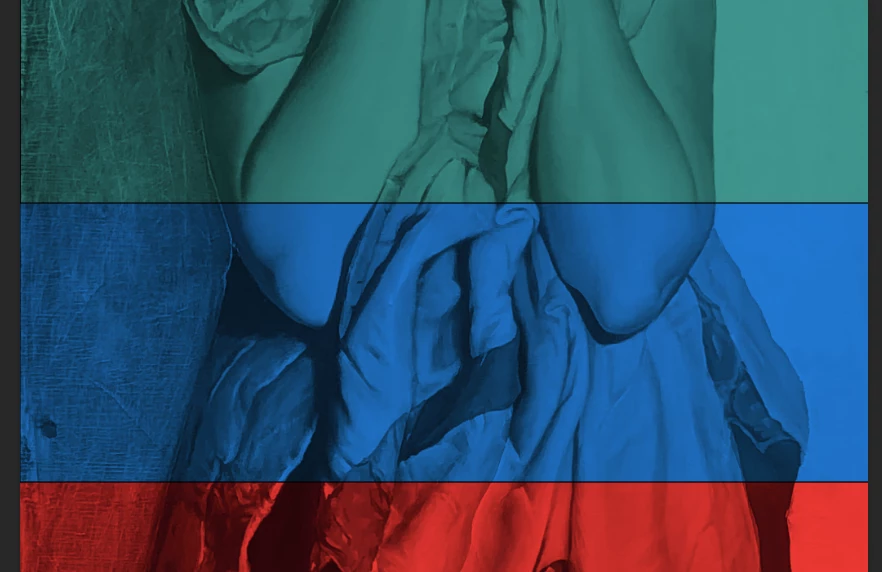
I have created separate layers with the rectangle tool, filled with color, and used the multiply setting for the image. I'm wondering how to get rid of the dark edges that look like a black line around the rectangles of color blocking. They are not overlapping, because even when I drag the rectangle much farther down there is still a dark edge.


I'm new to PS and have tried to find answers, but I'm so new I don't even know how to look it up. Any help is appreciated! 
 

This topic has been closed for replies.

2 replies

Jeff Arola
Community Expert
August 25, 2022

In the Layers panel click on one of the Rectangle layers, then go to Window>Properties and make sure there is no Stroke.


hatstead
Inspiring
August 24, 2022

Please post a screen shot of this so that we may see the layers as identified in the layers palette. 

Have you tried turning the visibility of the individual layers on/off by clicking on the eye icon(s) in the layers palette?


New Participant
August 24, 2022

I have clicked the layer visibility eye and the shadow, or dark line, remains


hatstead
Inspiring
August 24, 2022

It seems that you are using Photoshop and this is the Photoshop Elements forum.