New Participant
May 31, 2023
Question

Delete Photoshop Tempfiles?

  • May 31, 2023
  • 2 replies
  • 7235 views

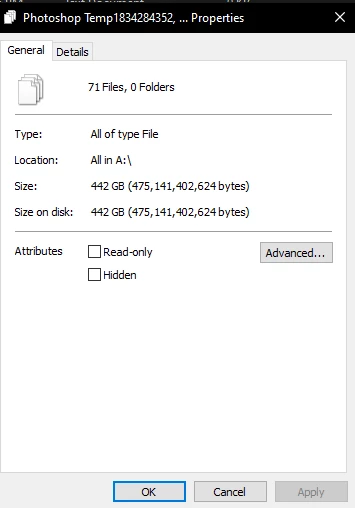
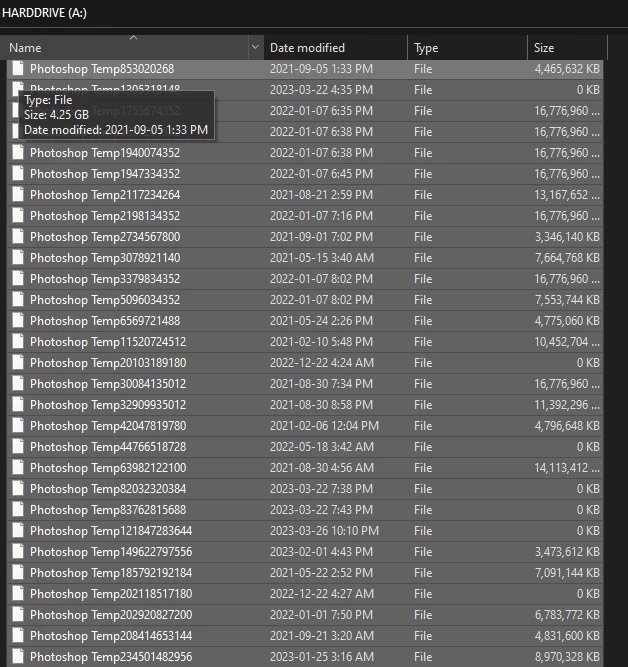
Are these Photoshop Tempfiles safe to delete? I just noticed these 450GBs of these files piling up and I want to delete them to free up some space and I was just wondering if they are safe to delete.


Thank you for any help!
 

2 replies

Trevor.Dennis
Community Expert
Community Expert
May 31, 2023

As already stated, this indicates a significant problem.  I've never seen anything remotely like it.  If Photoshop, or your computer while Photoshop is running, are not crashing, I wonder if it is something like a Permissions problem.  If you make changes to your Preferences and restart Photoshop, are those changes still showing?


What are your Scratch Drive settings?  It might be useful if you post your system info here.

Go Help > System Info > Copy and paste to this thread.   You have something going on that desperatrely needs fixing, so I'd be following the advice you get here.

Trevor.Dennis
Community Expert
Community Expert
May 31, 2023

I meant to add that those temp files are pretty big. I rarely see more than 6 to 8Gb with 64Gb RAM.  Are you working on large documents?  I wouldn't be surprised if you told us you were stacking dozens of layers for astronomical image noise reduction.

D Fosse
Community Expert
Community Expert
May 31, 2023

I've noticed that scratch files come in chunks of 16 GB. Then it starts a new chunk, so if you're pushing it with big files, you might get 16-16-16-3 or similar.


Permissions could be the problem, yes - in which case drive letter A might be worth changing as a first step.

D Fosse
Community Expert
Community Expert
May 31, 2023

You can safely delete them, they shouldn't be there in the first place.


However, this does indicate a deeper problem. It means Photoshop doesn't shut down properly, either it crashes, or some other irregularities. All these files should normally be deleted when Photoshop exits.


I think it's rather urgent to find out why. Do you see a lot of crashing? Most likely that would be caused by a graphics card problem.


If you post Help > System Info (all of it), we might be able to spot the problem.


EDIT: I notice you're using drive letter A. Although that shouldn't cause problems, it might. As we all know, back in the stone age, A and B were system reserved for floppy drives. There could still be snippets of code somewhere that frown over the use of A. Just as a general precaution, I wouldn't do that, just as I would't use, for instance, a period in a file name.