
Known Participant
November 15, 2017
Answered

Disable Popups for Photoshop [not Adobe Dimension?]

  • November 15, 2017
  • 18 replies
  • 14487 views

Hey all,

Forgive me if I am overlooking something obvious, but I am trying to figure out how to disable this pop-up ad for Adobe Dimension that shows up after I use the transform tool. It pops up pretty regularly, and is just the worst. I am running CC 19.0
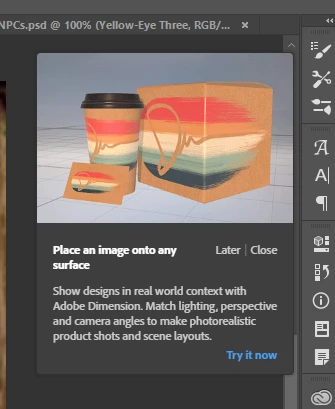
This topic has been closed for replies.
Correct answer epaulodas

Oh Sweet Jesus! I so do hate this pop-up so badly! I ve seen it every single day 3 times a day for the last 3 years... I ve searched internet up and down, high and low, shalow and deep... there s no help people. They made it to make you suffer... it like the alt key that need to be pressed twice in orde to be used as a shortcut, otherwise it make an annoying sound... You have to learn to live with that! They made it intentionally to hurt us... and it does!!

18 replies

Ussnorway7605025
Legend
January 3, 2018

moved to Photoshop forum

Participant
December 19, 2017

Still no solution? This is frustrating having to constantly click off this thing. So f-ing annoying

Known Participant
December 1, 2017

Adobe, fix this.

We are paying customers. We don't want advertisement while working.

Inspiring
December 4, 2017

Still no solution?

. Windows 10 -- Premiere Elements 2018 -- Photoshop CC
Inspiring
December 23, 2017

STILL!

. Windows 10 -- Premiere Elements 2018 -- Photoshop CC
Ussnorway7605025
Legend
November 30, 2017

you can't turn them off... Adobe thinks people like having popup tutorials that get in the way of doing your work

Known Participant
November 20, 2017

Yeah, it's back. I did not have it pop up for a while after turning off the rich tool-tips; but it showed up again recently.

Participating Frequently
November 21, 2017

Is there a way to mark this thread as unanswered then?

Known Participant
November 21, 2017

I went looking to reopen the question/mark as unanswered, but cannot find a way to do this. If anyone can point me to what I would need to do to reopen the issue, that would be rad.

Participating Frequently
November 20, 2017

I've had "rich tooltips" turned off already to disable the video tutorials when hovering over icons. And yet, I still get these damned in-app pop-up advertisements. How do we disable this? It's absurd that Adobe is pushing advertisements inside our productivity apps now. Move the ads to the Creative Cloud app instead. Not my Photoshop workspace while I'm currently working!

Jeff Arola
Community Expert
Community Expert
November 20, 2017

Not really sure how to stop that as it seemed to stop here by turning off Use Rich Tooltips.

Yeah that's very annoying to say the least and sure hope that's not a preview of many more such pop-ups to come in photoshop and other creative cloud applications

You can add a comment here if you wish.

Is Photoshop becoming Adware? | Photoshop Family Customer Community

Barb Binder
Community Expert
Community Expert
November 15, 2017

Hmmm. That doesn't look like a rich tool tip—those come off the Tools on the far left and demo the tool functions. Maybe that will still turn it off, if so, please let us know.

disable this pop-up ad for Adobe Dimension that shows up after I use the transform tool

There isn't actually a Transform tool in Photoshop (though there are transform commands in the menus), so I'm not clear what you are doing prior to the pop-up appearing. If disabling rich tool tips doesn't work, more info will help us help you.

~Barb at Rocky Mountain Training
Known Participant
November 15, 2017

Hey Barb, sorry for the confusion, I suppose, "tool," isn't the right word here; It pops up after I manipulate a layer or selection via free-transform (ctrl-t).

Barb Binder
Community Expert
Community Expert
November 16, 2017

That's funny. I was free-transforming all day and it never showed up so I thought that couldn't be it. Good to know!

~Barb at Rocky Mountain Training
Jeff Arola
Community Expert
Community Expert
November 15, 2017

See if turning off Use Rich Tooltips in Photoshop CC>Preferences>Tools (mac) or Edit>Preferences>Tools (windows)

stops it. You might have to restart photoshop for the change to take affect.

Known Participant
November 15, 2017

Thanks all, turning rich tooltips off seemed to do the trick - after a restart.