



TenTin
Known Participant
September 9, 2022
Question

Disable "Adjustment Layer" Auto Numbering

  • September 9, 2022
  • 2 replies
  • 1374 views

Hi, 

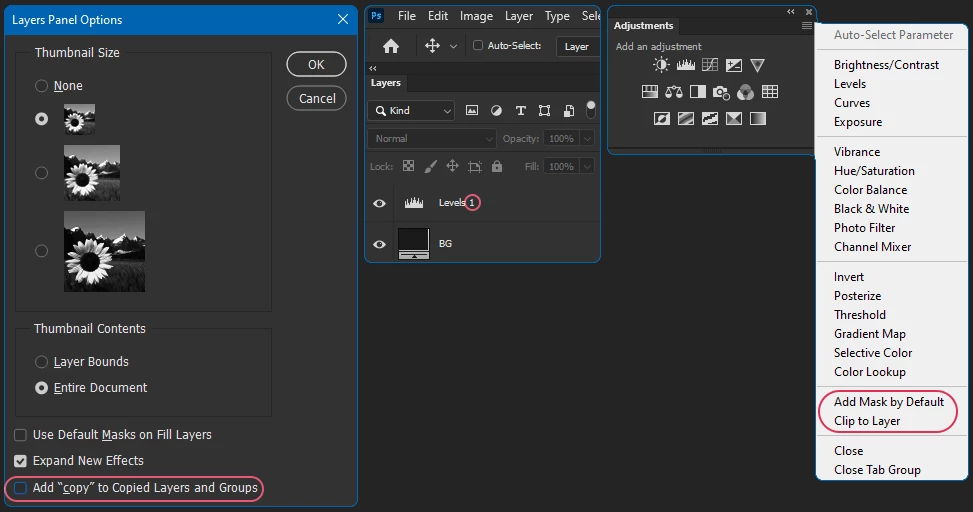
Is there a way to disable AL (=Adjustment Layer) auto numbering? I mean, by adding an "AL" (in layers panel) it adds a number automatically to the end of the AL (SS below). Layers panel "adding Copy" is disabled.
 

This topic has been closed for replies.

2 replies

Stephen Marsh
Community Expert
Community Expert
September 9, 2022

As mentioned by @Kevin Stohlmeyer the adjustment layers and other layers use a standard/default name that includes an incremental number... I am not aware of a way to disable this behaviour.


Having a uniquely named layer helps action or script automation so that the layer is not ambiguous and can be correctly selected.


If this isn't a concern for you, one option is to create an action or script to create a layer/group/adjustment with the required default name. Simply hold down the OPT/ALT key modifier when recording the creation of the new layer to set a static layer name.

TenTin
TenTinAuthor
Known Participant
September 10, 2022

Thanks. But I think I have to make an specific action with an specific shortcut for each AL. That's nonsense! I recommend to add an option to the AL panel option (to disable AL layer numbering).

Stephen Marsh
Community Expert
Community Expert
September 10, 2022

OK, however, there is a difference between a discussion of what is currently possible vs. a feature request idea of how you would like the software to be programmed over how it currently is.


Another approach would be to run a script that would remove the number suffix from every layer after it was added.


Or set a keyboard shortcut to run an action or script to create the adjustment layer without the number.


I couldn't find a script event specific for adding an adjustment layer, which would allow for an action or script to automatically change the layer name directly after it was added.


Regular layers and layer groups also have automatic numbering applied too.

Kevin Stohlmeyer
Community Expert
Community Expert
September 9, 2022

Not that I am aware of. This is intentional because each layer requires it's own unique name when initially created including adjustment layers. Ex Layer 1, Layer 2, Levels 1, Levels 2.

TenTin
TenTinAuthor
Known Participant
September 10, 2022

Thanks.