

Known Participant
May 8, 2025
Answered

Disable smart objects nonsense.

  • May 8, 2025
  • 3 replies
  • 1052 views

I don't need smart objects for anything, ever. How can I turn it off for good? Thanks for any help. 

Correct answer Bojan Živković11378569

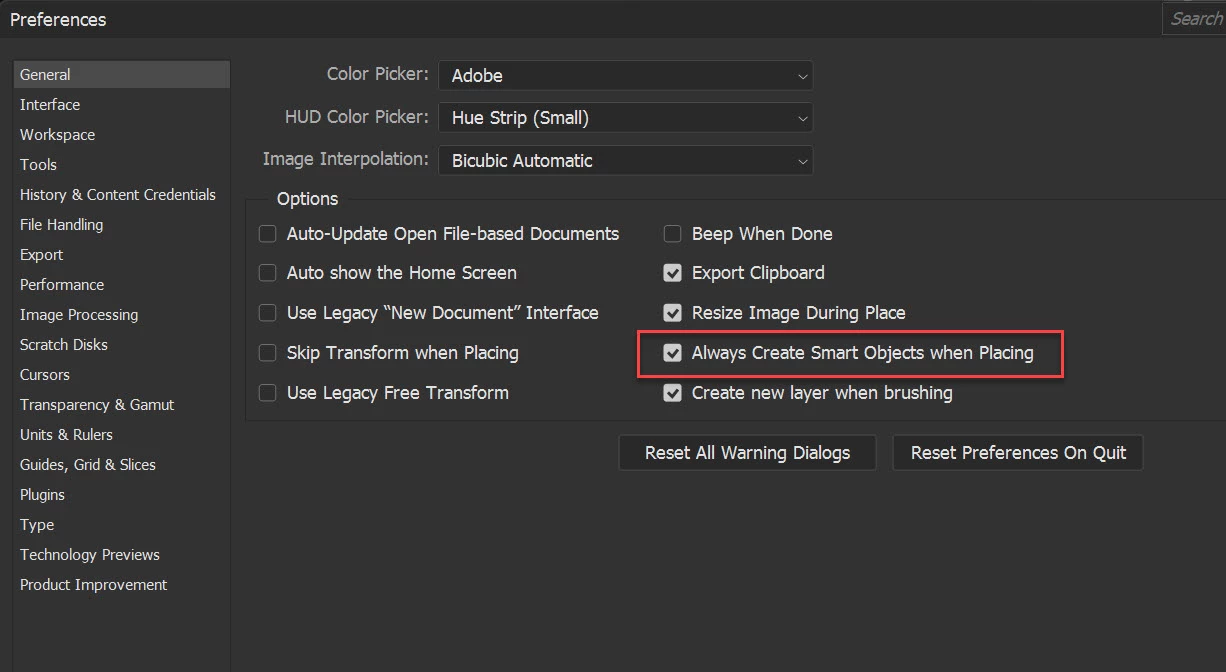
Do you mean when placing images? Go to Preferences > General and uncheck Always Create Smart Objects when Placing.
3 replies

Stephen Marsh
Community Expert
May 9, 2025

@Chris3000 – Did the reply from @Bojan Živković11378569 solve your problem? @Trevor.Dennis makes good points (or would like to) as a case for using Smart Objects for certain situations. We do understand that there are pros/cons.

Chris3000Author
Known Participant
May 15, 2025

It's just an annoyance that Adobe has users conviced is convenient. If I add a layer to an image, I might need to edit that layer, yes?

Bojan Živković11378569
Community Expert
May 9, 2025

Do you mean when placing images? Go to Preferences > General and uncheck Always Create Smart Objects when Placing.

Trevor.Dennis
Community Expert
May 9, 2025

Yes, Bojan.  I didn't think of that aspect.  I can imagine that being annoying for someone not used to them because of the limitations of non-raster layers. There was a recent thread talking about the Healing brush, for instance, but if you set it to sample all layers and work on a new layer above the SO, you get past that issue and maintain the non-destructive advantages of them.

Trevor.Dennis
Community Expert
May 8, 2025

@Chris3000  have you read about how they work and the advantages they have?  After selections and masks, they might be Photoshop's most important feature, so please give them a chance to grow on you.


If you really can't abide seeing them in your UI, then you can remove them from some menus like this.


Edit > Keyboard Shortcuts

Menu For: Application Menus

Scroll down to and expand Layer

Continue scrolling down to Smart Objects and click to remove the Eye icon

If you turn off the one I have highlighted, then all Smart Object functions will no longer appear on that menu.

I am not sure exactly where this will affect.  They might still be present in the Layers Panel when you right click a layer.  I just don't know.


I am now shedding a tear on your behalf  😞


Would you like to know some of the ways Smart Objects can help you?  As in _REALLY_ help you?

Chris3000Author
Known Participant
May 15, 2025

I don't see those visibility boxes here. 

Ged_Traynor
Community Expert
May 15, 2025

@Chris3000 you need to click on the menu tab