


Known Participant
January 8, 2024
Answered

Do not append "copy" still adding copy while saving jpg

  • January 8, 2024
  • 3 replies
  • 475 views

I have created an action to save the file as jpg.

Just to add: The option to uncheck "Save: As a copy" is grayed out.
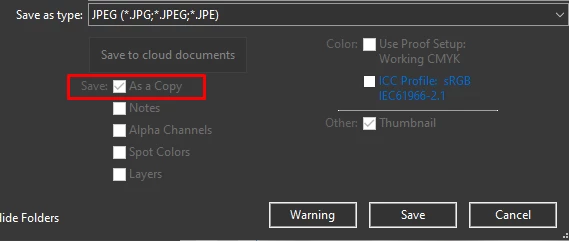
Here is this in Action Menu:
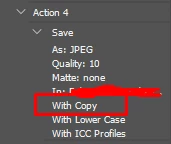
 

Though, I have already selected "Do not append "copy" to filename when saving a copy" from Preferences>File Handling

but this doesn't seems to be working. Even tried with legacy save as option.


I have lot of files and this is adding word copy to every jpg it is saving.


How can this be fixed?

This topic has been closed for replies.
Correct answer Jeff Arola

When you record the action make sure the image your using is flattened and 8 bits/channel.


Also if your files your saving are not already flattened and/or 8 bits/channel it would be wise to add those steps to the action.

3 replies

Jeff Arola
Community Expert
Community Expert
January 8, 2024

It seems to work here on Windows 10 and Photoshop 2024 (ps ver 25.3.1) regardless of whether Legacy Save As is on or off as long as the image being saved doesn't have anything jpgs don't support like layers, etc.


Bojan Živković11378569
Community Expert
Community Expert
January 8, 2024

I use Windows 11 and I participate in the beta testing program. That might be the cause of the problem. I didn't remember that I joined the program a few days ago.

Bojan Živković11378569
Community Expert
Community Expert
January 8, 2024

A fast solution is to rename multiple files at once in Bridge using String Substitution, as demonstrated below.


I confirmed that the latest Photoshop version adds "copy" to the filename, regardless of the preferences, as reported.

Jeff Arola
Community Expert
Jeff ArolaCommunity ExpertCorrect answer
Community Expert
January 8, 2024

When you record the action make sure the image your using is flattened and 8 bits/channel.


Also if your files your saving are not already flattened and/or 8 bits/channel it would be wise to add those steps to the action.

Bojan Živković11378569
Community Expert
Community Expert
January 8, 2024
quote

When you record the action make sure the image your using is flattened and 8 bits/channel.


By @Jeff Arola


It does not work for me on Windows, 25.3.1. It fails both when recording and when trying to make sure the file to process is 8-bit and flat.