Known Participant
October 24, 2013
Answered

Drop Down Menus in Photoshop CS 6 Goes Blank In Mavericks

  • October 24, 2013
  • 28 replies
  • 114288 views

Hi

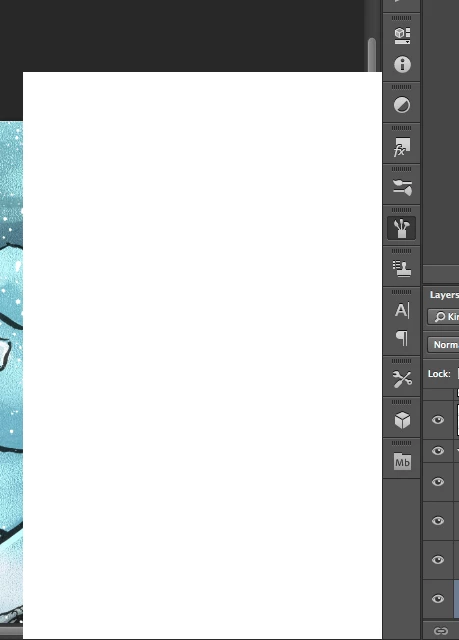
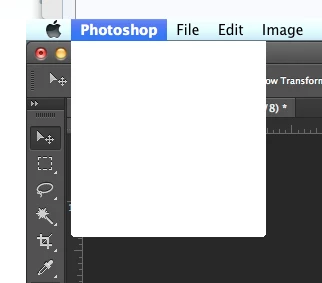
I'm having trouble with Photoshop CS6 in Mavericks. After a working a little while, all pop up/drop down menus goes blank. They still work, but I can't see what's on them. Even the Apple menu bar is afflicted by this, though only when Photoshop is in the front.

Any help is appreciated. Thanks.  PS: I do use a cintiq on a 2012 Macbook Pro 15" with retina display.

This topic has been closed for replies.
Correct answer Jesper Storm Bache

Hi Grenderer,

If the work-around does not work for you, can you perform the following test.

After you install the plug-in and launch Photoshop, then look in:

- the OSX console. You should see a message such as

     WhiteWindowWorkaround Initialized

- From within Photoshop, you can choose "Help > System Info". In the resulting dialog, you should be able to see the WhiteWindowWorkaround plug-in and it should be listed in the "Optional and third party plug-ins" similar to the following:

     "Optional and third party plug-ins:

      WhiteWindowWorkaround 1.0.4, Copyright 2013-2014 - from the file “WhiteWindowWorkaround.plugin”

If both of these tests pass, then something else is going on.

In general, be aware that in the end the right fix will not come from Adobe, as we don't own the code that seems to be inducing the failure. We can therefore not speculate on when the official fix will be available. When I become aware that the right fix is available, then I will update this thread


It looks like the plug-in fails to initialize on certain Photoshop installations. This should be fixed in:

    http://www.bache.name/download/osx/WhiteWindowWorkaround.plugin1_0_5.zip

If the plug-in is properly installed, then you should see something  similar to the following in the OSX console after launching Photoshop:

     Adobe Photoshop CC[14728]: WhiteWindowWorkaround Initialized

You can see the OSX console by going to “Utilities” from Finder, and then running the Console application.


28 replies

Participant
December 9, 2013

I am having the same issue with Dreamweaver. The drop down menus go blank after I've been working in Dreamweaver for a short time - probably less than half an hour. Has anyone else had this issue. I'm using a Macbook Pro running Maverick OS 10.9.

Thanks

Lilybeth

Participating Frequently
December 10, 2013

I am also having issues with this. It started upon upgrade to Mavericks and seems to occur and random intervals after using the dodge/burn tool. Sometimes the white menus will appear seconds after the tool is used... other times it will take minutes. In all cases the program becomes unuseable (so I must save either as a full PSD constantly or flatten and save as a jpg) and must be force closed completely before being able to resume working. It's a very annoying issue that was not present in Mountain Lion.

Additionally NEF files take much longer to view, increasing workflow time, and previews randomly do not work.

Any progress in identifying a workable update to this issue?

Participant
December 10, 2013

I think then that this is a Maverick OS problem. I'm planning to revert back to the Snow Leopard OS and hopefully this will fix the problem. Thanks for your response.

Participant
November 25, 2013

Having the exact same problem as everyone else - just got a new macbook pro 15" retina display and did a clean install of everything, so all the software including my wacom driver is completely up to date. Seems like the dodge tool makes it worse; it also blocks keyboard shortcuts when the tool is selected. The blank menus are happening close to every 15 minutes now, requiring me to quit and restart the program. Adobe, fix the problem or seriously - refund my money and lost work time!!!

Participant
November 26, 2013

I have also had  issue's  using PS CC and CS6 and experienced the Blank White Menus after a period of 20 or so mins.

I have now uninstalled my wacom Intuos 4 Driver via the Wacom Utility. Type into  SpotLight Wacom Utilty click youll see a menu click REMOVE. I then downloaded latest Wacom Driver via US web Site (.Com) dated the 15th. Installed and as yet had no reoccurence of blank white menus.

Hope this works for others.

My system is a 2010 Imac 12 Gb Ram running Mavericks with Lightroom 5 PS CC and a Wacom Intuos 4 wired.

Best of luck.

David

Inspiring
November 26, 2013

Unfortunately, this trick did not help to many of users. It is working on some machines for some time, but still appears

Participating Frequently
November 22, 2013

Hi,

I hava a similar problem with a different application, BetterTouchTool. http://blog.boastr.net

2013/11/22 14:12:48.828 BetterTouchTool[46226]: CGError CGSGetDisplaySystemState(uint64_t, CGSDisplaySystemState **): MIG error 0x10000003: (ipc/send) invalid destination port

When I get this error in console, the menu bar icon of BetterTouchTool becomes unavailable, and all the functionalities of BetterTouchTool hangs. This post is not related to Photoshop, but it might be helpful to understand the root cause of the problem.

I have been using BetterTouchTool for a few years. But this error started to happen after I upgraded my OS to Mavericks.

November 19, 2013

Hi everyone

I got exact the same issues like the most of You in this thread.

Now could it be, that it relies on the graphic card?

Since I switched to "Normal" mode, I got no "blank menus" anymore.

System:

Mac Pro, Quadro 4000

Can this be confirmed by somebody? Or is it only a tiny hope and coincidence that it didn't happen fpr some hours now.

Cheers

Edit:

The brush and Lasso tool problems still exist...

Inspiring
November 19, 2013

MrHoo do you mean Graphic Processor? Did you unmark the check-box Use Graphic Processor or simply just go to Advanced Settings and swith to Drawing mode "Normal"?

November 19, 2013

Yes, the advanced settings. I switched to "Normal". The checkbox stays ticked.

Inspiring
November 19, 2013

I have blank menu issue and brush freeze when I am using Dodge Tool and Brush Tool. Without these tools I can not work at all.
I still hope that Adobe, Apple and Wacom find the solution, othrwise I will shift to Mac OS 10.8

Participating Frequently
November 19, 2013

For me it's caused mostly when using the healing brushes and spunge tool. 

Does anyone from Adobe actually read this board? It sure would be nice to know if someone is actually working on the issue.

Inspiring
November 19, 2013

I've been having the same problem but with Flash CC on Mavericks. Restarting Flash seems to resolve it. It crops up for me at least a couple times a week.

Inspiring
November 19, 2013

Since I'm not using my Wacom tablet much at the moment, I'll try uninstalling my drivers and see if the problem still crops up

Participant
November 19, 2013

I have not experienced the whiteouts since I selectively stopped using the Dodge tool. I noticed it always happened with dodge tool so I gave it a try. It is annoying as I usually used it a lot, but I make a curve layer and mask it to achieve similar effects instead... Haven't had the issue in over a week, editind over 100 images.

Sent from my iPhone

Inspiring
November 16, 2013

Well, I wonder if the guys from Adobe team can finally tell something about their actions to solve this problem? Or they prefere to keep silence?

Earning for living as a photographer I can not work in correct way with photoshop and my Wacom tablet. I'm waisting too much time with this constant restartings of photoshop, when this bug appears. Ind it appears almost every hour!!!

Participant
November 16, 2013

I have the same problems with my Bamboo Wacom tablet in Photoshop. Really frustrating. The problem has been there since Mavericks launched... about time to fix it Adobe, Wacom or Apple! Losing so much time and work on this bugs.

Participant
November 15, 2013

This is not a fix but may save a little trouble.

When you start any project, save the PSD and then, if you get the blank menu, use your save hotkey (Cmd-S on Mac) to preserve your work.

If you forgot to save, then use the hot key for "Save as" (Shift-Cmd-S on Mac). Just remember the default location it saves to.

Sounds pretty elementary but is necessary in this situation.

Like all of you, I'm hoping for a fix soon.

Cheers!

donbarrum
Inspiring
November 16, 2013

Is there any status for these bugs in Mavericks/photoshop ?

I have two Major issues, the menus goes white and the polygonal lasso tool behaves stupid when I use a wacom tablet in photoshop. Now doing any of my professional work with photoshop and a tablet has become very troublesome. If there was a way for me to downgrade Mavericks easily I would do it. But I hope Adobe and Wacom can solve these issues fast so I don´t have to save and quit photoshop multiple times and have to do polygonal lasso with a mouse when masking stuff.

Participant
November 11, 2013

I am a system administrator of a design agency with ~100 iMacs running CC.  We have had this problem crop up sporadically since upgrading a pilot group (10) of our designers and retouchers to 10.9.  Though they fix interaction with the login screen and preference problems, the "photoshop blank menu" problem persists after upgrading Wacom drivers to the most current version.  There doesn't seem to be any reproducible steps, but each iMac experiences it at least once per day.  We haven't seen an instance of this problem on iMacs which haven't been upgraded to 10.9.  I can provide console logs if that would be helpful, but it would be really nice to have a resolution - this is severely impacting my user's workflow.

November 14, 2013

One thing i've noticed is that the issue is much worse if adobe lightroom is also open.

Editing photos from LR to Photoshop is awful - the problem happens within a few mins. Yet if I dont have LR open it might work for an hour or more before it happens.

Participating Frequently
November 21, 2013

@donbarrum

I haven't looked into it deeply yet, but I believe through using the recovery drive I can reinstall the previous OS from my Time Machine backup. I've done it in previous versions of OS's, but haven't tried it yet in Mavericks. My only issue right now is I don't have the time to do it. But if I get a break, I just might.

Recoverying from Time Machine does mean that I loose any local files added since I upgraded, but that isn't too big of an issue for me because I only upgraded to Mavericks last week and most of my important files are saved on our server.


@claclac - and for anyone else looking to rolling back (downgrading) from Mavericks -> Mountain Lion, here's a short tutorial:

http://osxdaily.com/2013/11/05/downgrade-from-os-x-mavericks/

PS: and no, you will NOT lose your new documents created with Mavericks... if you follow the instructions that is.

NOTE: No you can not downgrade a new Late 2013 iMac.

Message was edited by: DocPixel-BMW

Bryan In Box
Participating Frequently
November 1, 2013

Having the ghost menu problem running CS5 on a new Mac Mini 2.6 running Mavericks.

Restarting solves it until the next time, but kills workflow. Keyboard shortcuts still work. Trying reinstalling Wacom drivers but I'm not optimistic about that as a fix.

Participating Frequently
November 1, 2013

For anyone curious. I did a screen share with Jeffrey and after sending him diagnostic files he was able to reproduce the "brush hanging/stalling" issue on his own computer. Adobe is working on a solution and hopefully they are a step closer now. I still think it's the Wacom Drivers.

Legend
November 1, 2013

Thanks Chris. Yeah. Still need to figure out where the hangup is at between PS, the tablet/driver and Mavericks.

I'm still looking to a do a screen share debugging session with someone with the white menus/dialogs issue.