


Scasey
Inspiring
February 5, 2020
Answered

Editing 360 photos .dng format / Insta360

  • February 5, 2020
  • 3 replies
  • 34749 views

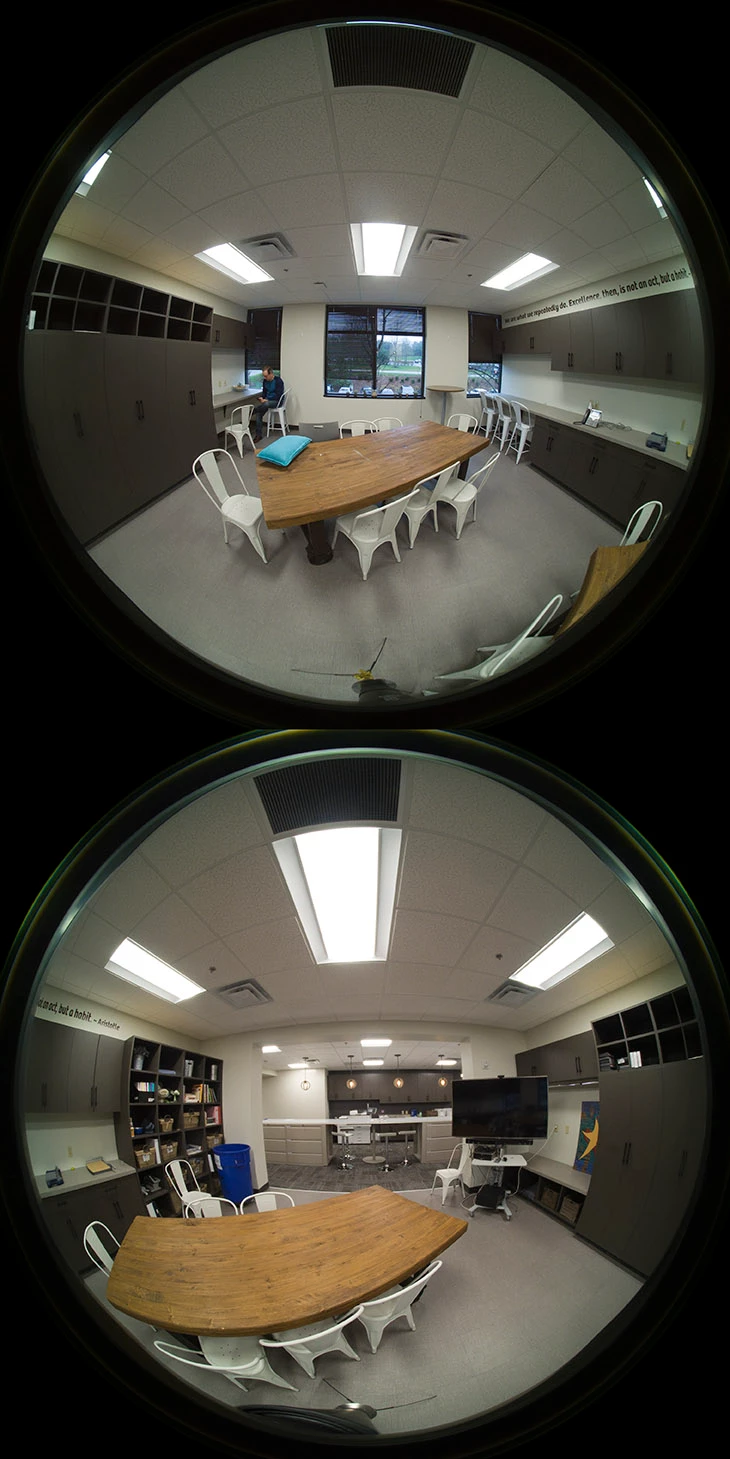
Can someone assist or point me to a useful tutorial? I have an Insta360 EVO camera and trying to simply edit some 360 photos. The camera shoots RAW in the .dng format. This opens in camera raw but separates the two cameras into circular photos one on top of the other. If I open the dng file in the Insta app they are merged into a true 360 photo but I have no RAW editing ability there. If I open the dng file in PS it doesn't merge the two cameras into one sphere that can be edited, stitched, and exported for 360. Am I missing something or is there simply no way to do this in PS?
Correct answer camerono29366438

Hey Steven, 


Not sure if you gave already figured this out as it has been a wheil since your original post, 


When shooting raw in the Insta 360,  the files save as you are showing them,   Run a batch export on all the raw DNG files thru the Insta360Studio,  You can find the batch expport inthe File tab of the Studio Application, 


Select all the DNG files that came out of the camera and give it a export file destination,  The Studio will stitch the photos and render a RAW stitched DNG fil ethat you can then edit in any software ie Lightroom or Photoshop,


Once your done your editng in the chosen editing software you can export as Jpeg for final viewing, 


Shootin gin Raw gives you a tone more flexibility then the .INS fileas that come from the camera (essentiallly Jpegs in their format) 


Hope this was helpful, 


Cameron 

3 replies

Participant
January 8, 2023

Insta360 is my one of the favorite action camera. Insta360 go 3 Release Date, here’s what I would do first: make it matte black. It’s less obvious, and I think it looks more cool. I’d make it a little larger, a bit taller, maybe about 20 inches wider to cause a larger battery.A larger sensor would be nice, but not an absolute must.

I would make the lens larger with a wider aperture to let more light in for low-light shots. I put an OLED display on the camera; the GoPro’s remote control has a tiny and really effective display, and the DJI remote has an even tinier one, so it would be great to see something like this on the camera body itself, no more relying on a smartphone to change the settings, and I’d like a better microphone.

camerono29366438Correct answer
Participant
March 21, 2020

Hey Steven, 


Not sure if you gave already figured this out as it has been a wheil since your original post, 


When shooting raw in the Insta 360,  the files save as you are showing them,   Run a batch export on all the raw DNG files thru the Insta360Studio,  You can find the batch expport inthe File tab of the Studio Application, 


Select all the DNG files that came out of the camera and give it a export file destination,  The Studio will stitch the photos and render a RAW stitched DNG fil ethat you can then edit in any software ie Lightroom or Photoshop,


Once your done your editng in the chosen editing software you can export as Jpeg for final viewing, 


Shootin gin Raw gives you a tone more flexibility then the .INS fileas that come from the camera (essentiallly Jpegs in their format) 


Hope this was helpful, 


Cameron 

Participant
April 4, 2020

Hi,

I'm having some trouble with this one and Insta 360 One R raw files after exporting them from Insta 360 Studio. Lightroom and Camera RAW via Photoshop opens the stiched files with half of the picture darker (or half of the picture lighter) than the other half. This only occurs in Adobe softwares and I had a long chat with Adobes customer service about this and we were unable to fix the issue. We even tried installing the upcoming Camera Raw beta with no luck..

The same dng files open okay in Affinity photo, but I'd much rather do the white balance and mixed lighting color correction etc. in Lightroom, since it's way more convenient. The original dng files straight from the camera work "okay" (just the same problem as the thread starter has with the two balloons).


lukebanfield
Participating Frequently
April 19, 2020

Same problem here too. I have had a very quick play around with merging the HDR from DNG files in Lightroom, then stitching the panorama in PTGui, then out of PTGui as uncompressed TIF for final tweaks (lightroom or Photoshop) before compressing to JPG. Bit of a faff, but was much better result than the JPG straight from Insta360 Studio 2020.

JJMack
Community Expert
Community Expert
February 5, 2020

You need some stitching application that support fish eye lens.  You may also do better taking 5 images up down and 3 horizontally at 120 degrees from each other for better overlap. Also check the Camera manufactures site to see what Firmwate and software downloads they have for you camera. insta360 evo  


Applications like Photoshop and Microsoft ICE do not support stitching circular fisheye images.   You need software that support stitching those circular fisheye lens images. 


stitching circular fisheye lens images software 

JJMack
Scasey
ScaseyAuthor
Inspiring
February 5, 2020

As I mentioned though, I have the Insta app that can stitch the images but I can't edit in RAW. Conversely, if I use PS I can edit in RAW but can't stitch the photo.

JJMack
Community Expert
Community Expert
February 5, 2020

There were free plug-in for stitching in Photoshop. "Panorama Tools"  But companies bugged the Professor so he removed them from the web. Other used the code to develop PTGui, PTAssembler and Hugin. However those developers did not include Photoshop Plug-ins in their Products.  I think that all you may have missed. Open source now. Panorama Tools  

JJMack