


Participant
August 10, 2020
Answered

Eraser tool does not erase up to eraser edge

  • August 10, 2020
  • 1 reply
  • 3647 views

For a couple of years now, across various macs that I have Photoshop CC installed on, the eraser tool does not erase up to the boundary of the eraser edge.  See screenshot below.  I've tried resetting everything, but not sure why it does this, making it very difficult to erase anything with precision, since the actual area erased is around 10% smaller than the tool.


Any ideas how to fix? 
This topic has been closed for replies.
Correct answer c.pfaffenbichler

Could you please post a screenshot with the pertinent Panels (Toolbar, Brush Settings, Options Bar, …) visible? 

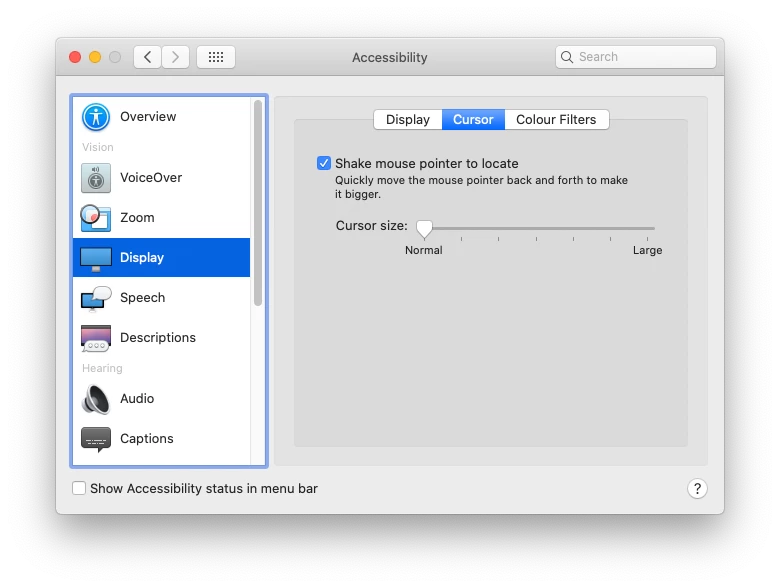
What are the Apple > Accessibility > Display > Cursor settings? 

1 reply

c.pfaffenbichler
Community Expert
c.pfaffenbichlerCommunity ExpertCorrect answer
Community Expert
August 10, 2020

Could you please post a screenshot with the pertinent Panels (Toolbar, Brush Settings, Options Bar, …) visible? 

What are the Apple > Accessibility > Display > Cursor settings? 

Participant
August 10, 2020

Thanks buddy - it was the cursor settings in accessibility.   Strange that this is linked to Photoshop, but now I know.  Problem fixed! 🙂