


Inspiring
May 29, 2023
Answered

Error 21: undefined is not an object

  • May 29, 2023
  • 25 replies
  • 16066 views

Hi, I'm using PS 24.5.0 on a M1 Mac.

Everytime I like to save an image (Ctrl + S) I get this error. The image will be saved, but I get this every time. I'm not shure, maybe since I installed the beta of PS. Now the beta is uninstalled.
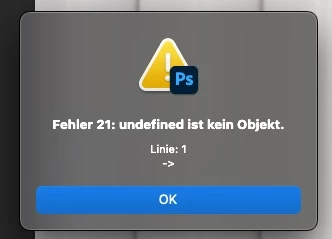
 

Does anyone have an idea?


Thanks, Stefan

Correct answer Pixel-Sallo

Problem solved!

I deinstalled PS (kept all settings) an reinstalled it 🙂

25 replies

riccardov93149412
New Participant
April 2, 2025

ciao a tutti aggiornato a 26.5 e beta 26.6 su entrambe le versioni si ripresenta l'errore 21 e ligthroom classic V14.2 non carica più il file al salvataggio di PS.  Non vorrei fare downgrade, qualche suggerimento?


Known Participant
October 18, 2023

I don't know if this is a solution or just a coincidence. But, the problem kept returning for me with every new PS update. Then I read somewhere someone mentioned something about having this issue when using the 'Edit In Photoshop' feature in Lightroom, which is what I do, too. So I tried opening a file outside of Lightroom and didn't have the problem. At that point, I realized I had 'Maximize Compatibility' turned off. I turned it back on and haven't had the problem since. For anyone having this issue, try turning Maximize Compatibility on and see if it solves the problem. It's worth a shot if nothing else works. 

Known Participant
September 11, 2023

Spoke too soon. Downgraded to 24.6 and the problem went away. So on a whim, I tried upgrading back to 24.7 and sure enough the problem was gone...so I thought. After several weeks error-free the error is back again. So annoying! So I guess I have to keep reinstalling every few weeks? PLEASE fix it!  

Participating Frequently
September 11, 2023

All of a sudden, I am having the same problem. 

When I am in LR and click on "open image in PS", PS will open but the image isn't showing up. Only way to open is when I open it as a spart object. 
Then when I try to save it back into LR, it won't show up in Lightroom. UGH! I updated a week ago or so and the problem just started

Peter Morlor
New Participant
September 9, 2023

I updated PS to 24.7.0 today, and then I noticed that I could not save my files as I usually do (from Lightroom to PS and back again).

When I use the shortcut command S I get the error message Error 21- undefined is not an object.


I'm on a Mac M1 - Ventura 13.3.1(a)


Does anyone else have this problem and know a solution for it?

raymondv79432589
Participating Frequently
August 14, 2023

downgraded It with a lower version , the problem is in Lightroom last update , have that problem 

raymondv79432589
Participating Frequently
August 12, 2023

same happend to me , i have apple MAC M2


Inspiring
August 10, 2023

I have/had the samer error on Photoshop 24.7 (MacOS M2Pro on Ventura 13.5), and it was fixed for me by uninstalling 24.7 using the Creative Cloud app (saving preferences), and then reinstalling 24.7 (same version) using the app. 


I am unable to open LR -> Adobe Photoshop Beta, however, after doing the same procedure with that app. My workaroud is to generate the PSD using production Photoshop (24.7) and then opening it in Photoshop Beta from Lightroom. 

New Participant
August 7, 2023

Reverting back to PS 24.6 will also fix the issue with files not opening in PS when using the "Edit In" function in Lightroom. 

Known Participant
August 1, 2023

same issue, I ended up downgrading to 24.6 to see if it works and so far things seem to be back to normal