


Inspiring
May 29, 2023
Answered

Error 21: undefined is not an object

  • May 29, 2023
  • 25 replies
  • 16066 views

Hi, I'm using PS 24.5.0 on a M1 Mac.

Everytime I like to save an image (Ctrl + S) I get this error. The image will be saved, but I get this every time. I'm not shure, maybe since I installed the beta of PS. Now the beta is uninstalled.
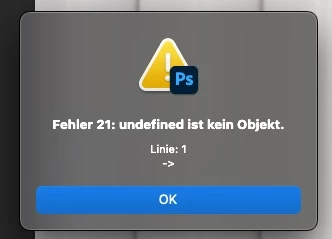
 

Does anyone have an idea?


Thanks, Stefan

Correct answer Pixel-Sallo

Problem solved!

I deinstalled PS (kept all settings) an reinstalled it 🙂

25 replies

New Participant
July 29, 2023

How do I downgrade to 24.6


raymondv79432589
Participating Frequently
August 14, 2023

Go to creative clouds , you can do it from their just remember preserve the settings when Adobe ask giving that option 

Known Participant
July 29, 2023

I just downgraded back to 24.6 and the problem is gone. So it's DEFINITELY something in the new update.

Known Participant
July 29, 2023

What update fixed the problem? This problem started happening to me AFTER I installed the latest update. Not before.

New Participant
August 13, 2023

Right,  I just updated and this is the first thing I see after hitting save.  Did you figure this out?

New Participant
August 13, 2023

Well I uninstalled the 24.7 version that I just updated and then reinstalled it and now it works. 


Inspiring
July 28, 2023

This exact same error started happening to me this morning.   Fortunately there was an update available and that fixed the problem.

Pixel-SalloAuthorCorrect answer
Inspiring
May 29, 2023

Problem solved!

I deinstalled PS (kept all settings) an reinstalled it 🙂

New Participant
September 9, 2023

I downgraded to 24.6. This fixed my Error 21 issue, as well as the issue with 'Edit in Photoshop' from Lightroom.