

Inspiring
September 18, 2022

P: Incorrect measurements for letter size - Photoshop 23.5.1

  • September 18, 2022
  • 10 replies
  • 921 views

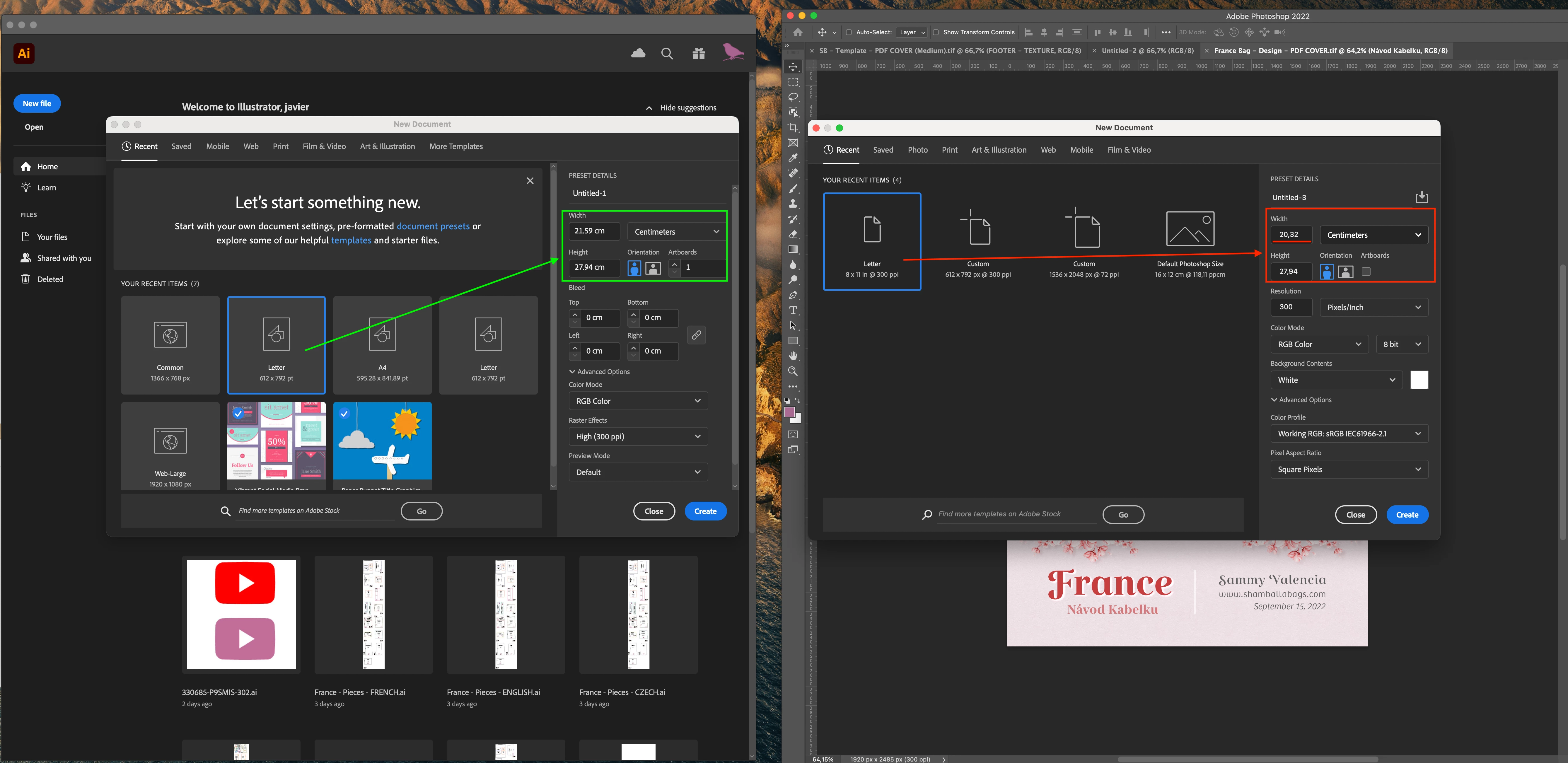
Incorrect measurements for letter size.

Photoshop: 23.5.1

Mac OS: 12.6

Macbook M1 Pro 16 GB RAM
 

This topic has been closed for replies.

10 replies

BrettN
Community Manager
Community Manager
October 28, 2022

I was able to recreate the behavior on my end. It occurs when your OS is set to use Comma instead of Period for decimal separation (which I noticed in the OP screen shot). I've logged a bug to get this addressed. The workaround for now is to simply manually enter the correct values and either save as a new preset or, once you've created the file, use the "Recent" saved version for future new documents. 

Legend
October 28, 2022

Is your OS running in English or another language?

Legend
October 28, 2022

@Ged_Traynor ack. Sorry. 

Inspiring
October 28, 2022

PS 2023.

Windows y  Mac OS

Error: Las dimensiones del Ancho para el tamaño Carta estan mal, no corresponden al verdadero. En la imagen pueden comprobar la comparacion con Illustrator e Indesign.


Ged_Traynor
Community Expert
Community Expert
October 28, 2022

Hi

It's showing the correct dimensions for me with Photoshop version 24.0 on Windows 10

Have you tried resetting your preferences

Ged_Traynor
Community Expert
Community Expert
October 28, 2022
Legend
October 28, 2022

Hmm. I can't reproduce either: 

If you restore your preferences using this manual method does it work correctly?
https://helpx.adobe.com/photoshop/using/preferences.html#Manually
If that doesn't solve it, you can quit Photoshop and put the Settings folder back.

Inspiring
October 28, 2022

@davescm  Sorry about the delay in responding. I have updated to version 24.0 and the error continues. In the Print tab, it still has the wrong dimensions for Letter size.

davescm
Community Expert
Community Expert
September 19, 2022

@J E L Yes, but if you go to the Print tab and choose the 8.5 x 11 Letter preset and change the dimensions to 8 x 11, and then name that edited preset 'Letter' before clicking Create, then it will appear in Recents as 'Letter 8 x 11'. The original 8.5 x 11 Letter still shows in the Print tab.

That is why I asked whether the original , in the Print tab, is still 8.5 x 11


Dave


J E L
Community Expert
Community Expert
September 18, 2022

@davescm I noticed that, too, Dave. But if you start on the Print tab for the preset, then come back after using that size, the Letter option will show up in Recent. As it did here for me just now:


davescm
Community Expert
Community Expert
September 18, 2022

Have you created that one yourself, based on the standard preset? I ask as it is in your 'recents' rather than 'Print'

The version I have in 'Print' measures 8.5x11 inches = 21.59 x 29.94 cm (this is Photoshop v23.5.1)


Dave


J E L
Community Expert
Community Expert
September 18, 2022

@YULIAN DAVID That's certainly strange! The size is incorrectly written as 8x11 in. It's correct for me (Windows 10; Photoshop 23.5.1)
