


Tom Winkelmann
Inspiring
November 14, 2018
Answered

ESTK: Photoshop CC2019 as default application

  • November 14, 2018
  • 4 replies
  • 3303 views

Today I installed the new updates for photoshop - first v20.0.1 then 19.1.7

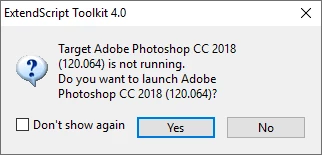
After this ESTK opens CC2018 as default application if I start a script which contains only "#target photoshop"

How can I get CC2019 back as default application in ESTK? It would be nice, without using "#target photoshop-130", selecting "Adobe Photoshop CC2019 (130.064)" all the time in the dropdown menu or reinstalling CC2019.
Regards

Tom

This topic has been closed for replies.
Correct answer Tom Ruark

I would reverse this. Last one in wins as "target". first  19.1.7 then v20.0.1

I would uninstall both and do 19 then 20.

4 replies

e.reed.rogers
Inspiring
December 30, 2018

Kukurykus​ They specifically told me that it is a know issue and "say" it will be fixed in the next release however I wouldn't count on it. I would just stick with v 19.1.7 and not update that. It seems to be the most recent stable version. Happy New Year!

Kukurykus
Legend
December 30, 2018

Yes, I completely agree. Unfortunately twice I have been told the same, that something is going to be fixed with next update, then future update, and then that was not fixed even after many months in another release. There is no certainty about that.

e.reed.rogers
Inspiring
January 3, 2019

To make it even worse I just update my Premiere Pro and am having the same gosh darn issue! The app opens but won't get past the blue circle "authentication" screen. I think a Kangaroo could do a better job then whomever at Adobe is messing this up. I said it from the start that this "subscription model" would only cause big headaches for the end user. Prophecy fulfilled I guess. Just call me the Nostradamus of Adobe.

Participant
December 1, 2018

Thanks -- and this is absolutely asinine by Adobe. Why would anyone want to keep CC 18 after updating to 19?

Kukurykus
Legend
December 1, 2018
Participant
December 1, 2018

I also had the issue of Bridge 2019 opening Photoshop CC 2018 instead of 19. The workaround is top end Photoshop before Bridge, and then Bridge opens 19. What a horrible way to have to work.

Sam Ostrow

Sam David Photography

<http://www.samdavidphotography.com/> www.samdavidphotography.com

CT ME:

1200 High Ridge Road – 11B Box 442

Stamford CT 06905 Stonington ME 04681

Tel: 914 414 9868

Tom Ruark
Tom RuarkCorrect answer
Inspiring
November 14, 2018

I would reverse this. Last one in wins as "target". first  19.1.7 then v20.0.1

I would uninstall both and do 19 then 20.

Tom Winkelmann
Inspiring
November 15, 2018

That's what I would like to have avoided - but seems to be the only solution.

Thank you all...

Kukurykus
Legend
November 14, 2018
Tom Winkelmann
Inspiring
November 14, 2018

Thanks for your reply ...

... unfortunately the changes of the pcd.db (replaced all 30 x "120.064" entries with "130.064" and the "Photoshop CC 2018" with "Photoshop CC 2019") didn't bring the desired success.


Do you have more informations about what exactly needs to be changed?

Kukurykus
Legend
November 14, 2018

Did you open pcd.db file by the notepad? If so that won't work, as you have to read file binaries that you rewrite and save.