


Known Participant
December 8, 2023
Answered

Export layers to files - How to set 'File Name Prefix' empty by default?

  • December 8, 2023
  • 2 replies
  • 4146 views

When using 'Export layers to files' I would realy like 'File Name Prefix' to be empty by defaut.
Can anyone please tell me what to change in the script to have this box NOT containing the current file name by default?


EDIT: My first post was not clear. I also wanted to get rid of the leading sequential numbers.
Thank you!

Correct answer Stephen Marsh

@TrimMark 


Just to be crystal clear, are you referring to the sequential numbers that are added, even if the prefix field is left blank:


Layer Names:

Layer 0

Layer 1


Exported File Names:

_0000_Layer 0.jpg

_0001_Layer 1.jpg


They are there as a safety to stop overwriting an existing file if there are multiple layers with the same name. I'm sure that the script could be modified, these Adobe default scripts are very complicated.


EDIT: If all you want is the layer name, then try changing the following as per the annotated screenshot and restart Photoshop:
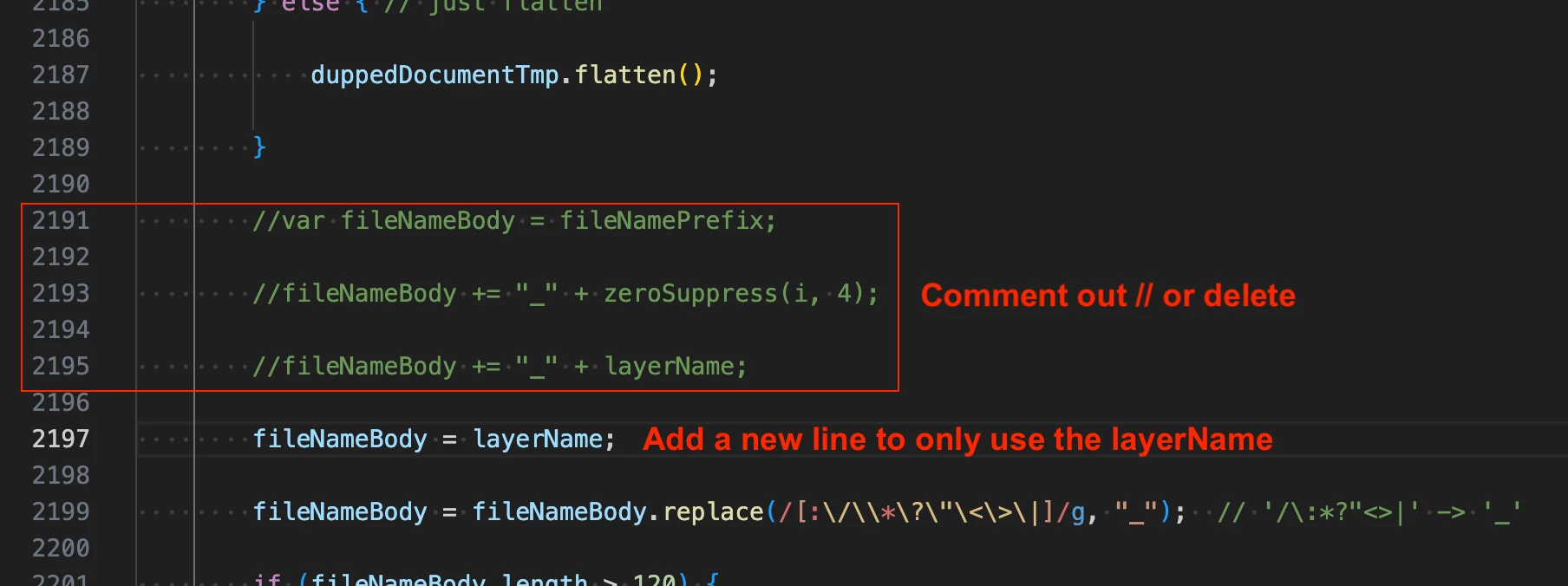


This has no effect on the GUI, all it does is change the output filename.


2 replies

TrimMarkAuthor
Known Participant
January 3, 2024

Annyone, please?
It's annoying to have to rename the exported files.

I want the exported files to have the name of the layer, no prefixes.

Stephen Marsh
Community Expert
Stephen MarshCommunity ExpertCorrect answer
Community Expert
January 3, 2024

@TrimMark 


Just to be crystal clear, are you referring to the sequential numbers that are added, even if the prefix field is left blank:


Layer Names:

Layer 0

Layer 1


Exported File Names:

_0000_Layer 0.jpg

_0001_Layer 1.jpg


They are there as a safety to stop overwriting an existing file if there are multiple layers with the same name. I'm sure that the script could be modified, these Adobe default scripts are very complicated.


EDIT: If all you want is the layer name, then try changing the following as per the annotated screenshot and restart Photoshop:


This has no effect on the GUI, all it does is change the output filename.


Participant
June 17, 2024

Hi @Stephen Marsh hi thanks for this info, I'm using Photoshop beta Version: 25.11.0 20240613.m.2665 411f25b x64, as it has the new generative fill features, but I can't find that section, would you know what I need to do in that version please?

GNDGN
Inspiring
December 8, 2023

Change the line 579 beginning with 

dlgMain.etFileNamePrefix = ...

to this:

dlgMain.etFileNamePrefix = dlgMain.grpTopLeft.add("edittext", undefined, "");


____________________Robotic Process Automation in Desktop Publishing (Book): https://doi.org/10.1007/978-3-658-39375-5
TrimMarkAuthor
Known Participant
December 8, 2023

Thank you for your help.
Now there is a other prefix that I cant turn off: '_000x'