Inspiring
July 26, 2020
Answered

Export PNG sequence in vertical stacked animation

  • July 26, 2020
  • 2 replies
  • 1336 views

Hi forum.


Is it possible that photoshop has a funciton whre it can export a PNG sqeuence animation in a vertical direction?


Here's an example of what Im trying to acheive in adobe animate but with no luck. Maybe in PS there's something in the animaiton properties which can do this?


I have made an animation of a rotating clog wheel which spins on the same axis. (20 frames). These 20 frames need to be exported stacked on a vertical direction.


Thank you. 



This topic has been closed for replies.
Correct answer JJMack

If you want to create that single vertical image from your square Frame animation you can.  If your Layered frame animation  document has  20 layers one for each frame you can you can create  that image document you want.  If you have  20 PGN files you can load them into a layer stack and create that image.  If your animated gif layer document does not have those 20 layers.  You can open your Animated Gif in Photoshop and that document will have those 20 Layers and you can create that image. 


You would add canvas to the document height so the document height is 20x the original height. You would then distribute the 20 layer over the canvas and save your vertical image.


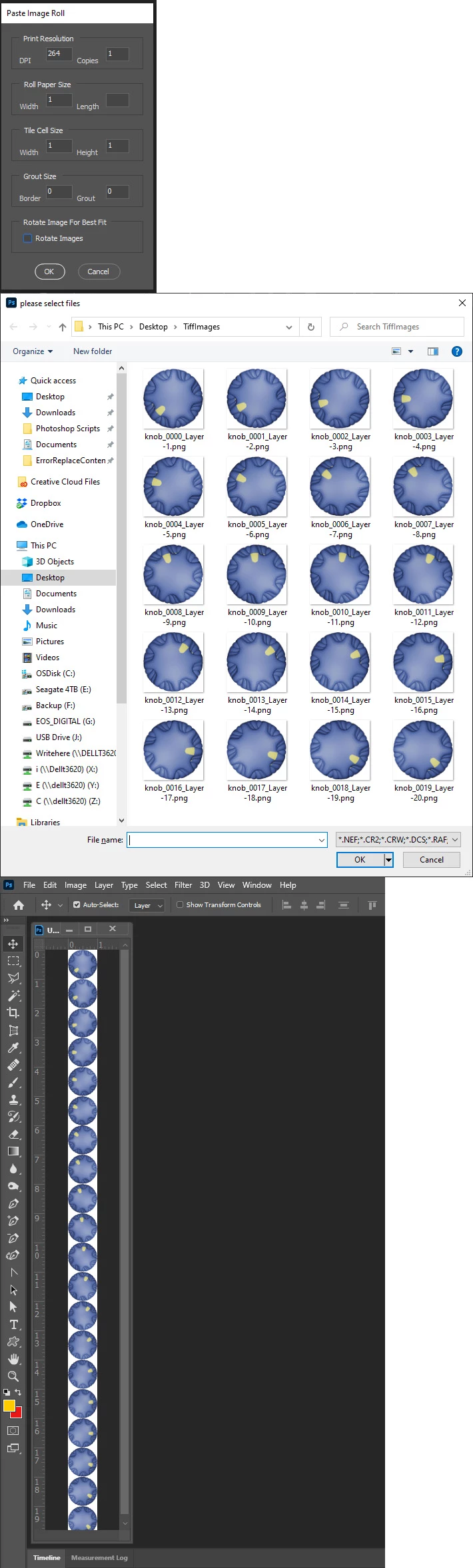
If you have the 20 Files or export the 20 file my PasteImageRoll script could stitch them vertically

2 replies

JJMack
Community Expert
JJMackCommunity ExpertCorrect answer
Community Expert
July 26, 2020

If you want to create that single vertical image from your square Frame animation you can.  If your Layered frame animation  document has  20 layers one for each frame you can you can create  that image document you want.  If you have  20 PGN files you can load them into a layer stack and create that image.  If your animated gif layer document does not have those 20 layers.  You can open your Animated Gif in Photoshop and that document will have those 20 Layers and you can create that image. 


You would add canvas to the document height so the document height is 20x the original height. You would then distribute the 20 layer over the canvas and save your vertical image.


If you have the 20 Files or export the 20 file my PasteImageRoll script could stitch them vertically

JJMack
Inspiring
July 26, 2020

Interesting tool,  first time Im seeing this, Im not familiar with scripts, as it sounds something with code, which scares me.

But where can I try this script?


Thank you.

JJMack
Community Expert
Community Expert
July 26, 2020
JJMack
lambiloon
Community Expert
Community Expert
July 26, 2020

Hi yes you can i think if make a canvas like this and can export it.....regards

Ali Sajjad / Graphic Design Trainer / Freelancer / Adobe Certified Professional