mattheww62744328
Participant
October 12, 2018
Answered

Extending a patterned background (Tiled floor)

  • October 12, 2018
  • 4 replies
  • 2328 views

Hi

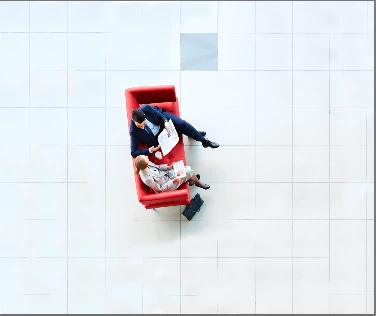
I want to extend the background of the image which i have attached. The issue i have is that when using content-aware functionality the tiles are skewed. Is there a technique which i can use to extend the background reliably but keep the proportions of the tiles correct.

Thanks for any help!

Regards

Matt

    This topic has been closed for replies.
    Correct answer davescm

    Another way:

    Make the canvas much larger than the final requirement

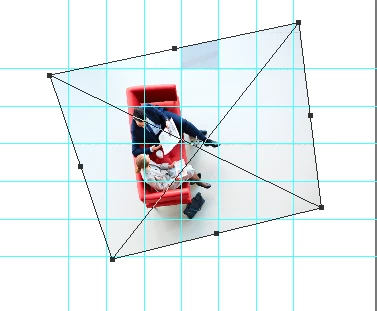
    Make a copy and transform distort to make the tiles square - use a guide layout to ensure square

    Clone into the empty areas

    Use transform distort to transform back to the opriginal perspective (use the original layer with low opacity as a guide)

    Crop as required

    Dave

    4 replies

    Semaphoric
    Community Expert
    Community Expert
    October 12, 2018

    You could use the Vanishing Point filter with the Clone Stamp option, but you'd have to be careful with the shadows.

    davescm
    Community Expert
    davescmCommunity ExpertCorrect answer
    Community Expert
    October 12, 2018

    Another way:

    Make the canvas much larger than the final requirement

    Make a copy and transform distort to make the tiles square - use a guide layout to ensure square

    Clone into the empty areas

    Use transform distort to transform back to the opriginal perspective (use the original layer with low opacity as a guide)

    Crop as required

    Dave

    Norman Sanders
    Legend
    October 12, 2018

    If you were to rotate the image so that the tile line was horizontal, you would see that the vertical line of the tile tapers and does not align because the camera angle is not directly overhead and centered in the area. Any attempt to add tiles would be difficult at best. I would suggest silhouetting the subject (a loose silhouette and blend into the tile area) and recreating the tile surface, and then Edit > Transform > Distort to introduce a slight taper.

    saponcpa
    Participating Frequently
    October 12, 2018

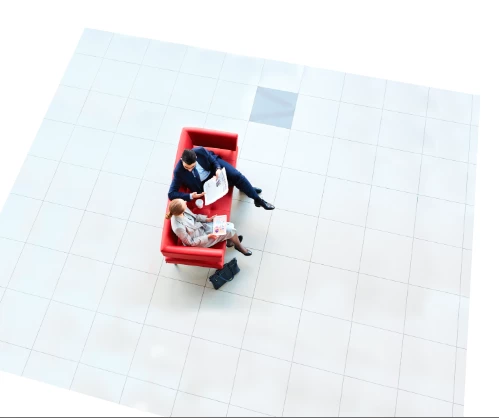
    We understand your concern completely. Please check out the attached file we have done already. The foreground has been extended maintaining the texture, color, and tiles design effect. We used Photoshop clone stamp tool to accomplish the work. We deliver similar service at ease.

    mattheww62744328
    Participant
    October 12, 2018

    Hi

    Thanks for the image you attached. I actually would like to make the background a lot larger than it is. Could you run through how you achieved this effect. I have tried using the clone stamp tool, however i couldn't get the same seamless effect that you achieved.

    Thank you for your help, much appreciated.

    saponcpa
    Participating Frequently
    October 13, 2018

    Yes, it can be extended more and more whatever you want. Do you have more images similar to this? Please do not hesitate to let us know (Clipping Path Arts) if you want to learn how we do the magic here.

    Thank you.

    Inspiring
    October 12, 2018

    If you're familiar with Frequency seperation, I would suggest this:

    Make sure your low frequency blurs the tile lines.

    Then manually clone the high frequency to extend the lines.

    Scale the low frequency around the areas the floor is and this should make a natural transition.