

w0nderfvl
Known Participant
February 28, 2021
Question

File has different colours when switching to .svg

  • February 28, 2021
  • 3 replies
  • 2181 views

Hello


somehow the colours of my file are not displayed as wanted when I change the file type from png to svg.

Maybe someone can tell me how to solve this?

 png
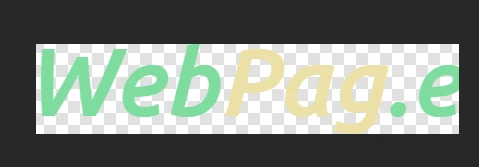
 

svg

This topic has been closed for replies.

3 replies

c.pfaffenbichler
Community Expert
Community Expert
March 1, 2021

Changing one of the RGB values of the last »e« by one value seems to provide a work-around for the issue. 

w0nderfvl
w0nderfvlAuthor
Known Participant
March 1, 2021

Can you tell me how to do this?

c.pfaffenbichler
Community Expert
Community Expert
March 1, 2021

It is a crude work-around but I have not been able to figure out which exact combination on colors on letters causes the issue. 

Like I said this looks like a proper bug to me … 

c.pfaffenbichler
Community Expert
Community Expert
March 1, 2021

Sorry, double post. 


Edit: As a workaround one could Convert to Shape and split the Shape Layer into the two color-elements. 

w0nderfvl
w0nderfvlAuthor
Known Participant
March 17, 2021

Can you show me how to do this?

w0nderfvl
w0nderfvlAuthor
Known Participant
March 25, 2021


Do you convert the layer to smart object from 1. to 2. picture? I don't really know what you do there 😞

Michael Bullo
Community Expert
Community Expert
March 1, 2021

Can you elaborate a little more on what you are doing…

  1. How are you converting from one format to another?
  2. Are you using color profiles?
  3. Are you previewing these graphics in Photoshop, a web browser, or something else?
  4. etc…
w0nderfvl
w0nderfvlAuthor
Known Participant
March 1, 2021

I just created this layer in photoshop and want to export as .. and then I select .svg And I see it in the preview changing colours. I don't know why. When I click to png it is normal. when I change it back to svg its wrong.

w0nderfvl
w0nderfvlAuthor
Known Participant
March 1, 2021

 png


svg