Balaji Murugesan
Known Participant
July 12, 2021
Answered

Find text and redefine font family name, style, size and leading.

  • July 12, 2021
  • 3 replies
  • 1218 views

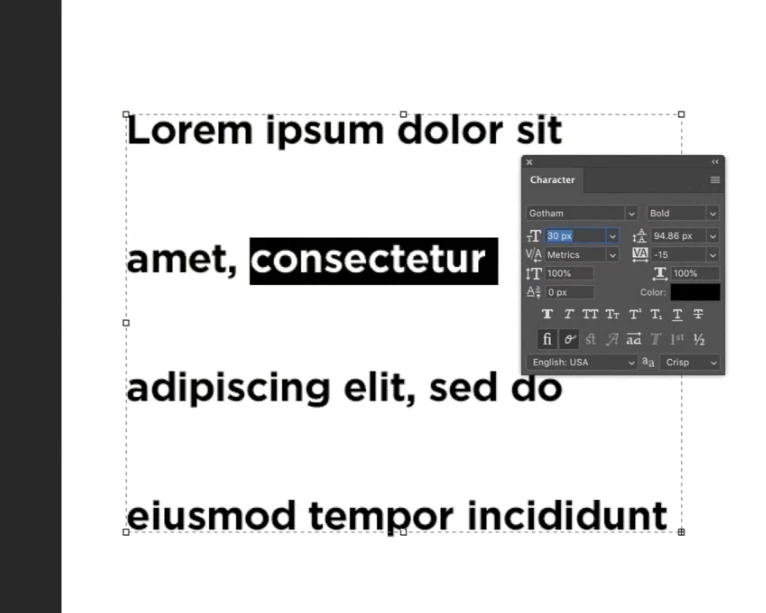
Hi Teams, For my request, I need to find a word in a paragragh and redefine the font family name, style, size and leading.


Ex. a sample snap attached here.


For this snap: Word "consectetur" font size is 30pt, and i need to find the text and redefince font family name, style, size and leading with new value. Thanks

This topic has been closed for replies.
Correct answer r-bin

Everything is not so simple and reliable there. In general, it is impossible to correctly change the properties of the text (depends on the text)


Try this


var s = activeDocument.activeLayer.textItem.contents;

var x1 = s.indexOf("consectetur");
if (x1 >= 0) set_text_style(x1, "consectetur".length, mdf); 
 

function mdf(d) 
    {
    try { 
        var sz_v = d.getUnitDoubleValue(stringIDToTypeID("impliedFontSize"));
        var sz_t = d.getUnitDoubleType(stringIDToTypeID("impliedFontSize"));
        d.putUnitDouble(stringIDToTypeID("impliedFontSize"), sz_t, sz_v+2);


        var sz_v = d.getUnitDoubleValue(stringIDToTypeID("impliedLeading"));
        var sz_t = d.getUnitDoubleType(stringIDToTypeID("impliedLeading"));
        d.putUnitDouble(stringIDToTypeID("impliedLeading"), sz_t, sz_v+2);
        }
    catch (e) { throw (e); }
    }

function set_text_style(from, len, style_modifier) 
    { 
    try { 
        // get textKey descriptor for activeLayer

        var r = new ActionReference(); 
        r.putEnumerated(stringIDToTypeID("textLayer"), stringIDToTypeID("ordinal"), stringIDToTypeID("targetEnum")); 
        var textKey = executeActionGet(r).getObjectValue(stringIDToTypeID("textKey"));

        var list = textKey.getList(stringIDToTypeID("textStyleRange"));
        var new_list = new ActionList(); 

        // get styles of each char, modify if needed
        var styles = new Array();           

        var x = 0; // chars counter

        for (var i = 0; i < list.count; i++)
            {
            var d = list.getObjectValue(i);

            var x0 = d.getInteger(stringIDToTypeID("from"));
            var x1 = d.getInteger(stringIDToTypeID("to"));

            var st = d.getObjectValue(stringIDToTypeID("textStyle"));

            for (var n = 0; n < x1-x0; n++)
                {
                if (x >= from && x < from+len) // modify current style
                    {
                    var d = new ActionDescriptor(); 
                    d.fromStream(st.toStream()); // duplicate style
                    style_modifier(d);           // modify current style
                    styles.push(d);
                    }
                else
                    {
                    styles.push(st);
                    }

                ++x;
                }
            }

        styles.push(new ActionDescriptor());

        // scan styles, modify if needed, compact to range (from-to)

        var from = 0;

        for (var i = 0; i < styles.length-1; i++)
            {
            if (!styles[i].isEqual(styles[i+1]))
                {
                var d = new ActionDescriptor(); 
                d.putInteger(stringIDToTypeID("from"), from); 
                d.putInteger(stringIDToTypeID("to"), i+1); 
                d.putObject(stringIDToTypeID("textStyle"), stringIDToTypeID("textStyle"), styles[i]); 

                new_list.putObject(stringIDToTypeID("textStyleRange"), d);

                from = i+1;
                }
            }

        // put new styles to textKey descriptor

        textKey.putList(stringIDToTypeID("textStyleRange"), new_list); 

        // set modified textKey back to textLayer

        var d = new ActionDescriptor(); 
        var r = new ActionReference(); 
        r.putEnumerated(stringIDToTypeID("textLayer"), stringIDToTypeID("ordinal"), stringIDToTypeID("targetEnum")); 
        d.putReference(stringIDToTypeID("null"), r); 
        d.putObject(stringIDToTypeID("to"), stringIDToTypeID("textLayer"), textKey); 

        executeAction(stringIDToTypeID("set"), d, DialogModes.NO); 
        } 

    catch (e) { alert(e); }  
    } 

3 replies

Legend
July 13, 2021

I have a sample script on my Dropbox that does this. You WILL need to edit the script with your parameters.
Adobe Scripts

Look for Photoshop Scripts->Update text layers

You can search for specific text, replace it, and set formatting.

Balaji Murugesan
Known Participant
July 17, 2021

Hi @Lumigraphics, Thanks for your set of scripts. i will look into this and let you as soon as possible.

Legend
July 12, 2021

There is something similar here:

Specific character changing to Small Caps


Balaji Murugesan
Known Participant
July 13, 2021

Hi @r-bin, Thanks a ton.

i will helpful to redefine font name.

Addtionaly i request you to, I need to find a text and redefine character format based custom inputs. Like as if font size is 30. I need to add extre 2 point and results 32 is applied in the finded text. Your help much appreciated ☺️


Ex: the word Consectetur font size is 30, I need to redefine the value as 32, if 50 means it need to redefine as 52.
Same as leading if leading 94 means i need to find current leading value and add 2, then redefine the new value 96 same finding words.


Thanks


r-binCorrect answer
Legend
July 13, 2021

Everything is not so simple and reliable there. In general, it is impossible to correctly change the properties of the text (depends on the text)


Try this


var s = activeDocument.activeLayer.textItem.contents;

var x1 = s.indexOf("consectetur");
if (x1 >= 0) set_text_style(x1, "consectetur".length, mdf); 
 

function mdf(d) 
    {
    try { 
        var sz_v = d.getUnitDoubleValue(stringIDToTypeID("impliedFontSize"));
        var sz_t = d.getUnitDoubleType(stringIDToTypeID("impliedFontSize"));
        d.putUnitDouble(stringIDToTypeID("impliedFontSize"), sz_t, sz_v+2);


        var sz_v = d.getUnitDoubleValue(stringIDToTypeID("impliedLeading"));
        var sz_t = d.getUnitDoubleType(stringIDToTypeID("impliedLeading"));
        d.putUnitDouble(stringIDToTypeID("impliedLeading"), sz_t, sz_v+2);
        }
    catch (e) { throw (e); }
    }

function set_text_style(from, len, style_modifier) 
    { 
    try { 
        // get textKey descriptor for activeLayer

        var r = new ActionReference(); 
        r.putEnumerated(stringIDToTypeID("textLayer"), stringIDToTypeID("ordinal"), stringIDToTypeID("targetEnum")); 
        var textKey = executeActionGet(r).getObjectValue(stringIDToTypeID("textKey"));

        var list = textKey.getList(stringIDToTypeID("textStyleRange"));
        var new_list = new ActionList(); 

        // get styles of each char, modify if needed
        var styles = new Array();           

        var x = 0; // chars counter

        for (var i = 0; i < list.count; i++)
            {
            var d = list.getObjectValue(i);

            var x0 = d.getInteger(stringIDToTypeID("from"));
            var x1 = d.getInteger(stringIDToTypeID("to"));

            var st = d.getObjectValue(stringIDToTypeID("textStyle"));

            for (var n = 0; n < x1-x0; n++)
                {
                if (x >= from && x < from+len) // modify current style
                    {
                    var d = new ActionDescriptor(); 
                    d.fromStream(st.toStream()); // duplicate style
                    style_modifier(d);           // modify current style
                    styles.push(d);
                    }
                else
                    {
                    styles.push(st);
                    }

                ++x;
                }
            }

        styles.push(new ActionDescriptor());

        // scan styles, modify if needed, compact to range (from-to)

        var from = 0;

        for (var i = 0; i < styles.length-1; i++)
            {
            if (!styles[i].isEqual(styles[i+1]))
                {
                var d = new ActionDescriptor(); 
                d.putInteger(stringIDToTypeID("from"), from); 
                d.putInteger(stringIDToTypeID("to"), i+1); 
                d.putObject(stringIDToTypeID("textStyle"), stringIDToTypeID("textStyle"), styles[i]); 

                new_list.putObject(stringIDToTypeID("textStyleRange"), d);

                from = i+1;
                }
            }

        // put new styles to textKey descriptor

        textKey.putList(stringIDToTypeID("textStyleRange"), new_list); 

        // set modified textKey back to textLayer

        var d = new ActionDescriptor(); 
        var r = new ActionReference(); 
        r.putEnumerated(stringIDToTypeID("textLayer"), stringIDToTypeID("ordinal"), stringIDToTypeID("targetEnum")); 
        d.putReference(stringIDToTypeID("null"), r); 
        d.putObject(stringIDToTypeID("to"), stringIDToTypeID("textLayer"), textKey); 

        executeAction(stringIDToTypeID("set"), d, DialogModes.NO); 
        } 

    catch (e) { alert(e); }  
    } 

Kukurykus
Legend
July 12, 2021

Can you mark correct answer in previous thread you created, or if there is not any that satisfy your expectations, to say why? Text is overset text?

Balaji Murugesan
Known Participant
July 12, 2021

Hi @Kukurykus, still that request is work in progress and will let you know as soon as possible the status. Kindly review my new request. I need to find a text and redefine character format based custom puts. Like as if font size is 30. I need to add extre 2 point and results 32 is applied in the finded text. Your help much appreciated ☺️

Kukurykus
Legend
July 12, 2021

The best answer you can get for now from r-bin linked thread 😉