Participant
July 24, 2019
Answered

Fit on Screen automatically in Photoshop

  • July 24, 2019
  • 5 replies
  • 18185 views

Hello!
Is there a preset in Photoshop CC that each time I open an image, it will fit in the window. Each time I have to use (Command 0) to Fit In View. Is there a setting that fixes this. Thanks!

Message was edited by: Sahil Chawla
    Correct answer Stephen Marsh

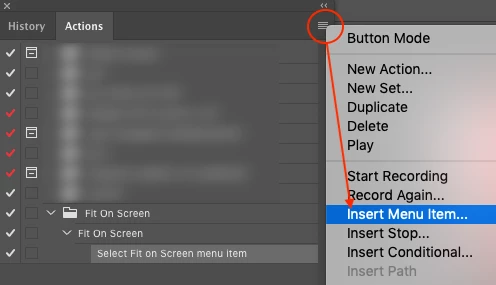
    Recording an action:

    Create actions in Adobe Photoshop

    https://www.creativebloq.com/adobe/create-own-photoshop-actions-61411918

    or Google, YouTube etc.

    (Note: you will need to insert the menu item for "Fit on screen" into the action as it can't be recorded)

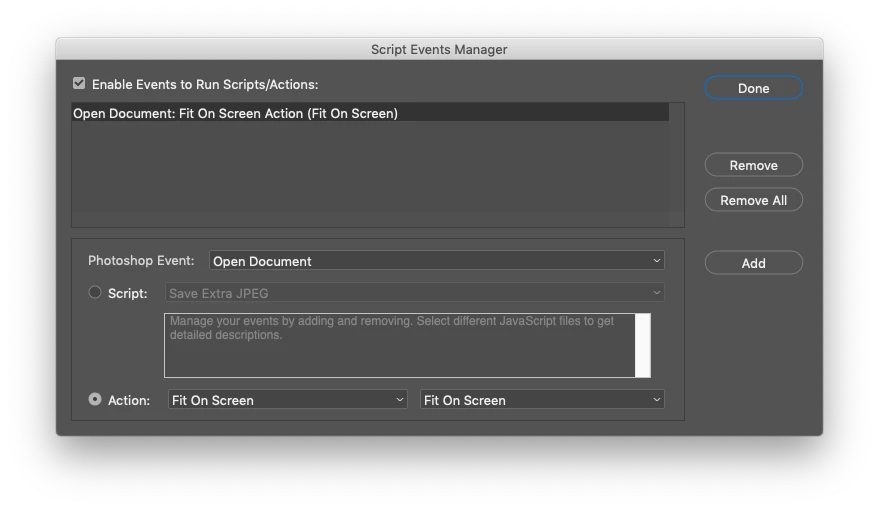
    Script Events Manager:

    https://www.designeasy.co/2018/06/how-to-automate-boring-tasks-using.html

    https://photoshoptrainingchannel.com/using-the-script-events-manager-in-adobe-photoshop/

    or Google, YouTube etc.

    EDIT – Here it is in one video:

    https://layersmagazine.com/photoshop-fit-to-screen.html

    While it would also be simple enough to adapt this one:

    Adobe Photoshop Scripts | Trevor Morris Photographics

    5 replies

    gener7
    Community Expert
    Community Expert
    June 24, 2024

    As an update, here's the link and instructions for the CS2 to CC "Fit Image on Screen".

    https://www.mediafire.com/file/18bjnkl7inisuk9/Fit%20image%20on%20screen.zip

    csgaraglino
    Known Participant
    March 23, 2022

    Anyone have an updated solution, and the current vedrsion states:


    You cannot record the painting and toning tools, tool options, View commands, and Window commands. However, you can insert many non-recordable commands into an action using the Insert Menu Item command.


    Stephen Marsh
    Community Expert
    Community Expert
    March 23, 2022

    @csgaraglino wrote:

    Anyone have an updated solution, and the current vedrsion states:


    You cannot record the painting and toning tools, tool options, View commands, and Window commands. However, you can insert many non-recordable commands into an action using the Insert Menu Item command.


    An updated solution to which specific issue? I don't believe anything has changed. Please provide some detail of exactly what you are trying to achieve.

    janeeporter
    Inspiring
    November 2, 2021

    Thanks so much Stephen, this works  - https://layersmagazine.com/photoshop-fit-to-screen.html 


    Stephen Marsh
    Community Expert
    Community Expert
    July 24, 2019

    You need to record an action, then setup script events manager to automatically play the action when a file is opened.

    Participant
    July 24, 2019

    Is there a tutorial how to do that?

    Stephen Marsh
    Community Expert
    Stephen MarshCommunity ExpertCorrect answer
    Community Expert
    July 25, 2019

    Recording an action:

    Create actions in Adobe Photoshop

    https://www.creativebloq.com/adobe/create-own-photoshop-actions-61411918

    or Google, YouTube etc.

    (Note: you will need to insert the menu item for "Fit on screen" into the action as it can't be recorded)

    Script Events Manager:

    https://www.designeasy.co/2018/06/how-to-automate-boring-tasks-using.html

    https://photoshoptrainingchannel.com/using-the-script-events-manager-in-adobe-photoshop/

    or Google, YouTube etc.

    EDIT – Here it is in one video:

    https://layersmagazine.com/photoshop-fit-to-screen.html

    While it would also be simple enough to adapt this one:

    Adobe Photoshop Scripts | Trevor Morris Photographics

    Sahil.Chawla
    Adobe Employee
    Adobe Employee
    July 24, 2019

    Hi there,

    I found a similar forum thread here: Photoshop CS6: Why don't images automatically open in 'Fit Screen' mode, by default?

    Could you please let us know if it helps?

    Regards,
    Sahil

    Participant
    July 24, 2019

    Thank you for sharing this. Unfortunately the link to the plug does not work anymore. Is there a new plug in?

    Ussnorway7605025
    Legend
    July 25, 2019

    crafts63265040  wrote

    Thank you for sharing this. Unfortunately the link to the plug does not work anymore. Is there a new plug in?

    I have just tested both the scripts Gene made and confirm they work

    Sahil.Chawla I assume you want a quick tutorial?