


Participant
February 16, 2018
Answered

Focus Stacking Droplet

  • February 16, 2018
  • 1 reply
  • 1824 views

I want to be able to drop 4/5/6 images into a droplet and photoshop auto aligns then and then focus stack blends them and saves as a tiff/psd/whatever. I've tried making an action and droplet but each time it asks me to locate the files manually. I'm spending 95% of my time on this job sitting there and loading files. There has to be a quicker way than this. Does anyone have a droplet that works for this? Is it possible? I've tried several different ways, via photostacking open files, and folders/also stacking opened files/, photomerge, everything. The same problem when doing the action is that it looks for the indiviual files.
This topic has been closed for replies.
Correct answer JJMack

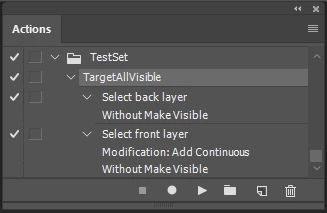
To target all visible layers you should be able to record that in an action. By recording two steps using shortcut keys.  Alt+, then Shift+Alt+. The problem I see is how are you going to get the files into a layer stack in the first place.

1 reply

JJMack
Community Expert
Community Expert
February 16, 2018

The thing is Droplets are created from action and the action should be one that is suitable for batching. If the action uses an interactive script like Load file into a stack that has a dialog the action step will be interactive not something you want in a batch action.   The droplet is not going to automate the scripts interactive active dialog.    What steps do you have in the Action you created the droplet with,  Did it have a step like  file>scripts>Load files into stack.  Also I believe the droplet will open the files you drop on it in Photoshop one at a time and play you action then open thenxt file.  All image files you dropped on the droplet will not be open in Photoshop all at once.

JJMack
Participant
February 19, 2018

The problem I have with the action is that there isn't an option to select all layers (or is there?). So it just selects the ones I manually select. Let me rephrase this question. Is there a way I can fully automate focus stacking? I'm shooting jewellery, and have to focus stack hundreds of items, which is thousands of files. I can't be doing it manually, via stacking the images and blending them. It's just taking too long.

JJMack
Community Expert
JJMackCommunity ExpertCorrect answer
Community Expert
February 19, 2018

To target all visible layers you should be able to record that in an action. By recording two steps using shortcut keys.  Alt+, then Shift+Alt+. The problem I see is how are you going to get the files into a layer stack in the first place.

JJMack