Known Participant
June 7, 2022
Answered

Formula for Levels adjustment (midpoint only)?

  • June 7, 2022
  • 1 reply
  • 1652 views

Before someone points me to it, YES, I’ve seen this thread https://community.adobe.com/t5/photoshop-ecosystem-discussions/question-on-the-gamma-mid-tone-value-in-levels-adjustment-layer/td-p/10869779


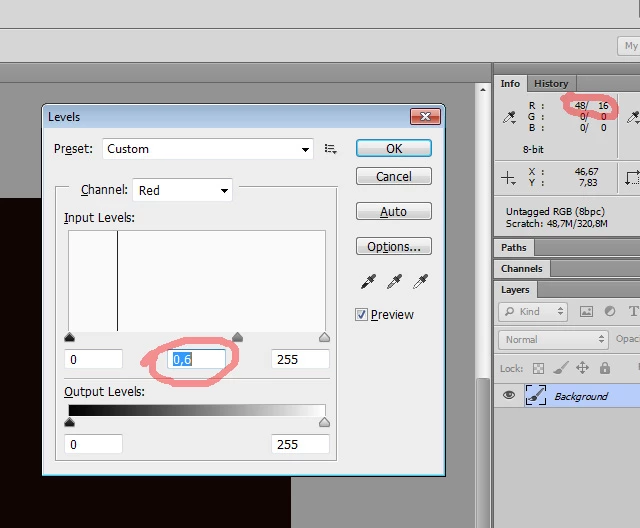
But I can’t get it to work on MY numbers... I’m just trying to communicate to some folks who are coding a GUI for me where some colors are generated from one base color choice — and I’ve achieved what I want VISUALLY by using a levels adjustment layer and changing the midpoint fom 1 to 0.6, with these channel values and the results:

R 30 -> 48

G 46 -> 78

B 78 -> 123


I’ll be honest: I went to art school 34 years ago to AVOID math. Earlier, trying to see if a solution using the (mathmatically) much simpler Multiply blend mode would work, I was pushing my limits. So it’s possible that the above thread DOES solve my problem, but I’d like to be able to duplicate the results myself before suggesting that someone else use it.


Thanks in advance! In a little bit of a rush here,  

This topic has been closed for replies.
Correct answer r-bin
quote
    • But — maybe I’m just not doing it right — ((48/255)^(1/0,6))*255 = 15.77 (not 30)
By @Serene_video0D4C


How did you get 30 out of 48? Show it in a screenshot analogous to mine.


1 reply

Legend
June 7, 2022
quote

I want VISUALLY by using a levels adjustment layer and changing the midpoint fom 1 to 0.6, with these channel values and the results:

R 30 -> 48

G 46 -> 78

B 78 -> 123


By @Serene_video0D4C


I didn't quite understand what that means. If you reduce the gamma (midpoint), then the values in the channels should also decrease.


Can you describe the desired result in more detail, or illustrate it with a screenshot?

Known Participant
June 7, 2022

Ah, the Gamma Guru! I’m sorry I couldn’t understand your answer at the other thread correctly.


I don’t think it will take a screenshot, just maybe a shorter description, because the visual really won’t demonstrate anything I can’t describe. But let me try a list:


  • 1) I have someone else creating some code that has to, among lots of other things, make a color adjustment to a color that was chosen by a user
  •  2) That adjustment has to be made on-the-fly ouside of Photoshop
  • 3) In Photoshop, I’ve achieved the color shift that I want, simply by changing the gamma to 0.6
  • 4) In order to tell the coders what I want to happen, I have to to describe the mathematical operation the code will need to run. I don’t want to just send them an example and say “make it like this, but for every possible color.”
  • 5) Which is why I’m looking for an algorithmic solution.
  • 6) Unfortunately, when I do the math that I think is being shown on the other thread, I get numbers that are nothing like the ones that I’m actually getting in Photoshop. For example:
    • Using RGB values 48/74/123 and
    • Applying a gamma shift to 0.6
    • The resulting PS values are 30/46/78. 
    • But — maybe I’m just not doing it right — ((48/255)^(1/0,6))*255 = 15.77 (not 30)

Does that make more sense? Sorry for using a bulleted list plus numbers BUT the formatting for a numbered list doesn’t indent at all (at least not in my browser).


Thanks again!

Known Participant
June 7, 2022

(seriously, I can’t edit or delete my own post? What the heck?)

Obviously, I mistakenly reversed the order of the pre- and post- gamma change numbers, they DID reduce as illustrated in my most recent example!