


til5
Participating Frequently
April 20, 2018
Answered

Get x/y position (and width/height) of the transform box of a layer (not chopped off bounds)

  • April 20, 2018
  • 1 reply
  • 12063 views

Hi there,

There are tons of great scripts out there to query the position and size of layers (e.g. outlined in this thread Export layer coordinates, layer width and height? )
However, I can't seem to find a way / to get the top left anchor position of the transfrom bounding box. All scripts I could find use "bounds" which chopps off everything that's not visible in the layer. But I would need the actual values that do show up in the info box while working in Photoshop. Is there any way to get those values out to a text file. Batch/Script would be awesome, but any hint helps. Thanks!

I hope this picture clarifies what I am after. Notice that the box is way bigger than the actual layer content (I don't need the precisely cut-out bat that "bounds" gives you!)
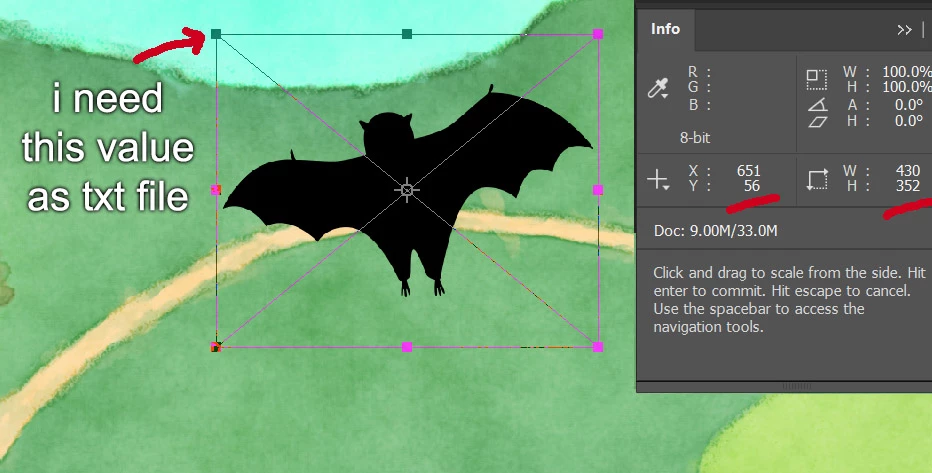
Cheers,
Til

This topic has been closed for replies.
Correct answer r-bin

Read this topic. Maybe this is it

Get Layer Transform X Y Top Left Coordinate Position

1 reply

Legend
April 20, 2018

If the layer is normal and has only a mask, then you can try.

var tmp = activeDocument.activeLayer.layerMaskDensity;

activeDocument.activeLayer.layerMaskDensity = 0;

alert(activeDocument.activeLayer.bounds)

activeDocument.activeLayer.layerMaskDensity = tmp;

You can also get the "boundsNoMask" property for the layer via the AM code.

til5
til5Author
Participating Frequently
April 20, 2018

Hi r-bin,
Thanks a lot for your message and suggestion! So sorry, I totally forgot to mention the layer is a smart object that does not have a mask. Then your suggestion wouldn`t work, right? ...maybe I should edit the post and mention it as it is probably important to know (hm, can`t edit the original post).
Cheers,
Til

Participant
March 3, 2022

No way! Thank you so much r-bin! With your latest instructions even I was able to put it together!


Ok, so if there are others out there struggeling with simple code edits like me, here comes the code put together, delivering a text file with all layer names and correct smart object bounds: *


// Export Layer Coordinates - Adobe Photoshop Script

// Description: Export x and y coordinates to comma seperated .txt file

// Requirements: Adobe Photoshop CS5 (have not tested on CS4)

// Version: 1.0-beta1.1, 8/31/2011

// Author: Chris DeLuca

// Company: Playmatics

// ===============================================================================

// Installation:

// 1. Place script in

//        Mac: '~/Applications/Adobe Photoshop CS#/Presets/Scripts/'

//        Win: 'C:\Program Files\Adobe\Adobe Photoshop CS#\Presets\Scripts\'

// 2. Restart Photoshop

// 3. Choose File > Scripts > Export Layer Coordinates Photoshop

// ===============================================================================


// Enables double-click launching from the Mac Finder or Windows Explorer

#target photoshop


// Bring application forward

app.bringToFront();


// Set active Document variable and decode name for output

var docRef = app.activeDocument;

var docName = decodeURI(activeDocument.name);


// Define pixels as unit of measurement

var defaultRulerUnits = preferences.rulerUnits;

preferences.rulerUnits = Units.PIXELS;


// Define variable for the number of layers in the active document

var layerNum = app.activeDocument.artLayers.length;


// Define variable for the active layer in the active document

var layerRef = app.activeDocument.activeLayer;


// Define varibles for x and y of layers

var x = layerRef.bounds[0].value;

var y = layerRef.bounds[1].value;

var coords = "";


//get layer bounds of smart objects

function get_layer_bounds(layer)

    {

    try

        {

        if (layer.kind == LayerKind.SMARTOBJECT)

            {

            var layer0 = activeDocument.activeLayer;

            activeDocument.activeLayer = layer;


            var r = new ActionReference();

            r.putEnumerated( charIDToTypeID( "Lyr " ), charIDToTypeID( "Ordn" ), charIDToTypeID( "Trgt" ) );


            var d = executeActionGet(r).getObjectValue(stringIDToTypeID("smartObjectMore")).getList(stringIDToTypeID("transform"));


            var x = [d.getDouble(0), d.getDouble(2), d.getDouble(4), d.getDouble(6)];

            var y = [d.getDouble(1), d.getDouble(3), d.getDouble(5), d.getDouble(7)];


            var l = [Math.min(x[0], Math.min(x[1], Math.min(x[2], x[3]))) ];

            var r = [Math.max(x[0], Math.max(x[1], Math.max(x[2], x[3]))) ];


            var t = [Math.min(y[0], Math.min(y[1], Math.min(y[2], y[3]))) ];

            var b = [Math.max(y[0], Math.max(y[1], Math.max(y[2], y[3]))) ];


            activeDocument.activeLayer = layer0;


            return [ UnitValue(l,"px"), UnitValue(t,"px"), UnitValue(r,"px"), UnitValue(b,"px") ];

            }

        else

            return layer.boundsNoEffects;

        }

    catch (e) { alert(e); }

    }


// Loop to iterate through all layers (replaced r-bin)

function recurseLayers(currLayers) {

  for ( var i = 0; i < currLayers.layers.length; i++ ) {

    layerRef = currLayers.layers[i];


    var bounds = get_layer_bounds(layerRef);


    x = bounds[0].value;

    y = bounds[1].value;

    coords += layerRef.name + "\n" + "x" + x + ", y" + y + "\n\n";


    //test if it's a layer set

    if ( isLayerSet(currLayers.layers) ) {

      recurseLayers(currLayers.layers);

    }

  }

}


//a test for a layer set

function isLayerSet(layer) {

  try {

    if ( layer.layers.length > 0 ) {

      return true;

    }

  }


  catch(err) {

    return false;

  }

}


// Ask the user for the folder to export to

var FPath = Folder.selectDialog("Save exported coordinates to");


// Detect line feed type

if ( $.os.search(/windows/i) !== -1 ) {

  fileLineFeed = "Windows";

}

else {

  fileLineFeed = "Macintosh";

}


// Export to txt file

function writeFile(info) {

  try {

    var f = new File(FPath + "/" + docName + ".txt");

    f.remove();

    f.open('a');

    f.lineFeed = fileLineFeed;

    f.write(info);

    f.close();

  }

  catch(e){}

}


// Run the functions

recurseLayers(docRef);

preferences.rulerUnits = defaultRulerUnits; // Set preferences back to user 's defaults

writeFile(coords);


// Show results

if ( FPath == null ) {

  alert("Export aborted", "Canceled");

}

else {

  alert("Exported " + layerNum + " layer's coordinates to " + FPath + "/" + docName + ".txt " + "using " + fileLineFeed + " line feeds.", "Success!");

}


* I hope this is ok to post. All credit goes to Chris DeLuca (Export Layer Coordinates Photoshop.jsx) and r-bin​ for the edits! And X-Raym​ for bringing up the topic.


Cheers,
Til


How can make it center instead of top left coords?