


Participant
February 23, 2015
Answered

Getting error 150:30 opening Photoshop cs4 on Macbook Pro

  • February 23, 2015
  • 21 replies
  • 76893 views

I've bought a new Macbook Pro with Yosemite 10.10.2. Installed old favorite programs from my old compute with time capsule. Sadly though I can´t start Indesign and photoshop, both bought in the CS4 versions. Bridge works though.

When Indesign or Photoshop starts, I get a note saying: The licenses for the product doesn't works, try to restart your computer. If the message appear again, contact Adobes technical support and quote the error code 150:30.

Ive tried to delete the FlexNet Publisher according to information given on the adobe site  [hard drive]/Library/Application Support/FlexNet Publisher/

But  the problem is I don't have a folder named FlexNet Publisher.

Help please?
This topic has been closed for replies.
Correct answer gener7

Update: I'm glad this procedure has helped many Mac owners of CS4 over the years.

Apple has announced that Mojave (10.14) will be the last MacOS to support 32 bit apps such as Photoshop CS4.

Do not upgrade to 10.15 if you intend to stay with CS4.

Now on to the License Repair procedure:

This can be avoided with the Terminal python script fix that will eliminate the 150:30 error, fix your install with out harming anything.

I can step you through with screenshots if you want to try it.

You account must allow you to administer your computer so your password will work and the Terminal prompt must have the $ sign.

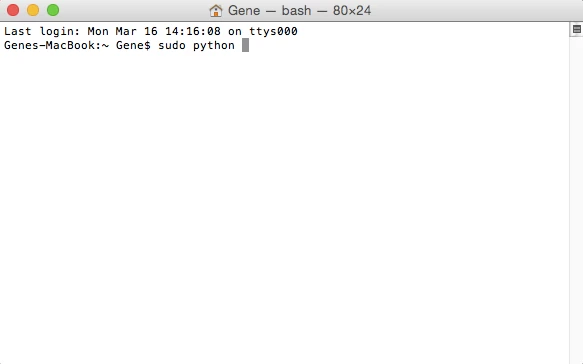
So go into Spotlight, type in Terminal and click to bring it up.  Type in sudo python and leave a space:

Get back to me when you have the below results.

21 replies

Benjamin Root
Legend
February 23, 2015

The 150:30 error is a common problem which usually happens after restoring from a backup. The simplest way to clear it up is to re-install CS4. Here is a link to the installers: https://helpx.adobe.com/creative-suite/kb/cs4-product-downloads.html

You can use your discs or the downloads from the provided link. Either way, have your serial number ready...

Benjamin

Participant
March 3, 2015

I have this same problem with ID CS4 on OSX 10.9.5, so I did the suggested download and clicked on the DMG, then on the Setup file. I get an oh-so-helpful error message: "Cannot install Please click the Quit button." I performed the ID uninstall prior to the download.I noticed that the uninstall had left behind a bunch of files and folders including the main ID folder. So I manually deleted them and tried again with the same result.

Now what?

Dan Shafer

gener7
Community Expert
Community Expert
March 3, 2015

Since InDesign is a different product, I'll link you to that forum where the experts there can best help you.

InDesign