

tanzhisengb63388035
Participant
June 28, 2020
Answered

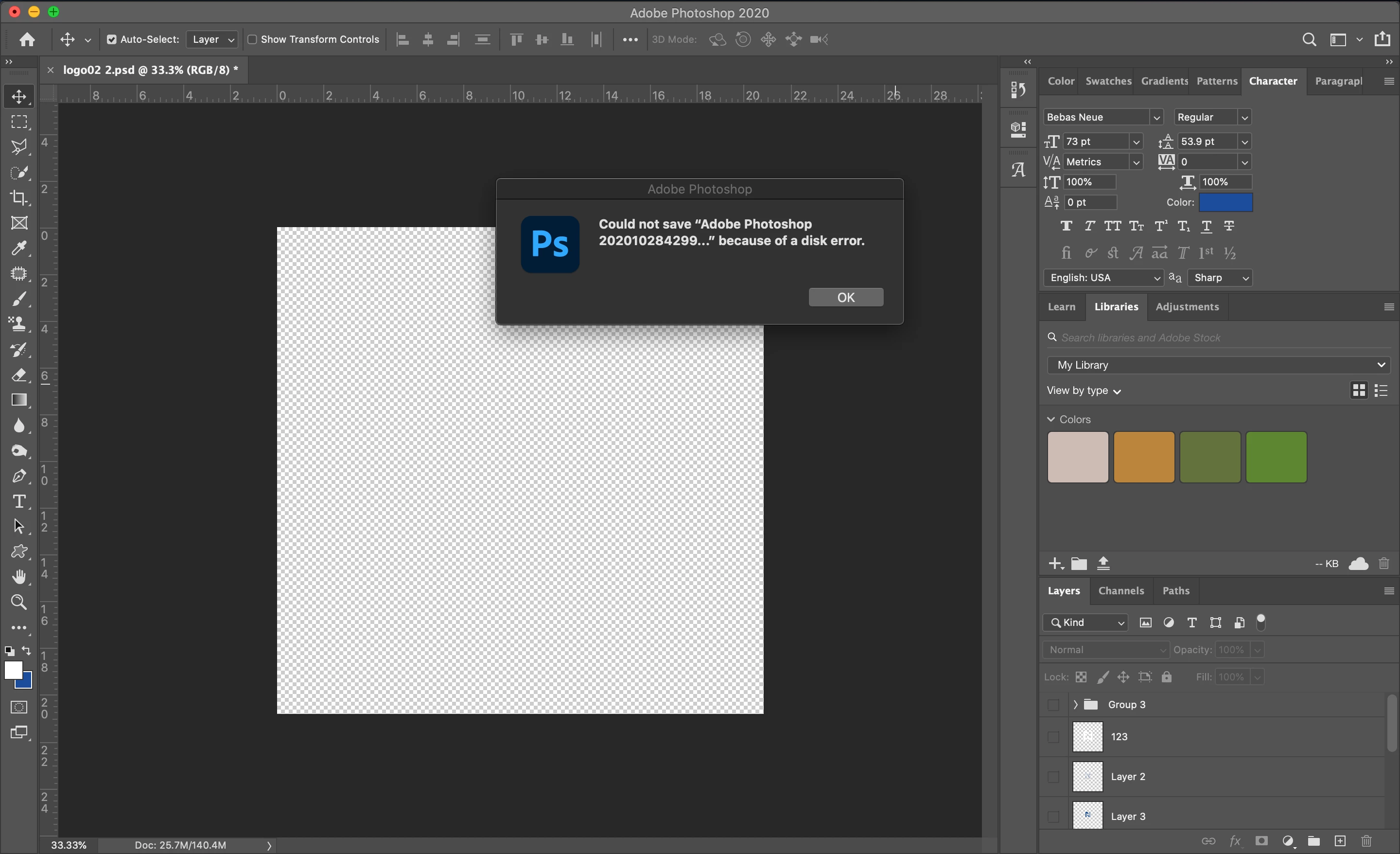
Error - Could not save the file because of a disk error in Photoshop
  • June 28, 2020
  • 16 replies
  • 112302 views

Correct answer Anastasia5ECB

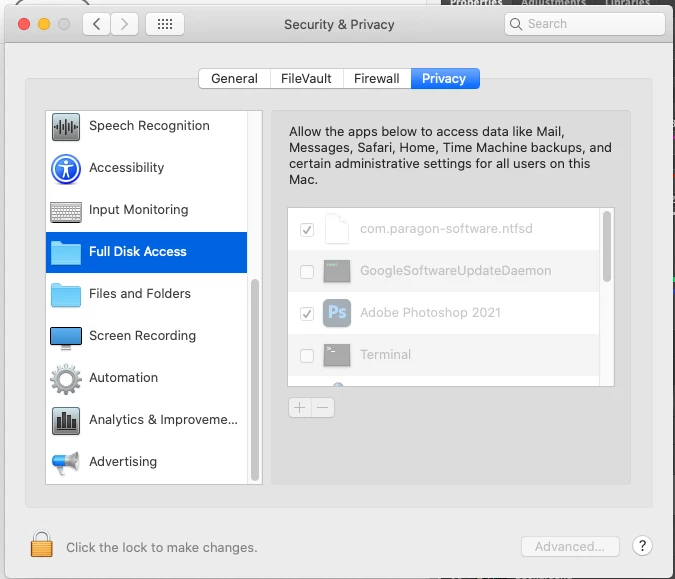
I found the solution! You need to grant full write access to Photoshop. Go to System Preferences > Security and Privacy, then Privacy tab. Scroll to folded on left called "Full Disk Access" then login to edit preferences and make sure to check off Photoshop to give it access!
 

16 replies

Participant
November 28, 2021

PROBLEM: "can't save because of disk error"


I'm not an expert on ANY of this tech stuff BUT... I have a brand new 27-inch 2020 imac with latest photoshop update 23.0.2 (and 1.2TB of memory to spare, so it's not an issue of disk space or scratch disks or purging this or that B.S. or allowing total disk access -- at least none of those were the issue for me, it might be for you depending on your setup and configurations, etc.)... anyways, I started getting the error message "can't save because of disk error"...


SOLUTION THAT WORKED FOR ME:


So after 10 minutes of uninstalling photshop, re-installing the previous version, it finally occured to me that it might be my antivirus... and the BitDefender AntiRansomeware was blocking access to photoshop saving anything. So I went into Bitdefender, then into antiransomeware and you'll see the up/down arrows... click on that to reveal allow/don't allow.... I clicked ALLOW (little green dot shows up), and that absolutely fixed it 100%. 


P.S. I'm not sure how this happened, either, since photoshop has been working flawlessly for years, for me, so maybe the Bitdefender updated itself or something. I've never blocked photoshop from access to being able to save anything (because obviously blocking access means you CAN'T save anything and I have TONS of saved photoshop files)... anyways, this was the problem and solution I had. Hope this helps 🙂 ---- one more thing: I'm NOT a tech expert or photshop expert at all, so please don't ask me for tips or help because I'm just a beginner. LOL!


Participant
December 12, 2021

Happy New Day, All!


Unfortuantely, after working through all of the solutions, I still can't open files. 

Participating Frequently
September 7, 2021

This is not a "real" solution, more of a workaround - but if you "save as" and change the file name slightly, it will save. Or you can save as a .psb if it's originally a .tiff. But this obviously eats up disk space quickly since you're essentially creating and saving a new file every time you save your work. This has been going on for months now. We really need a fix for this...

Participant
July 26, 2021

I see the problem says answered but there are people that aren't getting a fix. So here's how I fixed mine. I made sure all text was updated as it wasn't in sync with the font I downloaded after opening the file. You guys probably can't close photoshop after the error so force quit photoshop. Re open the photoshop file you were working on that isn't saved, go to edit and hit undo or hit command + z. This should bring back your file since photoshop will create a recovered file when you force quit. This should be able to save as mine was. Make sure to save as just in case. Hope this helps as I've dealt witht his on multiple projects and this time I tried everything until I got a solution. 

Participant
July 20, 2022

The real solution in 99% cases. Thank you, @CreativeGuyTy.

realistic_Glimmer0D45
Participant
May 20, 2021

I gave Photoshop "Full Disk Access" and still having the same error "Could not save because of a disk error"
Please help!

Participant
December 9, 2020

I have been getting error while saving and merging the layers after updating to v22.1. My photoshop files are saved on creative cloud and I am importing the files to edit through external drive. 


PS It's working when I am hiding that specific layer.


Macbook Pro early 2015 running BigSur.

Participant
February 7, 2021

Agreed! I have the same problem! This is absolutely unacceptable! I cannot do anything in Photoshop application because I cannot save files due to the "Program Error"! Adobe you need to fix it yesterday!

Participant
July 26, 2021

Have you installed v 22.1.1 which contained a fix for Program Error on save?

Known issues in Photoshop


Dave


Dave, I am on a brand-new 24-inch mac with PS version 22.4.2 and it is still happening just as much as it did on my old 2015 iMac. How is this not fixed??


Akash Sharma
Legend
July 1, 2020

Hi there,


Sorry that you're getting an error that Photoshop 2020 could not save the file because of a disk error.


Are you getting the error while saving a specific file to a specific location? Does the issue occurs with all the files? Also, which version of macOS are you running?


Please check that you have the latest version of Photoshop 2020(v21.2) installed. See this link for more details: Keep Photoshop up to date


To troubleshoot the error you're getting while saving, please checkout the steps mentioned in this article Troubleshoot scratch disk full errors in Photoshop and let us know how it goes.


Thanks,

Akash

tanzhisengb63388035
Participant
July 14, 2020

my file is open inside external hardisk

italosan
Community Expert
Community Expert
July 14, 2020

Try to move the file directly to your computer and check if it opens correctly or the error appears again.
