JonathanArias
Legend
July 10, 2025
Answered

gif animation stops mid animation

  • July 10, 2025
  • 2 replies
  • 605 views

Hello, I made a simplete scrolling animation gif on photoshop:
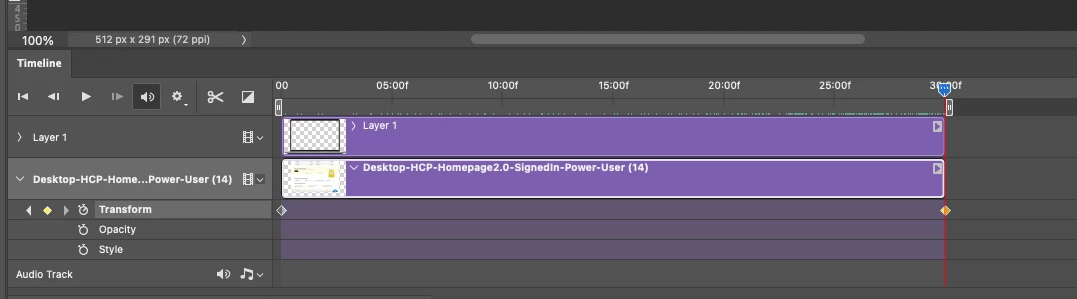
 

 It plays fine on photoshop, however, it does not play all the way, It stop before making it all the way down"

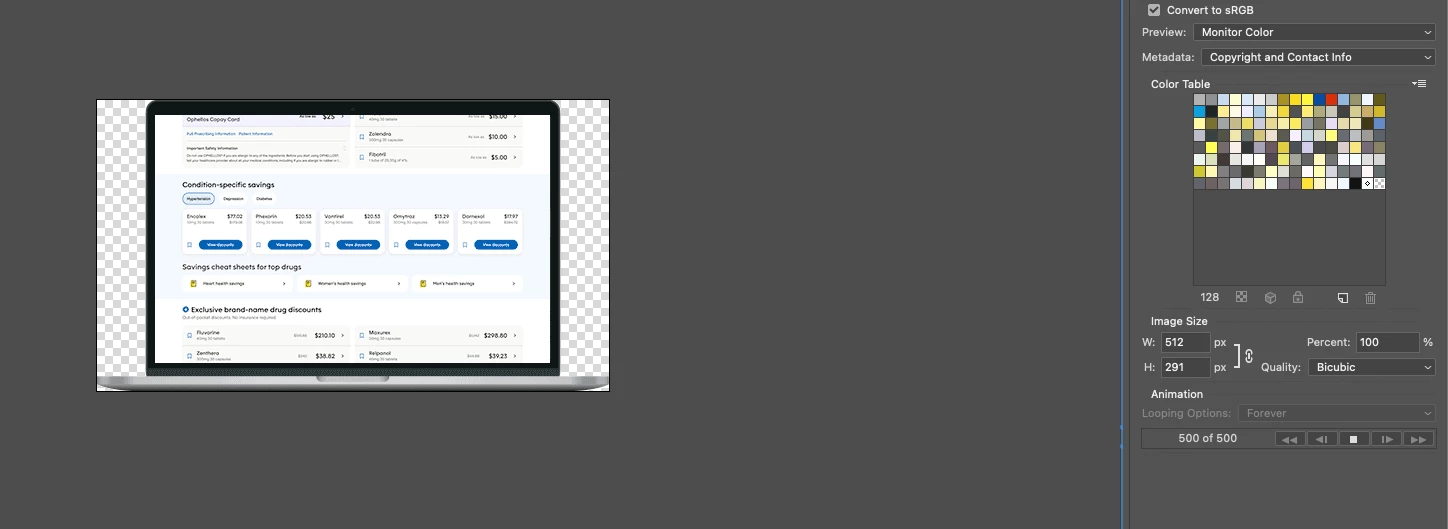
It s plays fine on photoshop timeline, in the export for web dialiog it stops here:
Correct answer Trevor.Dennis

Scratch my last reply.  It ocurred to me that there might be a frame limit, and that turns out to be the case.

You are going to need to work out what percentage of the timeline was completed, and adjust the speed to get inside 500 frames.  


BTW the file size was only 7.3mb


2 replies

Trevor.Dennis
Community Expert
Community Expert
July 10, 2025

I expect you realis that you are showing us a video timeline that you have exported out as a frame anomation.

It has 500 frames, and the last one has a 13.4 second delay. 


I suspect what has happened is that when you animated the virtical movement there was some sort of inconsistancy of the movement and overal time, although I don't have a clear idea of what particular circumstances would cause that.


Another possibility is that the end of work area marker was positioned before the end of the video.  


How exactly did you export the video out to a GIF?

Trevor.Dennis
Community Expert
Trevor.DennisCommunity ExpertCorrect answer
Community Expert
July 10, 2025

Scratch my last reply.  It ocurred to me that there might be a frame limit, and that turns out to be the case.

You are going to need to work out what percentage of the timeline was completed, and adjust the speed to get inside 500 frames.  


BTW the file size was only 7.3mb


Conrad_C
Community Expert
Community Expert
July 11, 2025

This was my thought too. If the GIF animation is longer than 500 frames, Save for Web cuts it off. And the original screen shot does show Save for Web at 500 frames.


If it needs to be longer than 500 frames, maybe it could be exported from the Photoshop timeline as a video, and then that video could be rendered to a GIF animation using software other than Photoshop, such as Gifski (free).

Community Manager
July 10, 2025

Hi @JonathanArias! Thanks so much for reaching out.

Could you share a few more details so I can better understand what’s going on? What version of Photoshop are you using? What does the last frame of your animation look like? And how long is the animation supposed to be?

If you’re able to include the full Photoshop window in your screenshots, that would be super helpful too. Appreciate it!

Alek

*(If you mention me with an @, like @Aleke, I’ll get a notification and can respond faster.)*
JonathanArias
Legend
July 10, 2025

photoshop 2025

animation is 30 seconds

The animations plays fine in them timeline.


The issue is in the export for web dealog, it stop playing about at almost 22 seconds:

JonathanArias
Legend
July 11, 2025

It could be the overall size of the file a 28 MB GIF is pretty large.

Anything over 8 MB can suffer playing/buffering issues - common GIF limit, not specific to PS. 

Ignoring the Export for Web dialog, have you completed the save and tried opening in a browser?


hi, ah!! that explains the out of memory alerts! why would it be that big, see attached.